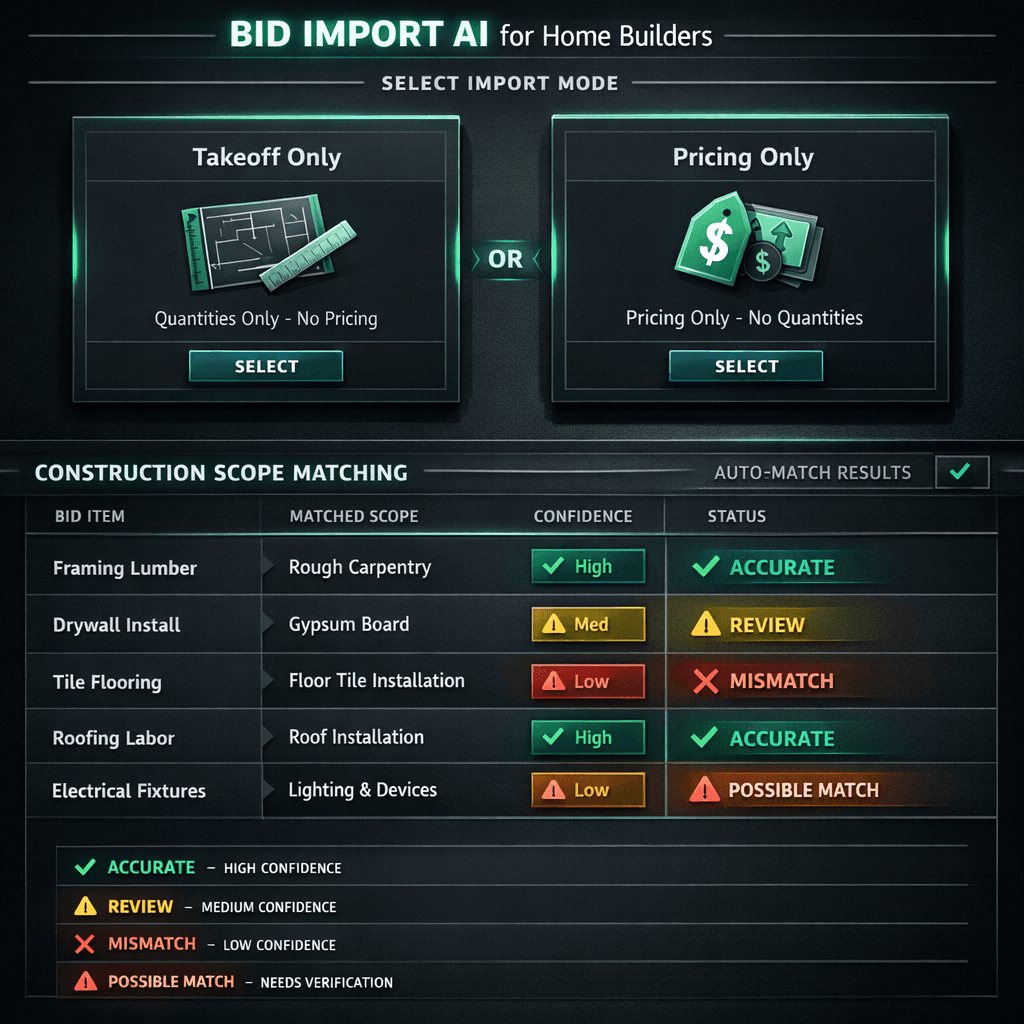
Bid Import AI: Takeoff-Only, Pricing-Only, or Both — Without Duplicates
Cornerstone PM's Bid Import AI gives you three surgical import modes — takeoff-only, pricing-only, or takeoff+pricing — so you pull exactly what you need from a vendor submission without duplicating line items or scrambling scope into the wrong trade category.
Every production builder re-imports vendor bids. Pricing changes mid-cycle. A framer resubmits after lumber costs shift. A plumber adjusts their fixture pricing before the deadline. In most platforms, re-importing means one of two outcomes: you either end up with duplicate line items bloating your Master Cost Budget, or you blow away existing scope structure to start over. Cornerstone PM's purchasing module fixes both problems with a targeted import model that replaces what changed and leaves everything else intact.
What are the three bid import modes?
Each mode is designed for a specific point in the bid lifecycle. Using the wrong one at the wrong moment is what creates duplicates — so Cornerstone PM surfaces the choice explicitly before every import.
Pulls scope quantities and line items from the vendor's submission — without touching any existing pricing. Use this when you're establishing your initial scope structure and aren't ready to lock in pricing yet.
Updates pricing on existing scope items without altering quantities or structure. Use this every time a vendor re-bids — numbers change, the scope stays exactly as it was.
Imports everything — quantities, line items, and pricing — in a single pass. Use this for a first-time bid on a new scope or when a vendor resubmits a comprehensively revised bid.
The distinction matters most for pricing-only imports. When a vendor sends revised numbers on a bid you already awarded scope structure to, you want the pricing cells updated — not a second set of line items appended below the first. Pricing-only mode finds the matching scope items by AI scope matching, updates the numbers in place, and surfaces any items it couldn't confidently match for manual review.
How does AI scope matching prevent “Drywall” landing in “Electrical”?
Cross-scope contamination — where a line item from one trade ends up categorized under another trade — is one of the most common errors in manual bid entry and in naive import tools that rely purely on keyword matching. A bid template that lists “Drywall finishing” can be misread as a finish carpenter line if the matcher only looks at the word “finishing.”
Cornerstone PM's Bid Import AI uses cross-scope penalty scoring. When the AI is evaluating where a line item belongs, it doesn't just look for the best match globally — it penalizes matches that would land the item in a trade category that doesn't fit the surrounding context. A drywall line surrounded by other drywall and insulation items scores much higher against the Drywall scope category than against Electrical, even if both categories technically contain the word “finish.”
The problem with keyword-only matching
Legacy import tools match line items to scope categories based on surface-level keyword overlap. “Finish” matches Finish Carpentry, Paint, and Drywall simultaneously. Without penalty scoring, the highest raw match wins — and it's often wrong. Cornerstone's contextual matching with cross-scope penalties uses the surrounding trade cluster to resolve ambiguity instead of guessing on isolated tokens.
Any line items the AI isn't confident about are flagged for builder review before the import completes. You don't discover a misplaced scope item two weeks later when a budget number doesn't reconcile — you see the flagged items at import time and decide how to route them.
Why does “replace instead of duplicate” matter for your Master Cost Budget?
The Master Cost Budget is a live document in Cornerstone PM. It aggregates scope item pricing across every vendor, every floorplan, and every community into a single source of truth for what each home costs to build. If bid re-imports append new rows instead of updating existing ones, the budget doubles up on every re-bid cycle — and the totals become meaningless.
Pricing-only and takeoff+pricing imports both write to existing scope items rather than creating new ones. The AI matches the incoming line items to your existing scope structure, updates the pricing in place, and preserves the item's position in the budget hierarchy. The Master Cost Budget reflects the latest accepted pricing — not a running history of every number a vendor has ever submitted.
Before re-import
- Frame Labor — $4.25/sqft
- Frame Labor — $4.25/sqft (v1)
- Frame Labor — $4.50/sqft (v2)
Legacy tools append. Budget totals triple.
After Cornerstone pricing-only import
- Frame Labor — $4.50/sqft
One line. Updated in place. Budget stays clean.
How does this connect to the vendor bid portal?
Bid Import AI is the back half of a workflow that starts with Cornerstone PM's no-login vendor bid portal. When you send a bid request, vendors receive a scope-filtered Excel template with three tabs (Base, Structural, Designer) and submit through a portal that requires no Cornerstone PM account. Once they submit, their bid is locked.
The locked bid becomes the source file for Bid Import AI. Because you controlled the template structure on the way out, the AI has a well-formatted input to work with on the way back in. Scope categories in the template correspond directly to scope categories in your purchasing module — which is why the cross-scope penalty matching is so accurate. The import AI isn't trying to parse a free-form PDF; it's reading a structured Excel file your system generated.
What about items that weren't bid? Where do allowances fit?
Not every line item has a vendor bid behind it — especially early in the sales cycle. Appliances, landscaping, and other owner-provided items often sit as budget placeholders while the home sells and design selections finalize.
Cornerstone PM's allowances system handles these. You add a budget placeholder allowance to the scope — either per-floorplan or globally — and it flows into the Master Cost Budget alongside your bid-backed scope items. When a vendor bid comes in later, a pricing-only import replaces the allowance placeholder with real pricing. The budget tracks the distinction: you always know which line items are bid-backed and which are still running on allowances.
This matters for production builders managing large option catalogs where some scopes are locked in early and others trail behind. The Master Cost Budget doesn't have to be a placeholder-riddled mess — allowances give you a clean number to work with at every stage, and Bid Import AI replaces them cleanly when real bids arrive.
How does this compare to bid import in Buildertrend or JobTread?
Buildertrend's bid request system is designed around the custom builder's workflow: one project, one set of vendor negotiations, managed manually per job. There's no native three-tab scope structure that separates Base, Structural, and Designer scope, no AI scope matching, and no replace-in-place logic for re-bids on the same scope structure. JobTread handles vendor quotes at the project level as well — a production builder running the same scope across five communities and twelve floorplans will spend significant manual effort keeping pricing current.
Cornerstone PM's purchasing module was built for the production model: one scope structure priced once and applied across every plan repeat in every community. Bid Import AI keeps that structure clean through every re-bid cycle without requiring a rebuild.
For a full platform comparison, the home builder project management software overview covers where Cornerstone PM sits relative to Buildertrend, NEWSTAR, BuildPro, and JobTread.
The clean bid cycle
The three import modes, AI scope matching, and replace-in-place logic are all aimed at the same outcome: a Master Cost Budget that reflects reality at every point in the bid cycle — not a graveyard of superseded numbers your team has to manually reconcile before every job release.
Builders who run 50-200 homes per year can't afford to spend a purchasing coordinator's week fixing scope contamination and deleting duplicate lines after every re-bid round. Bid Import AI compresses that cleanup to near-zero so your team can focus on evaluating vendor pricing instead of maintaining spreadsheet hygiene.
Ready to clean up your bid cycle?
Scope-filtered templates out, AI-matched pricing in — without duplicates, without cross-scope contamination, without manual cleanup.
Request Early Access