Purchasing & Cost Control

Mark it done.
The PO sends itself.

Cost-code-driven live budgets, vendor bids that become real costs, and purchase orders that generate and email the vendor the instant a task is complete. The whole loop — schedule to vendor payment — runs itself.

⭐ THE CLOSED LOOP

One “task complete” fires the entire purchasing chain

Other platforms make you build the PO, look up the pricing, attach the PDF, and email the vendor — by hand, every time. Cornerstone wires the schedule directly to the vendor’s inbox. Mark a construction task complete and the matched purchase order generates and sends itself.

Step 1
Task complete
A construction task is checked off on the schedule.
Step 2
Cost code
The task resolves to its cost code — the exact phase and trade.
Step 3
Live budget
Cost code pulls the right takeoff items and quantities for that home.
Step 4
Vendor pricing
Accepted vendor bid pricing prices every line, automatically.
Step 5
PO generated
A branded PO PDF is built, line items grouped by cost code.
Step 6
Vendor emailed
It's sent to the vendor's scheduling email — hands-free.

BuilderTrend, CoConstruct & spreadsheets

The task gets marked done in one tool. Then someone opens the budget, finds the right line items, types the quantities, builds the PO, exports a PDF, opens email, finds the vendor, attaches the file, and hits send. Every phase. Every home. Things get forgotten.

Cornerstone PM™

Mark the task complete. The PO is already built — right parts, right quantities, right vendor, right price — and it’s already in the vendor’s inbox. Prefer a checkpoint? Leave the task on draft-first and the PM reviews before anything sends. Auto-send is a per-task opt-in, so POs only fire where you’ve authorized it.

Cost-code-driven live budgets

Every budget line resolves to a cost code, and every cost code knows its takeoff items. The budget isn’t a number you type and maintain — it computes live from your floorplan takeoffs multiplied by accepted vendor pricing. Lock a structural option, award a bid, approve a change order, and the budget moves on its own.

  • Quantities flow from floorplan takeoffs — no manual line entry
  • Accepted vendor pricing drives the dollars, not guesses or stale catalogs
  • Hierarchical cost codes track each phase under its trade scope
  • Structural options, design selections, and change orders all feed the same number
How a line computes
Takeoff quantity
PLM-002 Plumbing Rough · 2,400 sqft
×
Accepted vendor pricing
Awarded bid · locked unit cost
=
Live budget line
Recomputes automatically — no double entry
Send to bidCompareAward Lock
The moment you award a vendor, their scope items, quantities, and pricing lock — no scope drift, no surprise edits. That locked pricing becomes the real cost on the budget and every PO it touches.

Vendor bids become real costs

Send a floorplan to bid with one click, collect responses through a no-login vendor portal, and compare them side by side with full scope-item drill-down. Award the vendor you want — based on relationship and scope coverage, not a lowest-bid auction — and the accepted pricing flows straight into your budget and POs.

  • No-login vendor portal — subs upload bids in their own format
  • Side-by-side comparison with scope-item drill-down, not just totals
  • Community-assigned awards protect long-term vendor relationships
  • Lock-after-acceptance freezes awarded pricing against drift

Purchase orders, grouped by cost code

POs build themselves from the home’s takeoffs — line items grouped by cost code, deduped to correct totals, at the right quantities for that floorplan. Each one renders as a branded PDF with your logo, payment terms, and date, ready to view, save, or email the vendor. And you choose when they fire.

  • Branded PO PDFs — your logo, your payment terms, correct dates
  • Line items grouped by cost code, deduped to correct totals
  • Per-phase POs — the exact materials for each vendor visit
  • Four PO patterns: all at job start, partial deposits, on task completion, or configurable per task / scope / community
Purchase Order
The Addison · Lot 14 · Auto-generated
PLM-002Plumbing Rough
grouped
PLM-003Plumbing Trim
grouped
ELE-001Electrical Rough
grouped
Emailed to vendor’s scheduling inbox

Payables, with an approve-to-pay gate

Nothing pays a vendor until it passes a checkpoint. Every PO runs a status lifecycle, and the Approved step is your approve-to-pay gate — an invoice sits on hold until someone reviews it against the PO, the budget, and the work.

Draft
Sent
Acknowledged
Invoiced
Approved
Paid
Approve-to-pay
Invoices land at Invoiced and hold until a reviewer moves them to Approved against PO, budget, and work done.
Payment tracking
Record payments by check, ACH, wire, card, or cash with reference numbers and dates, tied to vendor, PO, and home.
Retainage
Withhold a configured percentage on POs until project completion — standard construction billing, handled automatically.

Change orders, controlled

Buyer-requested and field changes run through an approval workflow with a full audit trail. Approved changes spin up dedicated change-order POs and flow into the same budget number — so the cost of a change is never lost between the field and the books.

  • Approval workflow with full audit trail
  • Dedicated change-order POs, flagged and tracked separately
  • Budget impact flows into the live home budget automatically

QuickBooks Online sync (live)

Connect to QuickBooks Online in one click — no developer setup. Purchase Orders, Bills, sales tax, vendors, and homes push one direction, Cornerstone → QuickBooks, so your books keep up automatically. Changes made in QuickBooks never overwrite your Cornerstone data.

  • One-way sync: POs, Bills, vendors & job costs push to QuickBooks — never the reverse
  • True job costing — each Community syncs as a QuickBooks Customer and each Home as a Project for real per-home, per-community P&L
  • Optional auto-Bill: mark a PO complete and Cornerstone creates the linked Bill in QuickBooks — payment stays your manual approval, we never auto-pay
  • AP payment terms — Net-X, weekly, monthly (Nth/last weekday), or bi-weekly — compute the due date and carry it to QuickBooks so you batch-pay on one payday
  • Inbound paid status — pay a Bill in QuickBooks and the linked PO marks itself Paid (with QB payment date + amount); partial payments handled, PO flips only when the balance hits $0. Read-only, not two-way sync
  • Auto-builds a construction-ready Chart of Accounts from your scopes and cost codes
  • Prefer to script it yourself? REST API and Zapier webhooks are available too
NEW — AUTO-QUANTITY

Auto-Quantity Scope Items

Set it once. Every floorplan gets the right number.

Scope items like Electrical Rough, Paint Labor, and Insulation can now have their quantities automatically calculated from your floorplan dimensions. Set “Electrical Rough → Under Air Sqft” once on the scope item, and The Addison gets 2,400 sqft while The Magnolia gets 1,800 sqft — automatically. No manual entry per floorplan, no stale numbers, no forgotten updates.

Manual
Enter quantity by hand when auto-calc doesn't apply
Under Air Sqft
Conditioned living space — excludes garage & porch
Total Sqft
Everything under roof — includes garage & porch
Ext. Perimeter
Exterior perimeter in linear feet
Roof Squares
Roof area in roofing squares

Without Auto-Quantity

Add a new floorplan. Open every scope item. Type the sqft for Electrical, Insulation, Drywall, Paint, HVAC, Framing… 40+ scope items × every floorplan in your portfolio. One typo and your budget is wrong for months.

With Auto-Quantity

Set “Electrical Rough → Under Air Sqft” once. Add a floorplan with its dimensions. Every scope item auto-calculates. POs combine base house + structural option quantities automatically. ANSI Z765 compliant.

NEW — AI FEATURE

Bid Import AI

Upload any vendor format. AI does the rest.

Your vendors don't use your bid template. They send Excel files, PDFs, scanned quotes, even photos of handwritten estimates. Bid Import AI reads them all — extracts every line item with quantities, unit prices, part numbers, and scope assignments, fuzzy-matches them to your parts catalog, and gives you a clean review table. No squinting, no manual re-entry.

Any format
Excel, PDF, scanned docs, photos of handwritten quotes
Fuzzy matching
Maps to your parts catalog with confidence scores
Interactive review
Edit, approve, or reject items before importing
3 import modes
Import as a Bid, Vendor Pricing, or Takeoffs

Without Bid Import AI

Open the vendor's PDF. Find every line item. Type each one manually. Make a typo. Start over. 2 hours later, the budget's updated.

With Bid Import AI

Upload the file. Review the AI-extracted table. Approve the items. Done. Costs pennies per import vs. hours of manual data entry.

Live Bid Workflow Demo
0:00 / 0:00

Everything included

Parts Catalog
Full parts and materials catalog with unit pricing, synced across all jobs.
Budget Hierarchy
Builder — Community — Floorplan — Home — budgets cascade and override at each level.
Base Budgets
Pre-built budget templates per floorplan, ready to apply at sale.
Auto-Budget Generation
When a home sale is created with structural options, the budget auto-generates instantly.
Structural Options Pricing
Every structural option tied to a line-item budget impact — no manual entry.
Global Structural Options
Mark an option as global and its takeoffs and retail price stay identical across every floorplan. Edit takeoffs once and the change syncs everywhere — no more duplicating the same option data on floorplan after floorplan. One source of truth, fewer errors, hours saved.
Dedicated Elevations Manager
A dedicated page for managing exterior styles per floorplan — Colonial, Craftsman, Modern Farmhouse, and more. Card-based layout with inline-editable retail price adders, expandable takeoffs (add parts, scope items, edit quantities), and per-elevation sqft overrides. Cost is computed from real vendor pricing, never set by hand.
Active Homes Dashboard
All homes, budget status, and variance at a glance.
Apply Budget Flow
One-click flow to apply base budget + options to any home.
Design Center Integration
Room-by-room selections tied directly to purchasing budget. Includes Product Configurator for complex multi-attribute selections like cabinets and countertops.
Designer Collections
Group selections into curated collections for buyer presentations.
Pricing-Free Trade Copy
Hand trades a spec sheet that shows every finish and photo with zero pricing — no price columns, subtotals, or totals. Auto-saved to the home’s Documents on every selection lock. Protect your margins: trades see the finishes, never the prices.
Unlimited Spec Levels
Community Standard, Premium, Luxury — unlimited spec levels with separate pricing.
Base Pricing Matrix
Floorplan → Community pricing matrix with per community overrides.
Change Orders
Buyer-requested changes with approval workflow and budget impact.
Bid Templates That Write Themselves
The moment you create a bid request, Cornerstone auto-generates a 3-tab Excel template (Base / Structural / Designer) pre-filled from your floorplan takeoffs and emailed to every vendor. Zero spreadsheet babysitting.
Scope-Filtered Per Trade
Your electrician doesn't see plumbing rows. Each vendor's template only includes line items relevant to their scope — pulled from the ScopeOptionClass linkages so nothing gets miscategorized.
No-Login Vendor Upload Portal
Vendors click a token-protected link and drag-drop their bid sheet (PDF, Excel, or CSV, up to 10 files). Two clicks to submit. Perfect for subs who already have their own bidding workflow and refuse to retype line items.
Bid Status Tracking
Every bid request flows through Invited → Viewed → Submitted → Declined with timestamps — so you know exactly who to chase before the bid window closes.
Bid Management
Send a floorplan to bid to every vendor with one click. Track responses, manage the full RFP lifecycle, and award through a branded portal.
Bid Comparison & Drill-Down
Side-by-side vendor bid comparison with scope-item drill-down review — not just price, but full scope coverage.
Community-Assigned Vendor Wins
Award based on community vendor relationships and scope coverage — not lowest-bid auctions. Protects long-term vendor partnerships.
Lock-After-Acceptance
Once a bid is accepted, it locks — no surprise scope changes or pricing edits after award.
Vendor Portal Scope Editing
Vendors edit their own scope items in their portal — you review, you approve, you award.
Bid Notification Subscriptions
Admins subscribe to bid events — new bids, edits, awards — with per-user notification preferences.
Award & Budget Flow
Award a bid and it flows directly into the budget — no double entry.
Flexible PO Generation — Four Patterns
Most platforms hard-code one PO model. Cornerstone gives you four: (1) all POs at job start (lock in budget exposure day one), (2) partial deposit POs from any earlier task (permit pull, contract sign, foundation pour), (3) PO auto-generated when a construction task is marked complete — draft-first (reviewed before sending) or auto-send (emailed straight to the vendor, hands-free), or (4) configurable per task / scope / community — mix and match on the same job. Your cash flow rules drive the system, not the other way around.
Auto-Send PO on Task Completion
Mark a construction task complete and Cornerstone fires the vendor's purchase order automatically — it generates the matched PO (line items grouped by cost code, at the right quantities for that home's floorplan, with vendor and pricing) and emails it to the vendor's scheduling email with the PDF attached. Zero manual steps. This closes the entire loop end to end: schedule → cost codes → live budget → vendor pricing → PO → vendor notification, all off a single 'task complete.' Prefer a checkpoint? Leave the task on draft-first and the PM reviews before anything sends. Auto-send is a per-task opt-in, so POs only fire to vendors where you've authorized it. Most construction software — BuilderTrend, CoConstruct, spreadsheets — can't auto-fire a vendor PO straight off the schedule; Cornerstone does.
Cost Codes - Hierarchical Phase Tracking
Trade scopes are your vendor relationship; cost codes sit beneath them for phase-level detail. Plumbing breaks into PLM-001 Underground, PLM-002 Rough, PLM-003 Trim — each its own vendor visit and its own PO. Generate a separate purchase order with exactly the right materials list per phase instead of one giant PO. Cost codes explicitly link tasks → takeoff items → POs (zero fuzzy matching), and the same part can appear on multiple POs at different quantities. Enterprise-grade cost tracking like Procore or Sage 300 — without the enterprise complexity. Fully optional and backward compatible: ignore it if you don't need the granularity. BuilderTrend and CoConstruct use flat cost codes; Cornerstone supports the full hierarchy.
Take Your Data With You, Anytime
Your data is always yours. Download everything as CSV or JSON in one click — 91 tables, every vendor, every home, every schedule, every option, every budget line. Sensitive fields excluded automatically. Plus nightly auto-backups with 7-day retention for instant rollback. No vendor lock-in, no exit fees, no strings attached.
QuickBooks Auto-Bill on Completion
Optional per-toggle: mark a purchase order received/complete and Cornerstone creates the matching Bill in QuickBooks, linked to the PO so it closes out with no duplicate. Payment always stays a manual approval in QuickBooks — Cornerstone never auto-pays a vendor. The human pay gate is yours.
AP Payment Terms & Batch-Pay
Set how each bill comes due — Net-X days, weekly on any weekday, monthly on the Nth (or last) weekday, or bi-weekly anchored to a payday you pick. Cornerstone computes the due date automatically and carries it into QuickBooks, so you can batch-pay every vendor on a single payday instead of chasing invoices one at a time.
QuickBooks Paid Status Flows Back
When you pay a vendor Bill in QuickBooks, that paid status flows back and Cornerstone automatically marks the linked purchase order Paid — stamped with the QuickBooks payment date and amount, so your PO lifecycle closes out without re-keying anything. Partial payments are handled: the PO only flips to Paid once the QuickBooks bill balance reaches $0. This is one-way sync plus a single inbound status signal — a read-only reflection of what happened in QuickBooks, not two-way sync. Cornerstone never pushes edits or money into QuickBooks, and never auto-pays a vendor.
Buildertrend Migration
Import existing budgets from Buildertrend with smart column mapping.
Bid Import AI
Upload vendor bids in ANY format — Excel, PDF, scanned docs, even photos of handwritten quotes. AI extracts line items, maps to your parts catalog with confidence scores, and lets you review, edit, approve, or reject before importing.
Auto-Quantity Scope Items
Set a quantity source (Under Air Sqft, Total Sqft, Exterior Perimeter, Roof Squares) once on a scope item and it auto-calculates across every floorplan. POs combine base house + structural option quantities. ANSI Z765 compliant.
Multi-Tab Excel Import/Export
Export an entire floorplan as a single multi-tab Excel workbook — base house, locations, structural options, elevations. Import works the same way. One file, complete data.
Included in
Builder Plan
$299/mo
NEWSTAR / BuildPro$800+/mo
Cornerstone PM™Free during beta
Get Early Access →

Beta limited to 100 builders —· No credit card required

Why builders choose Cornerstone for purchasing

Legacy purchasing software like NEWSTAR and BuildPro were built for enterprise builders with dedicated estimating teams. Cornerstone was built for growing builders who need the same power without the complexity or the price tag.

The auto-budget generation, bid-to-PO flow, and structural options pricing were designed to eliminate the double entry that costs your team hours every week.

No Vendor Lock-In

Your data is always yours.

Take all your data with you, anytime. No strings attached. One-click export to JSON or CSV. Every vendor, every home, every schedule, every option, every budget line. Nightly auto-backups. Zero exit fees. We don't hold your business hostage.
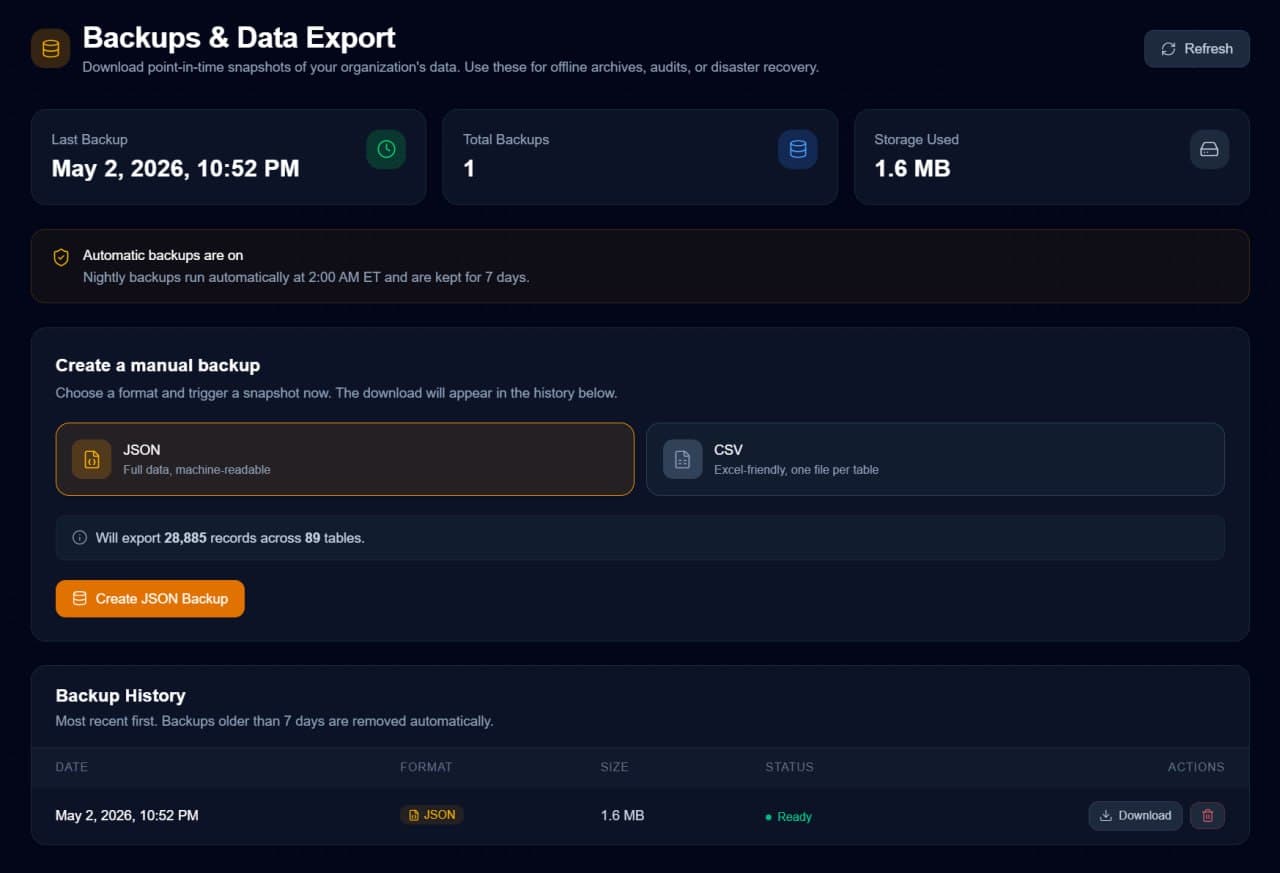
Cornerstone PM™ Backups & Data Export interface — one-click JSON or CSV download of your entire database
One-click full export

Download every record across 96+ tables in JSON or CSV — 96+ CSV files generated in seconds. No support ticket. No 30-day waiting period.

Nightly auto-backups

Snapshots run at 2:00 AM ET every night and stay available for 7 days. Your safety net runs while you sleep.

JSON or CSV — your choice

JSON for full machine-readable data. CSV gives you 96+ files — one per table — generated in seconds and opening straight in Excel.

Sensitive fields excluded

Passwords, tokens, and secrets are stripped automatically. Safe to share with auditors, accountants, or migration teams.

The most important promise we make.

If Cornerstone ever stops working for you, walk away with a complete copy of your data. No exit fees. No data hostage. No 90-day extraction process. Just a download button.

Home Builder Purchasing FAQ

Common questions about purchasing and bid management software for home builders.

What is home builder purchasing software?

Home builder purchasing software manages the bid-to-purchase-order flow: vendor bids, parts catalogs, purchase orders, payment scheduling, and budget tracking. Cornerstone PM™'s purchasing module connects directly to your sales pipeline and design center so structural options and design selections automatically feed the budget — no double entry, no spreadsheets.

What is AI construction purchasing for home builders?

AI construction purchasing uses agents to handle bid generation, vendor outreach, bid comparison, and PO creation. Cornerstone PM™'s Foreman AI includes a 4-skill Bid Pipeline domain plus a 7-wave automated bidding pipeline that contacts vendors, collects bids, normalizes pricing, and recommends an award — all inside one platform.

What is Auto-Quantity and how does it work?

Auto-Quantity lets you set a quantity source on any scope item — Under Air Sqft, Total Sqft (Under Roof), Exterior Perimeter, or Roof Squares. Set it once on the scope item and the quantity auto-calculates from floorplan dimensions for every floorplan in your portfolio. POs intelligently combine base house + structural option quantities (e.g., 2,400 sqft base + 800 sqft finished basement = 3,200 sqft on one PO). No manual entry per floorplan, no stale numbers, ANSI Z765 compliant.

Can I share the same structural option across all my floorplans?

Yes — mark a structural option as global. A global option keeps identical takeoffs (parts and scope items) and a single retail price across every floorplan, so options like Finished Basement or Garage Extension that don't vary by plan only need to be set up once. Edit the takeoffs in one place and the change automatically syncs to every floorplan. When takeoffs differ between floorplans, a source picker lets you choose which floorplan's takeoffs to standardize on, and the retail price is editable inline. It eliminates hours of duplicate data entry and the errors that come with it.

How do I manage floorplan elevations and their pricing?

Cornerstone PM™ has a dedicated Elevations Manager — a card-based page for managing every exterior style (Elevation A — Colonial, B — Craftsman, C — Modern Farmhouse, etc.) per floorplan. Each elevation has an inline-editable retail price adder that flows into the base home price, plus a code, description, and optional sqft override. Expand any card to manage its material takeoffs — add parts and scope items and edit quantities — while the cost is computed automatically from vendor pricing instead of being typed in. Foreman, the built-in AI assistant, can also create elevations, add parts, and set pricing entirely through natural conversation.

How does the auto-budget feature work?

When a sales counselor locks structural options on a new home sale, Cornerstone PM™ automatically generates the home's construction budget using the floorplan's base costs plus the option-specific deltas. Design center selections, change orders, and bid awards continue to flow into the same budget number throughout the build.

Is Cornerstone PM™ a NEWSTAR or BuildPro alternative for purchasing?

Yes. Cornerstone PM™ was built as a modern, affordable alternative to NEWSTAR and BuildPro for small-to-mid home builders. It covers the same core purchasing functionality — parts catalog, budget hierarchy, bid management, POs, payments — without the 6-figure implementation cost. Starts at $299/mo on the Builder plan.

Does Cornerstone PM™ track retainage?

Yes. Cornerstone PM™ tracks retainage on payments, classifies cost types, manages payment schedules, and surfaces variance reports against the budget. Vendor 1099 totals are exportable.

How does the parts catalog work?

Cornerstone PM™'s parts catalog maintains SKUs, vendor pricing, and unit costs that sync across every job. Foreman AI's Parts Catalog domain (5 skills) handles SKU lookups, vendor pricing comparisons, material substitutions, catalog updates, and inventory alerts via plain-English requests.

Can I use my own AI agent against Cornerstone purchasing data?

Yes. The Pro+ plan ($599/mo) includes Bring Your Own Agent (BYOA) and full REST API access. You can connect Claude, ChatGPT, or any custom agent to live purchasing, bid, vendor, and budget data through 150+ API endpoints with scoped Bearer-token auth.

How do I review competing vendor bids?

Cornerstone PM™'s bid review uses a side-by-side comparison view with scope-item drill-down. You see every bid against every scope item simultaneously — not just total price, but full scope coverage so you can spot gaps, exclusions, or scope creep before awarding. Vendors edit their own scope items inside their vendor portal; you review and approve.

What's in the auto-generated bid template?

Three tabs: (1) Base — floorplan-location-scope rows for the vendor's trade with option pricing; (2) Structural — takeoff-driven structural options for that scope; (3) Designer — design center option classes the vendor is responsible for. Everything is scope-filtered — your electrician doesn't see plumbing rows. The template is auto-attached to the vendor invite email and downloadable from the portal.

How do vendors submit bids? Do they need a login?

No login, no training. Vendors get a token-protected URL when invited. They download the auto-generated, scope-filtered Excel template (Base / Structural / Designer tabs), fill in their numbers in their own workflow, then upload PDF/Excel/CSV files back to the portal — up to 10 files, 10 MB each. Two clicks to submit. Builders don't end up doing data entry on behalf of subs who hate logins.

How is bid status tracked?

Every bid request flows through Invited → Viewed → Submitted → Declined, with timestamps. You can see at a glance who opened the link, who's working on it, and who never showed up — so you know who to chase before the bid window closes.

Can I get my data out if I leave?

Yes. Take all your data with you anytime, no strings attached. Settings > Backups lets you download a full org export (91 tables) as CSV or JSON in one click, with sensitive fields automatically excluded. Every vendor, every home, every schedule, every option, every budget line. Nightly auto-backups run with 7-day retention for instant rollback. Your data is always yours — no vendor lock-in, no exit fees, no support ticket.

How do I lock a bid once it's accepted?

Cornerstone PM™ uses a lock-after-acceptance flow. The moment you award a vendor bid, the scope items, pricing, and terms lock down — no surprise edits, no scope drift, no last-minute pricing changes. The locked bid feeds directly into the home's budget and PO pipeline.

When are POs generated — at job start, after the work is done, or somewhere in between?

All three, plus a fourth. Cornerstone gives you four PO patterns and lets you mix them on the same job: (1) generate every PO across the entire build the moment the home is approved (locks in budget exposure on day one), (2) generate a partial deposit PO from any earlier pipeline task — permit pull, contract sign, foundation pour — then top it up later, (3) auto-generate a PO when a construction task is marked complete — choose draft-first (the PM reviews before sending) or auto-send (the PO is emailed straight to the vendor's scheduling email with the PDF attached, hands-free), or (4) configurable per task / scope / community so different trades follow different rules on the same home. Most platforms hard-code one PO model. Cornerstone lets your cash flow rules drive the system, not the other way around.

Do I have to create purchase orders manually?

No. Cornerstone can auto-generate a PO the moment a construction task is marked complete — auto-populated with the right parts, scope items, quantities, vendor, and pricing for that home's floorplan (line items grouped by cost code). You choose the behavior per task: draft-first (the PO is created as a draft and the PM reviews it before sending) or auto-send (flag the task and the PO is generated and emailed to the vendor's scheduling email with the PDF attached, the instant the task is done — zero manual steps). The mapping is explicit (Construction Task → Cost Code → Takeoff Items → PO → Vendor Email), so there's zero manual data entry and nothing gets forgotten when a phase wraps. You can also download any PO as a PDF to email the vendor yourself. BuilderTrend, CoConstruct, and spreadsheets require fully manual PO creation and vendor email; Cornerstone fires the whole loop off a single 'task complete.'

How does the approve-to-pay (payables) workflow work?

Every purchase order moves through a status lifecycle: Draft → Sent → Acknowledged → Invoiced → Approved → Paid (or Void). When a vendor invoice comes in, the PO lands at Invoiced and effectively sits on hold — it doesn't get paid until someone with authority reviews it against the PO, the budget, and the work, then moves it to Approved. That Approved gate is your approve-to-pay checkpoint. Once approved, you record the payment (check, ACH, wire, card, or cash) with a reference number and date, and the PO flips to Paid. Retainage is withheld automatically at your configured percentage until project completion. Nothing pays a vendor without passing the approval gate.

Does Cornerstone PM™ integrate with QuickBooks?

Yes — Cornerstone PM™ has a live QuickBooks Online integration. Connect in one click (no developer setup), then Purchase Orders, Bills, sales tax, vendors, and homes push one direction from Cornerstone into QuickBooks — Cornerstone stays your source of truth, and changes made in QuickBooks never overwrite it. It auto-builds a construction-ready Chart of Accounts from your scopes and cost codes, and syncs each Community as a QuickBooks Customer with each Home nested under it as a Project so you get true per-home and per-community P&L in QuickBooks. You can also turn on auto-Bill: when you mark a PO received/complete, Cornerstone creates the matching Bill in QuickBooks linked to that PO (so the PO closes with no duplicate) — payment itself always stays a manual approval in QuickBooks, we never auto-pay a vendor. Set AP payment terms per bill — Net-X days, weekly on any weekday, monthly on the Nth (or last) weekday, or bi-weekly anchored to a payday — and Cornerstone computes the due date and carries it into QuickBooks so you can batch-pay everyone on a single payday. And when you actually pay a Bill in QuickBooks, that paid status flows back: Cornerstone marks the linked PO Paid automatically, with the QuickBooks payment date and amount (partial payments are handled — the PO only flips to Paid once the bill balance hits $0). That inbound paid status is a read-only reflection, not two-way sync — Cornerstone reads the payment result but never pushes edits or money into QuickBooks, and never auto-pays. It adapts to your QuickBooks plan (POs need Plus or Advanced) and can pull your existing accounts, items, and vendors so it matches your books. Prefer to build your own sync instead? The REST API and Zapier webhooks (qboId fields, po.created, payment.created events) are available too.

Does Cornerstone PM™ support cost codes?

Yes — and not just flat cost codes like BuilderTrend or CoConstruct. Cornerstone supports a full hierarchy: trade scopes (your vendor relationship level) with cost codes beneath them for phase-level detail. The Plumbing scope, for example, breaks into PLM-001 Underground, PLM-002 Rough, and PLM-003 Trim. This unlocks per-phase PO generation — a separate purchase order with exactly the right materials for each vendor visit, instead of one giant PO per trade. Cost codes explicitly connect tasks → takeoff items → POs with zero fuzzy matching, and the same part can land on multiple POs at different quantities. It's enterprise-grade cost tracking (the kind you'd find in Procore or Sage 300) without the enterprise complexity — and it's fully optional, so builders who don't need the granularity can ignore it. Your master budget is unaffected; cost codes only drive home-level PO generation.

How do I subscribe to bid notifications as an admin?

Cornerstone PM™ ships per-user notification preferences plus role-level subscriptions for admins. Admins can subscribe to bid events — new bids submitted, vendor scope edits, awards, lock events — and choose email, in-app, or both. Each user controls their own notification toggles independently.

Does Cornerstone PM™ use lowest-bid auctions to pick vendors?

No — and that's intentional. Home builders rely on long-term community vendor relationships, not lowest-bid auctions. Cornerstone PM™ supports community-assigned vendor awards: you choose who you want to win based on scope coverage, relationship, and quality — with the bid comparison data to back the decision. Lowest-bid auctioning destroys vendor relationships in residential homebuilding.

What does purchasing software for home builders cost?

Cornerstone PM™'s purchasing module is included in the Builder plan at $299/mo with up to 30 users (60 on Pro+). The Pro plan at $499/mo adds Foreman AI's Bid Pipeline and Parts Catalog skills. Pro+ at $599/mo adds the REST API and BYOA. NEWSTAR and BuildPro typically require $25,000+ implementation budgets before monthly licensing.

Ready to buy smarter?

Join the beta and get 2 years free. Limited to 100 builders.

Request Early Access →