Eight modules.
One platform.
One price.
Every tool a home builder needs - from the first lead to the final walkthrough. Built specifically for residential construction. Starting at $149/mo.
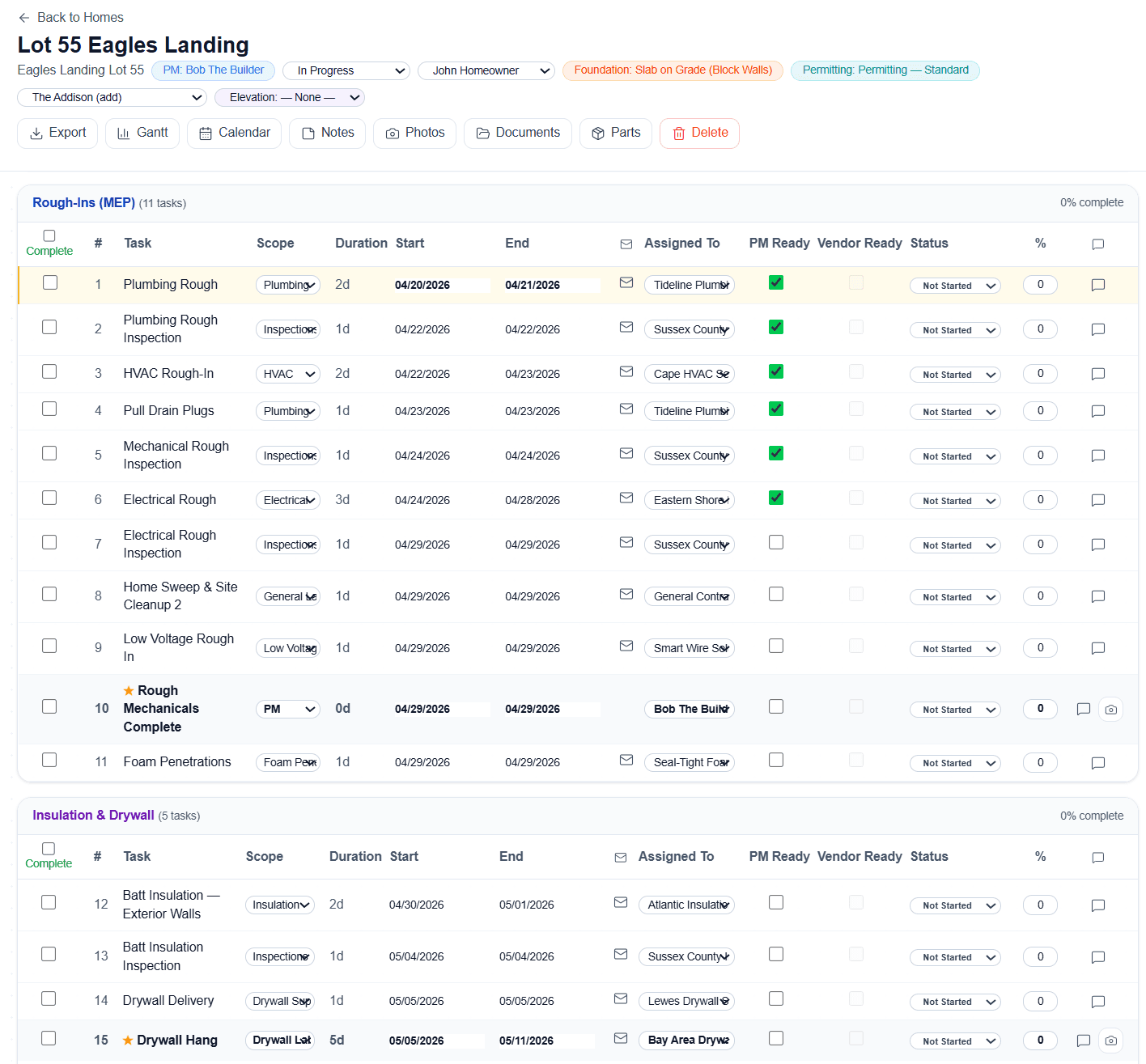
Construction Scheduling
Interactive Gantt charts with drag-and-drop task management. 3-tier dependency system with auto-cascade - move one task and every downstream task adjusts automatically. No manual re-dating, no broken timelines.
- Gantt charts with critical path highlighting
- 3-tier task dependency system with auto-cascade
- 17 pre-built templates (7 foundation types)
- 4-tier cascade email notifications to subs - delivered in under a second via Cloudflare
- Phase-based milestone tracking (5 phases)
- Weekday-only scheduling - auto-skips weekends
- Vendor magic links - no passwords for subs
- Daily & weekly digest emails to subcontractors
- 6-step closing workflow (CO → Orientation → Punch List → Close)
- Punch list items with photo attachments - snap a picture in the field, the photo lands on the item and routes to the right vendor
- 2-year warranty tracking post-close
- QR check-in signs auto-generated for every home - vendors scan to log GPS, weather, and hours on-site
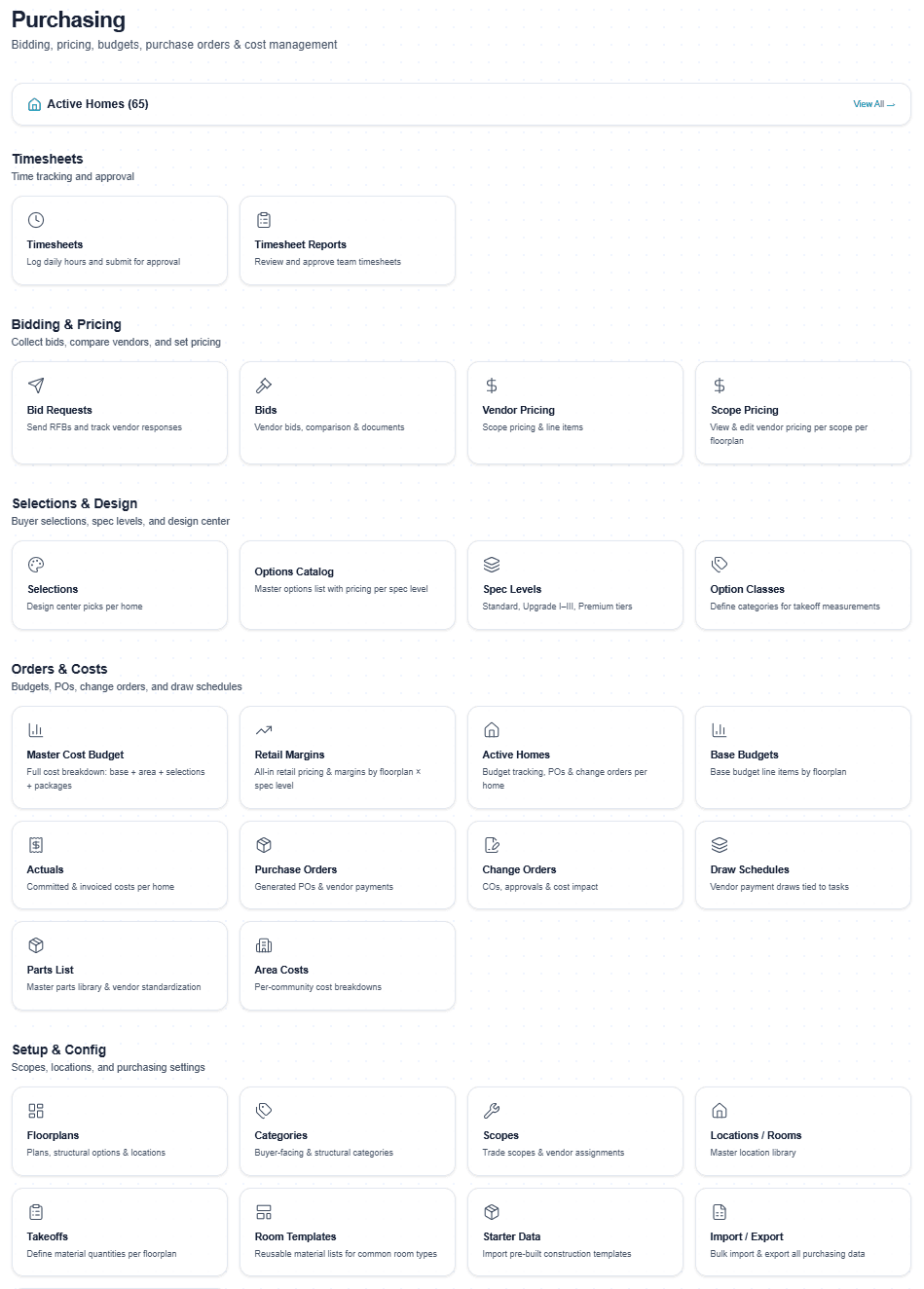
Purchasing & Budgets
200+ part catalog with real pricing. Auto-generate ~97 budget lines from floorplan takeoffs when structural options are locked. Full bid management lifecycle with side-by-side vendor comparison and one-click PO generation.
- 200+ part catalog with multiple unit types
- 3-level budget hierarchy: Scope → Task → Parts
- Auto-budget generation from floorplan takeoffs (~97 lines)
- Room-aware structural options - model added rooms and multi-room zones, replace base-plan rooms, or carve space from a larger room; quantities net automatically so budgets and POs reflect what will actually be built without double-counting
- Global structural options - mark an option global to share identical takeoffs and one retail price across every floorplan; edit takeoffs once and the change syncs everywhere, no duplicate data entry
- Dedicated Elevations Manager - manage exterior styles (Colonial, Craftsman, Modern Farmhouse) per floorplan with inline-editable retail price adders and expandable material takeoffs; elevation cost is computed from vendor pricing, and Foreman can create elevations and set pricing through natural conversation
- Full bid management: send to bid → compare → award
- Bid requests linkable to specific design or structural options - vendors price exactly what you're selling, awards flow straight to the right budget lines
- Side-by-side vendor bid comparison with lowest-price highlighting
- Purchase orders: Draft → Sent → Acknowledged → Invoiced → Approved → Paid, with an approve-to-pay gate (invoices hold until approved), retainage withholding, and payment tracking by check/ACH/wire/card/cash
- Hierarchical cost codes - phase-level tracking under each trade scope (Plumbing → PLM-001 Underground, PLM-002 Rough, PLM-003 Trim) for per-phase PO generation; the only residential platform with full cost-code hierarchy, not flat codes like BuilderTrend/CoConstruct
- Task-completion PO generation - mark a construction task complete and Cornerstone auto-generates the PO pre-filled with the right parts, quantities, vendor, and pricing for that home's floorplan via cost codes (Task → Cost Code → Takeoff Items → PO); choose draft-first (review before sending) or auto-send (PO emailed to the vendor's scheduling email with PDF attached, hands-free), or download as PDF to email the vendor yourself
- Change order approval workflow with full audit trail
- Active homes dashboard with financial rollup
- BuilderTrend migration support - AI Migration Wizard ingests your data in an afternoon
- Bid Import AI - upload any vendor format (Excel, PDF, scanned docs, handwritten quotes), AI extracts and maps line items
- Fuzzy catalog matching with confidence scores - review, approve, or reject before importing
- 3 import modes: as a Bid, Vendor Pricing, or Takeoffs
- Auto-Quantity Scope Items - set a quantity source (Under Air Sqft, Total Sqft, Exterior Perimeter, Roof Squares) once, quantities auto-calculate across every floorplan. POs combine base + structural option quantities. ANSI Z765 compliant
- Multi-tab Excel import/export - entire floorplan (base house, locations, structural options, elevations) in one workbook
- Vendor Activity Map - Google Maps view of every vendor check-in across all communities in real time
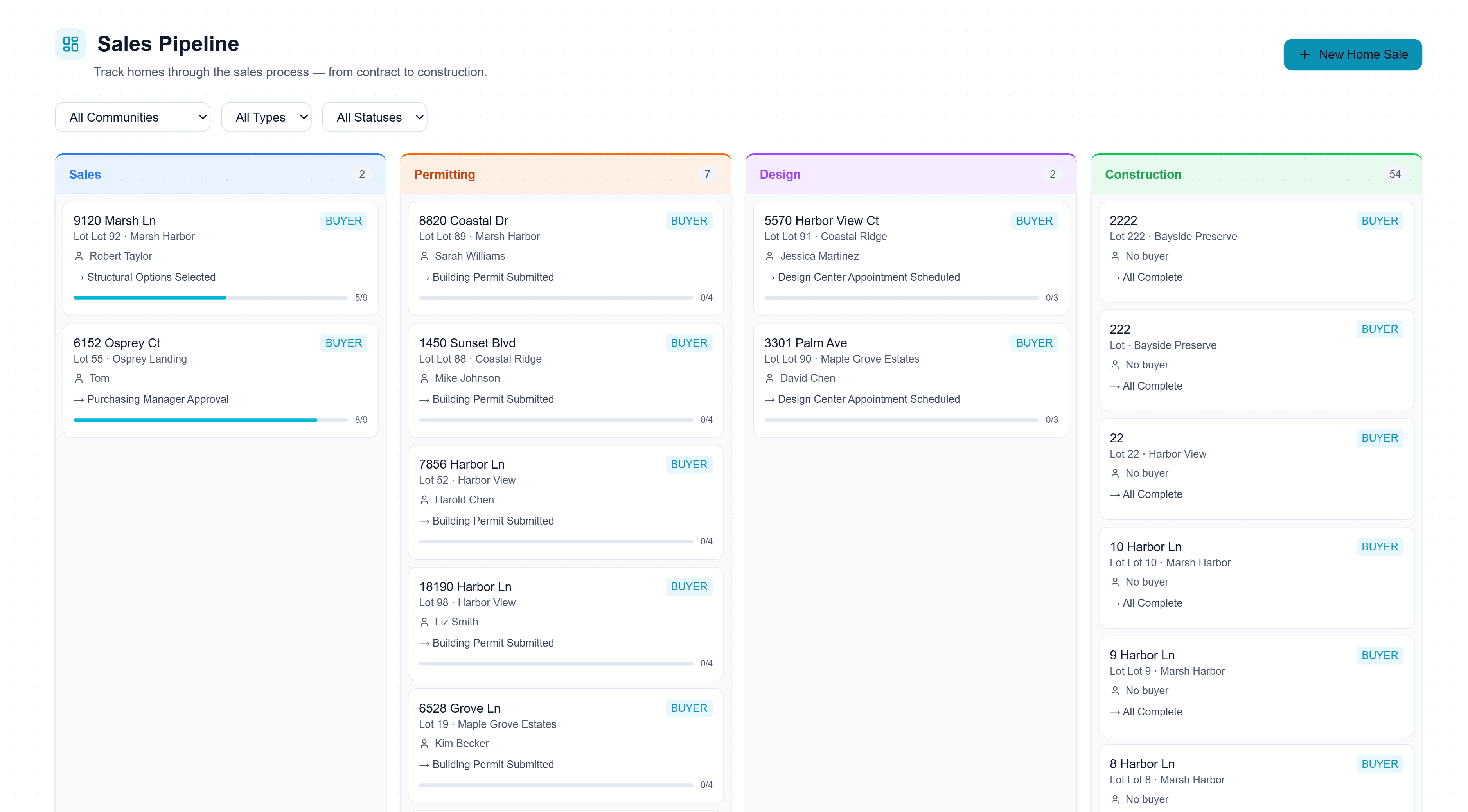
Sales Pipeline
Create a new home sale in under 60 seconds. Select community, floorplan, elevation, enter buyer info, pick structural options, apply incentives, and submit. The system auto-generates a 9-step sales checklist and full budget.
- New home sale in under 60 seconds
- 9-step auto-generated sales checklist
- Auto-budget generation when structural options are locked
- 12+ structural options per floorplan with real-time pricing
- Real-time pricing matrix per floorplan × community
- Active promotions & incentives with expiration countdowns
- Branded PDF price sheets (per community or all)
- AI-powered MLS listing sheet - Claude Sonnet writes the description from your real data (room dimensions, upgrades, community info, lot size)
- Custom AI prompt input, word count slider (50-1,000), one-click PDF download
- Description saves to floorplan - auto-populates every home on that plan
- Net price calculator with stacked promotions
- Auto-handoff to permitting when sales tasks complete
- Excel/CSV export of pricing matrix
- Model home QR code for buyer lead capture - replaces paper sign-in sheets, recognizes returning visitors, creates Lead records auto-tied to community
Design Center
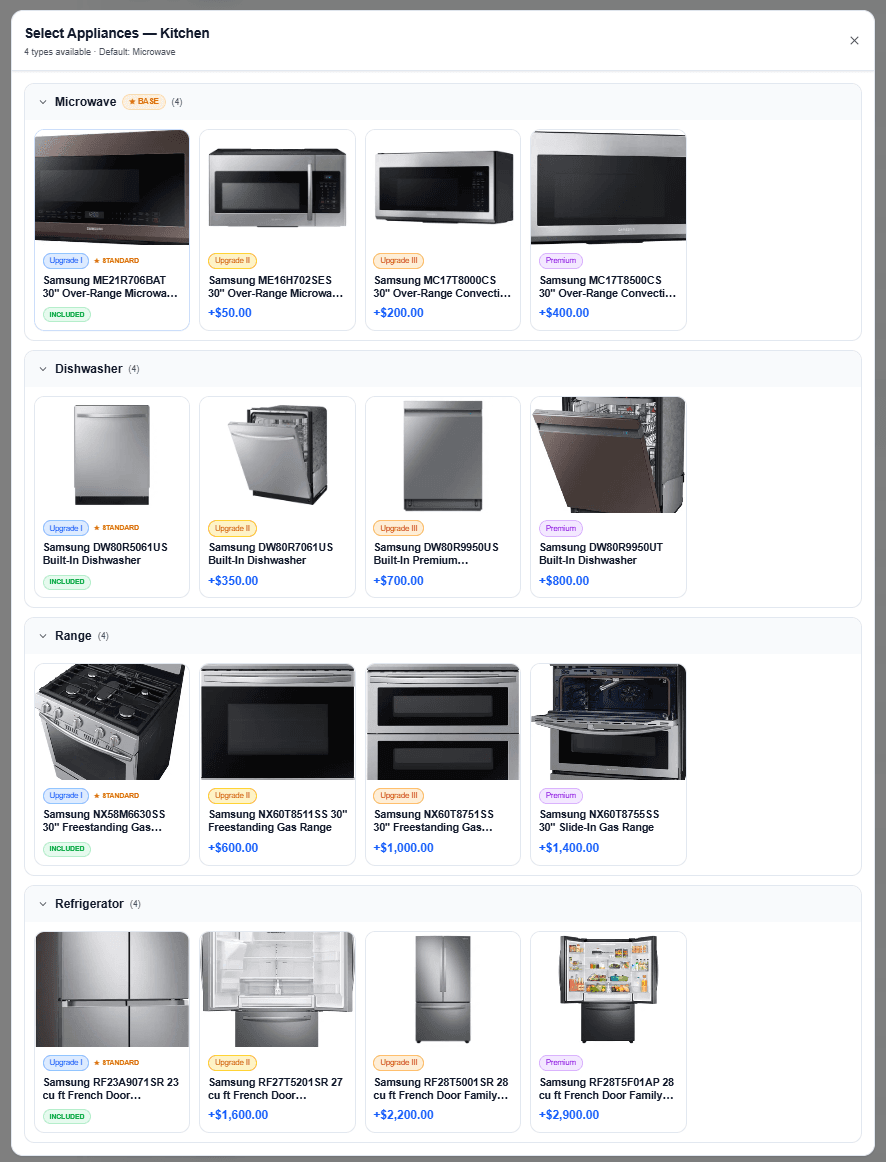
Cross-class upgrades, per-room pricing from real takeoff quantities, 64+ designer packages, and a Product Configurator for complex selections like cabinets and countertops. Unlimited spec levels - Standard, Upgrade, Premium, or custom tiers. Buyers pick their finishes and see real-time upgrade pricing.
- Options Attributes - define attribute groups (Door Style, Wood Species, Finish, etc.) and manage 7,000+ variations from just 5 options. Compatibility rules block invalid combos, per-value pricing modifiers, visual image catalog, auto-generated vendor bid templates (Excel) that import pricing back as real cost data
- Product Configurator - step-by-step guided flows for cabinets, countertops, and other multi-attribute selections. Smart compatibility rules, spec-level tier gating, and pricing from base + attribute modifiers
- Community-based upgrade pricing - each community has its own included spec level baked into the home price. Buyers see INCLUDED on options at that level and +$X deltas above (selected price minus community-included price). One option library, every community priced correctly, zero manual configuration
- No-downgrade enforcement - buyers in an Upgrade I community never see Standard options. Design center filters them out automatically. No accidental downgrades, no margin leak
- Attribute tier-gating - product attributes (Collection, Size, Pattern, Grout Color) are cosmetic spec selectors with availability gated per tier. Herringbone only at Upgrade I+? 12x24 only at Premium? Done
- Cross-class upgrades - switch carpet to hardwood, recessed to pendants, within the same category
- Allowances - budget placeholders for non-bid items, rename and reassign at the floorplan or community level any time
- Unlimited custom spec levels per community
- Different communities can start at different spec levels (Standard in one, Upgrade I in another) sharing one option library - no cloning required
- Per-room selections with sqft - 'Kitchen flooring (180 sqft)' with pricing from takeoffs
- Real-time upgrade pricing - exact delta shown: '+$684 upgrade'
- 64+ designer packages across 7 categories - one-click curated collections
- Driven by takeoffs - zero double-entry, quantities flow from your plans
- Structural option gated rooms with material scopes
- Selection tracking with buyer approval workflow
- Polished customer-facing selection sheet PDF export
- Selections flow directly into purchasing budget
- Exclusion Groups - "Pick One" rules for flooring, countertops, and other either/or categories. Buyer picks hardwood? Carpet auto-locks. No conflicting selections, no manual cleanup
- 100% Selection Confetti - celebration animation when all design selections are complete. Small touch, big buyer moment
Permitting
Pre-built permit sequences with correct order, dependencies, and lead times already baked in. Phase-based permit gates prevent downstream construction from starting until permits clear.
- Pre-built permit sequences (Foundation, Framing, Final)
- Phase-based permit gate - construction can't start until permits clear
- Permitting agent dashboard with buyer info & floorplan details
- PA workflow with one-click template setup
- Permit status tracking: Applied → Approved → Expired
- Document storage for permit certificates
- Auto-handoff from sales pipeline when all tasks complete
- Buyer portal invite from permitting stage
- Toggle permit gate on/off per account
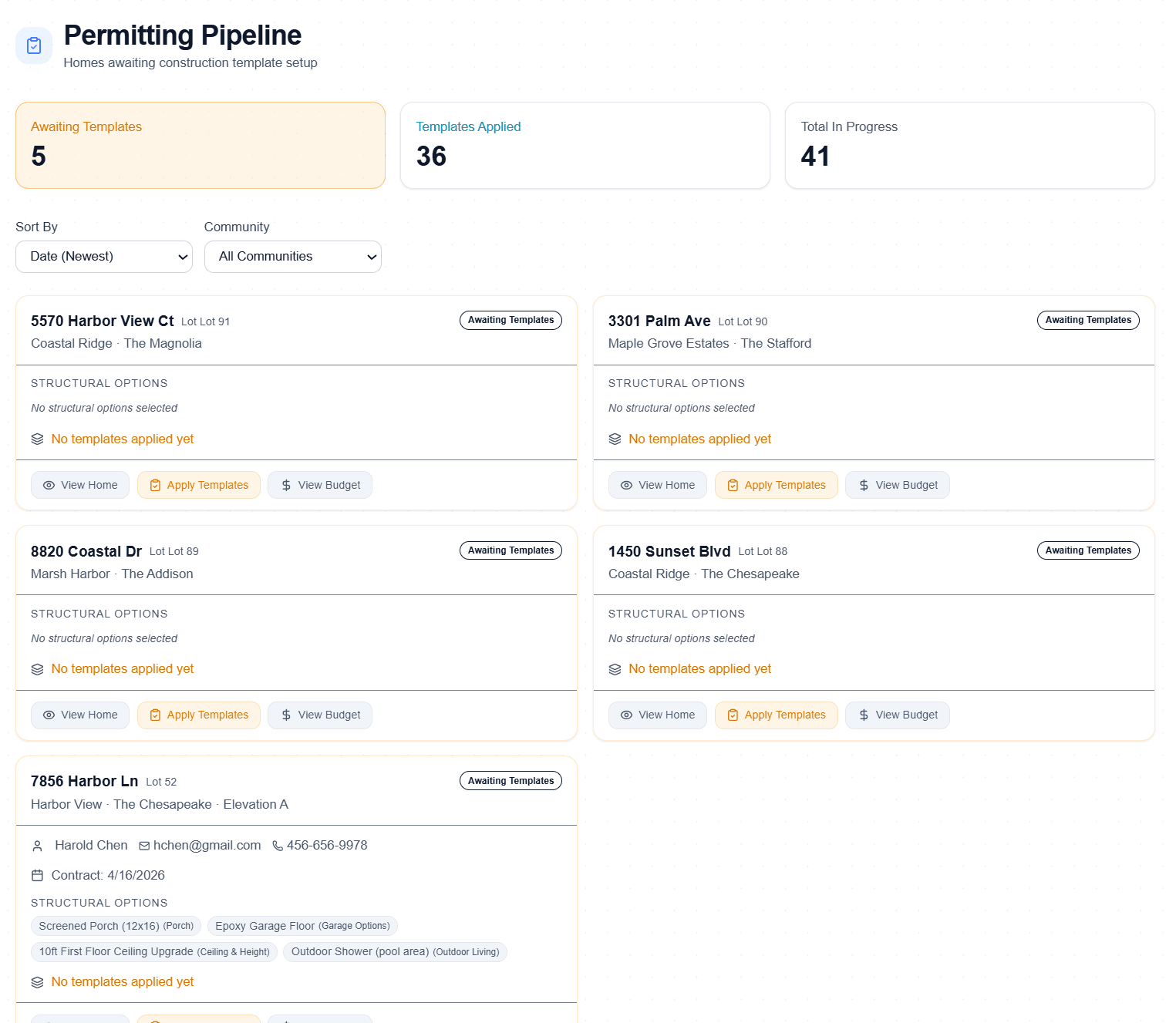
Buyer Portal
Real-time portal synced with the construction schedule - when framing moves three days, buyers see it instantly. Builder-uploaded milestone photos (up to 5 per milestone), built-in messaging app with permanent record, and one-click ZIP download of all job photos. Magic link access - no passwords needed. Reduces inbound calls, builds trust, turns into referrals.
- Real-time sync with construction schedule - framing moves, buyers see it instantly
- Magic link access - no app download, no password
- 20-phase construction milestone carousel with photos
- PM/builder uploads real job site photos at each milestone (up to 5 per milestone via task-row camera button)
- Built-in messaging app between builder and customer with permanent searchable record
- One-click ZIP download of all build photos - buyers save their whole build history
- Schedule visibility - buyers see upcoming phases in real time
- Document access (warranty docs, plans, permits)
- Selection review - approve finishes from the portal
- Construction progress percentage tracking
- Invite triggered automatically from permitting stage
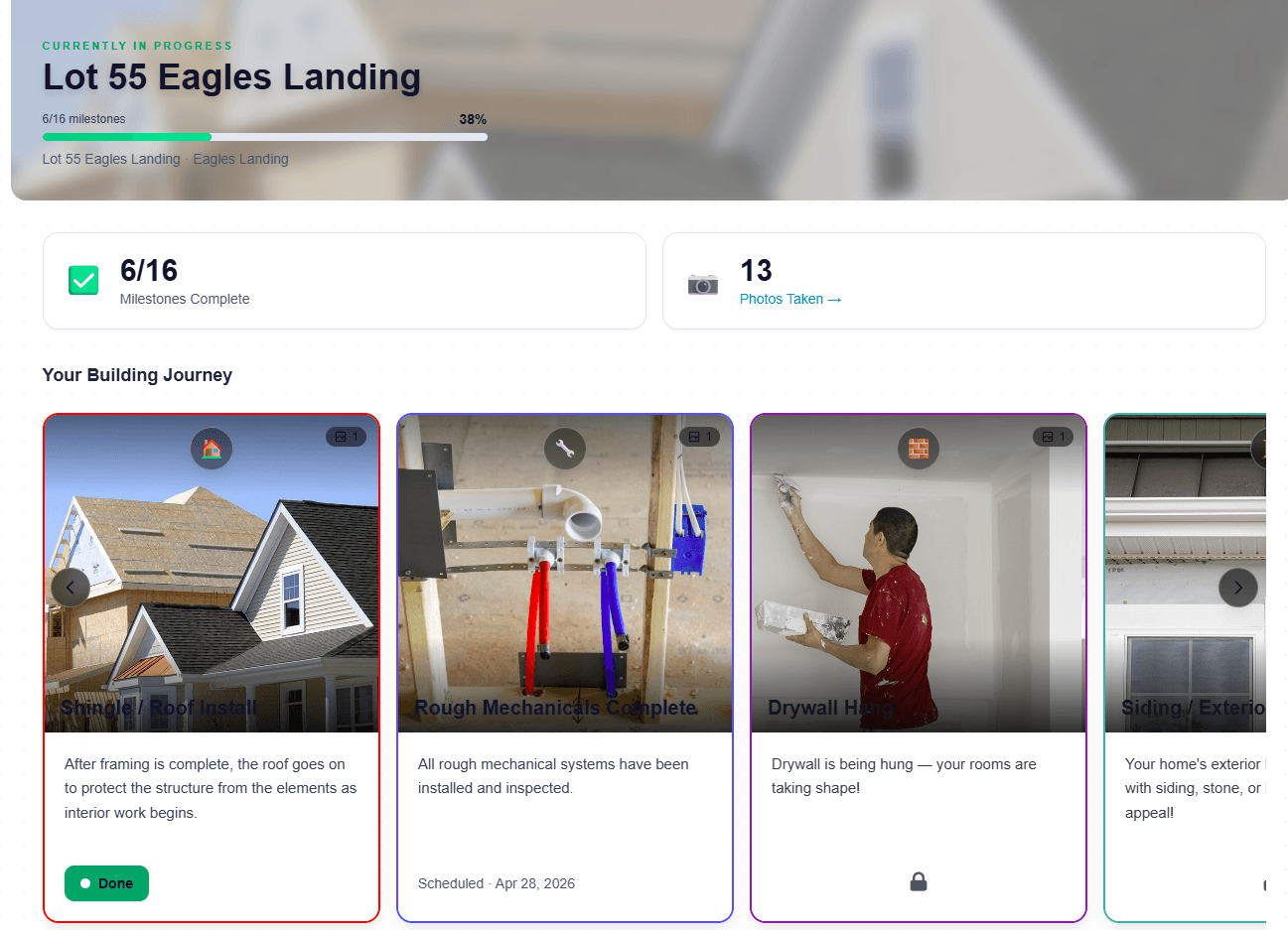
Punchlist AI
Two ways to build a punch list fast — record a walkthrough video, or upload a home inspector’s PDF report. Either way, Punchlist AI extracts every finding, tags severity and location, sorts by trade, and auto-assigns the right vendor to each item — in seconds. Stop re-typing a 30-page inspection report. Upload the PDF, get a sorted, vendor-assigned punch list before you put the phone down.
- Upload a home inspection PDF — AI extracts every defect/finding automatically
- AI pulls location/room, trade (Electrical, Plumbing, Roofing, HVAC, Structural, Cosmetic), description, and severity from the report
- Pulls the inspector’s actual embedded photos out of the PDF and attaches them to the matching item — so the defect photo flows through to the vendor email
- Review and edit room/scope/vendor/description (and remove any photo) before committing
- Or record a phone video walkthrough — no special hardware required
- Video mode: AI watches the footage + transcribes audio callouts in one pass
- Sorts findings by trade/category; sort and review before committing
- Auto-assigns the right vendor to each item by trade — with manual override
- Groups same-vendor items into a single notification email
- Location pinning — room, fixture, surface (Kitchen, Office, Master Bath)
- Photo evidence captured from key video frames
- Status tracking from open → in progress → verified-complete
- Multi-walkthrough comparison (pre-drywall, pre-closing, warranty)
- Auto-attached to the home in the build record — no copy/paste
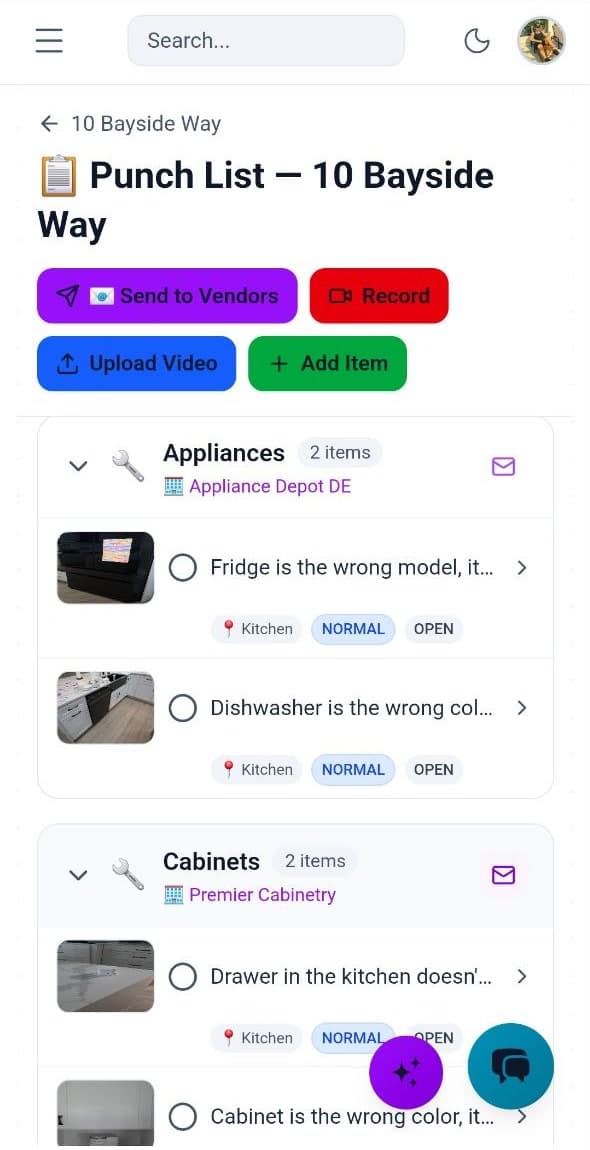
Jobsite Operations & QR Ecosystem
The only home builder platform with a triple QR code system: vendor jobsite check-in, community/PM check-in, and sales model home lead capture. Plus a live Vendor Activity Map and AI camera-event integration that auto-starts tasks when vendors arrive.
- Vendor Jobsite QR - scan to check in, GPS + weather + timestamp captured automatically
- Community QR - builder staff & inspectors log presence; feeds timesheet validation
- Sales Model Home QR - captures buyer leads, recognizes returning visitors, replaces paper sign-in sheets
- Printable 11×8.5" QR signs auto-generated for every community and home
- Vendor Activity Map - Google Maps view of live check-ins across all communities, 30-second refresh
- Jobsite AITM vendor presence detection - webhook-driven, works with any camera, doorbell, gate, or GPS (Verkada, Ring, Sensera, Samsara, custom IP cams)
- Auto-task start when vendor arrives, auto-departure logging on exit
- Photo upload at check-in (up to 10 per visit), stored in cloud
- Check-out flow with completion %, notes, and next-visit scheduling
- Configurable safety acknowledgment per community
- Public check-in page - no app install or login required for vendors
- Webhook events: vendor.arrived, vendor.departed (HMAC-signed, retry, delivery logs)
Developer API & Integrations
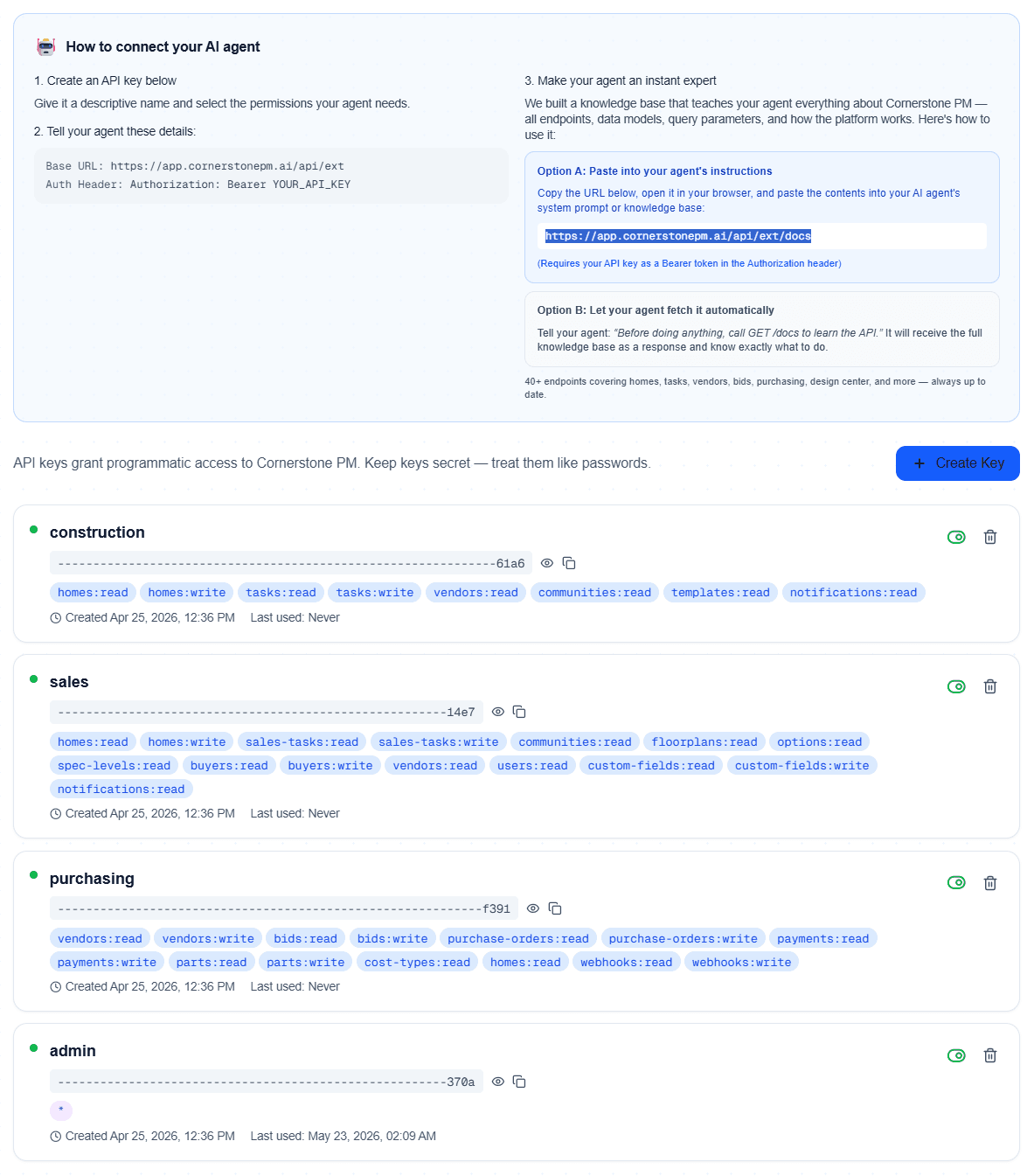
150+ REST API endpoints that expose every Foreman AI skill as a callable REST endpoint. 84 dedicated RESTful routes with clean URLs, plus a generic execute endpoint that runs any of the 396+ skills by name. 3 schema formats: Anthropic, OpenAI function calling, and OpenAPI 3.1.
- 150+ REST API endpoints — the largest API surface in residential construction software
- 84 dedicated RESTful routes for vendors, bids, homes, tasks, POs, parts, options, budgets, and more
- Generic execute endpoint: POST /api/ext/execute runs any Foreman skill by name
- Skill catalog endpoint: GET /api/ext/skills serves all 396+ tool schemas
- 3 schema formats: Anthropic tool format, OpenAI function calling, OpenAPI 3.1
- Pro+ API key authentication with role-based permissions
- 37+ real-time webhook events with HMAC signatures, delivery logs, and auto-retry
- Connect Claude, ChatGPT, LangChain, n8n, Twilio, Bland, Retell — any agent that speaks HTTP
- BYOA (Bring Your Own Agent) — your external AI agents get the same intelligence as Foreman
MCP Server
The no-code on-ramp to AI-native construction management. Cornerstone PM ships a built-in Model Context Protocol (MCP) server, so you can point Claude Desktop, Cursor, or Windsurf straight at your construction data in about 30 seconds. Generate an API key in settings, paste the ready-made config block, and your AI tool can run any of the 396+ Foreman skills directly. Most construction software has no AI integration at all — we ship a full MCP server.
- Built-in MCP server in app settings — no plugins, no middleware, no extra service to host
- Ready-to-paste config blocks for Claude Desktop, Cursor, and Windsurf
- Generate a scoped API key (cst_ Bearer token) and connect in ~30 seconds
- Exposes all 396+ Foreman skills as MCP tools through a single JSON-RPC endpoint
- Role-based tool filtering — Admins/Owners get every tool, PM/Member get most, Vendors a limited set
- Denylist permissions model — ship a new Foreman skill and it's instantly available to your AI tools, zero config changes
- The no-code on-ramp; the REST API + BYOA is the full-control path — both hit the same skill catalog
Your accountant keeps QuickBooks. Your team keeps Cornerstone.
They stay in sync — one direction, no double entry. Purchase orders, bills, vendors, and job costs flow from Cornerstone into QuickBooks automatically, while your Cornerstone data stays the source of truth. The schedule → cost code → budget → PO loop already lives in Cornerstone; now your books keep up with it on their own.
One-way sync — your books stay safe
POs, Bills, Vendors, and Homes flow one direction: Cornerstone → QuickBooks. Changes you make in QuickBooks never overwrite your Cornerstone records. Your accountant can't accidentally break your project data.
One-click connect — no developer setup
Hit “Connect with QuickBooks,” pick your company, and you're done. Cornerstone manages the Intuit app credentials for you — no API keys, no OAuth wiring, nothing to configure.
Construction-ready Chart of Accounts
Starting from a blank QuickBooks, Cornerstone builds a construction CoA straight from your scopes and cost codes — each top-level scope becomes a COGS account, each cost code an item. Full preview before anything is created; existing accounts are reused by name, never renamed.
Job costing QuickBooks can't do alone
Each Community syncs as a QuickBooks Customer and each Home nests under it as a Project (or a sub-customer job on plans without Projects) — so you get true per-home and per-community P&L in QuickBooks, not just a lump sum.
POs, Bills, Vendors & sales tax
Vendors upsert, Purchase Orders create/approve/update (voids close them out), and vendor invoices post as Bills — the moment they happen in Cornerstone. Sales tax carries through on sync, with a live progress bar as it runs.
Auto-create the Bill when a PO is complete
Optional: mark a purchase order received and Cornerstone creates the matching Bill in QuickBooks, linked to the PO, so the PO closes out with no duplicate. Payment always stays a manual approval in QuickBooks — we never auto-pay a vendor. The human pay gate is yours.
AP payment terms — batch-pay on one payday
Set how each bill comes due — Net-X days, weekly on any weekday, semi-monthly on two paydays a month, monthly on the Nth (or last) weekday, or bi-weekly anchored to a payday. Cornerstone computes the due date off the invoice date and carries it into QuickBooks, so you can pay every vendor in one run instead of chasing invoices.
Full sync visibility — a Sync Events log
Every push to QuickBooks lands in an Accounting → Sync Events log, so you can see exactly what synced, when, and whether it succeeded — and retry anything that needs it. Each transaction carries a clean memo (community, lot, address, PO#, cost code) so your accountant knows what every line is.
Pay in QuickBooks — the PO marks itself Paid
One-way sync plus one inbound signal: pay a vendor Bill in QuickBooks and that paid status flows back on its own — Cornerstone marks the linked purchase order Paid, stamped with the QuickBooks payment date and amount. Partial payments are tracked; the PO only flips to Paid once the bill balance hits $0. It's a read-only status reflection, not two-way sync — Cornerstone never pushes edits or money into QuickBooks, and never auto-pays.
Works with your QuickBooks plan
Auto-detects whether your plan supports POs (Plus/Advanced) or Bills (Essentials and up), warns you clearly, and re-enables automatically when you upgrade — no reconnect. Already on QuickBooks? Pull your existing accounts, items, vendors, customers, and classes so Cornerstone matches them.
Stop paying
for software that's
built for someone else.
Cornerstone PM™ was built by a builder who got tired of wrestling with enterprise software. Request beta access today — no credit card, no catch.