Bid Leveling: How to Compare Vendor Quotes Apples-to-Apples
The cheapest quote isn't always the cheapest job — especially when three vendors submit in three different formats with three different assumptions. Bid leveling puts every quote on the same scope-item lines so the comparison is real. Cornerstone PM's purchasing module handles this without a spreadsheet.
Here is a scenario every purchasing manager recognizes: you send a bid request to three framing contractors. One emails a lump sum. One sends a spreadsheet with labor and material broken out differently than you expected. One attaches a PDF with line items that don't match your scope at all, plus an asterisk next to cleanup that reads “quoted separately.” You now spend two hours retyping all three into an Excel comparison before you can even guess who is actually cheaper — and you still aren't sure, because the assumptions aren't aligned.
That two-hour reconciliation is what bid leveling is supposed to eliminate. The goal is simple: every vendor fills in the same lines so the side-by-side comparison is immediate. Cornerstone does this by removing the free-form format entirely.
Why do vendor quotes land in different formats?
Vendors quote in whatever format they use internally. Without a structured template, a framing sub might quote by the square foot, by crew day, or as a lump sum that buries materials and labor together. None of those formats map cleanly onto a builder's scope-item budget, so every comparison requires translation — which introduces error and takes time.
The underlying problem is that most bid systems ask vendors to interpret the scope rather than fill it in. When the scope is ambiguous, so is the quote. Cleanup, mobilization, and materials haul-off end up either double-counted or missing entirely, and the comparison you run is based on apples vs. oranges regardless of how careful you are.
Step 1: Send every vendor the same template
In Cornerstone's Purchasing → Bid Requests flow, every invited vendor receives an auto-generated Excel template with three tabs: Base, Structural, and Designer. The template is scope-filtered — a plumber only sees the plumbing scope items, not framing or cabinetry. The line items on that template are the exact same scope items your budget is built on, so when a quote comes back, it maps directly to your cost plan without translation.
Vendors don't need a Cornerstone account to access or submit the template. They click the link in their email, download the file, fill in their numbers, and upload it back — along with any supporting documents — through a no-login vendor portal. No account friction, no forgotten passwords, no reason to ghost the request.
Step 2: Track exactly who has seen the request
Every invite moves through four states: Invited, Viewed, Submitted, and Declined. The bid request dashboard shows the current status per vendor, so you know at a glance whether someone has opened the link or is still sitting on the invite.
The Declined state is underrated. When a vendor can't price a job, they can decline in one click — which tells you to find a replacement before the deadline, not after. Most traditional bid processes produce silence instead of a decline, and silence is far more expensive than an honest no.
Step 3: Compare bids side-by-side, line by line
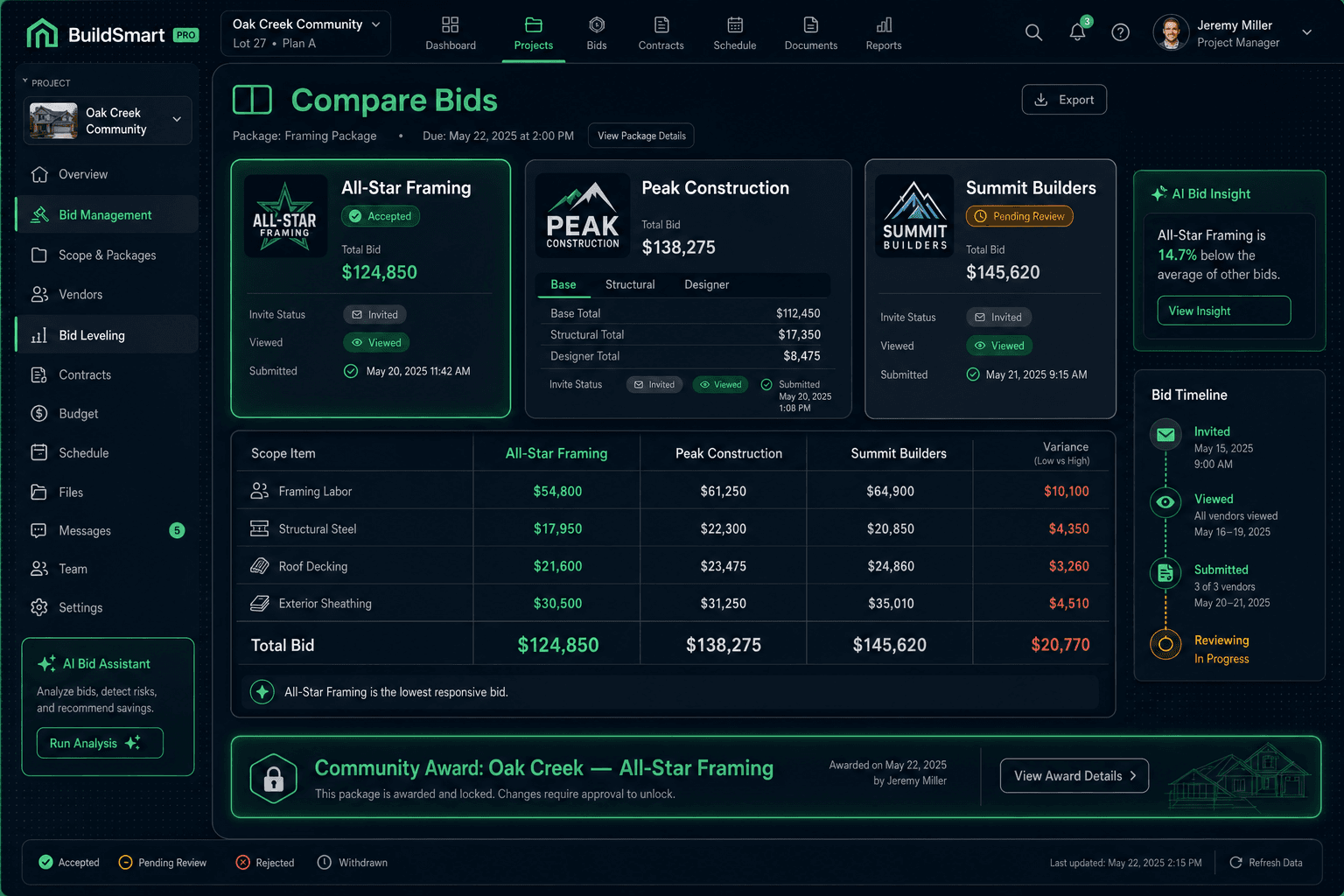
When two or more vendors submit, Cornerstone surfaces them in a side-by-side view with drill-down to each scope-item line. Because every vendor filled in the same template, the comparison requires no retyping or reconciliation — the numbers are already aligned.
Side-by-side framing bid comparison — Oak Creek Community
| Scope Item | All-Star Framing | Peak Construction | Summit Builders |
|---|---|---|---|
| Framing Labor | $24,200 | $22,800 | $26,500 |
| Structural Steel | $8,400 | $8,400 | $7,900 |
| Roof Decking | $6,100 | $5,850 | $6,400 |
| Exterior Sheathing | $4,300 | $4,750 | $4,100 |
| Total | $43,000 | $41,800 | $44,900 |
All three vendors filled in the same scope-item lines — no retyping, no translation.
From this view you can see more than the total — you can see where the spread comes from. If Peak Construction is $1,200 cheaper overall but $500 higher on structural steel and $1,700 lower on labor, that tells you something about their crew efficiency assumptions that a total number alone would hide.
Step 4: Award by community, not by lowest price
The most important thing bid leveling makes possible isn't finding the cheapest number — it's making a confident, defensible decision about who gets the work and where.
Cornerstone awards bids per community, not per project. One vendor wins Oak Creek; a different vendor wins Maple Ridge. Both bids can be accepted simultaneously. The vendor you trust most in a community where you are new, the vendor whose crew knows your superintendent on a community where the schedule is tight — those are legitimate criteria, and the side-by-side comparison gives you the data to make that call intentionally rather than defaulting to whoever came in lowest.
What the bid workflow covers
Scope-filtered Excel templates
Base, Structural, and Designer tabs — each vendor sees only their trade
No-login vendor portal
One link from the email, no account required — bids lock after submission
Per-vendor status tracking
Invited → Viewed → Submitted → Declined — no guessing who needs a follow-up
Side-by-side comparison
Drill down to individual scope items across all submitted bids at once
Community-based awards
Assign different vendors to different communities — multiple accepted bids per scope
Locked pricing on award
Neither builder nor vendor can edit the number after award — every budget line traces back to it
Step 5: Lock the bid — and mean it
Once a bid is awarded in Cornerstone, it locks. Neither the builder nor the vendor can quietly edit the number afterward. That lock is not a technicality — it is the foundation of accurate job costing.
Cornerstone runs on what it calls the hard cost rule: nothing in the budget carries a stored or default cost. Every scope item, area cost, and Master Cost Budget line traces back to an accepted vendor price. A line with no awarded bid shows as $0 / needs pricing rather than a fabricated number. When you award a bid and lock it, you are creating the source of truth that every downstream budget calculation will reference — all the way through QuickBooks.
Why the lock matters
An unlocked bid is a number that can drift. A vendor who knows the price is still negotiable will test that assumption. A builder who can quietly edit an awarded bid creates budget variance that nobody can explain later. The lock is what makes “every dollar traces back to an awarded bid” literally true.
How bid leveling connects to the rest of the purchasing stack
Bid leveling is not a standalone feature — it is one step in a connected purchasing workflow. Cornerstone's purchasing module runs the full loop: you send bid requests, vendors submit through the no-login portal, you compare and award, and the awarded price flows into the scope item and the Master Cost Budget. When a task completes, the purchase order generates and emails the vendor automatically. On receipt, the linked Bill auto-creates in QuickBooks and closes the PO — no dangling commitments, no duplicate entry.
Foreman AI can run parts of this workflow by chat. Ask it to draft a scope-of-work from your scope items, identify which vendors are still pending on a bid request, or pull a bid comparison summary — it reads and writes real data, so the answer it gives is based on your actual records, not a generic template. That is what it means to have 396+ construction skills that reach into the purchasing module.
The goal of bid leveling is not to pick the lowest number faster. It is to make a confident, well-informed decision about who gets the work in each community — and then lock that decision in a way that the entire platform can build on. When every quote arrives on the same lines and every award locks, the comparison is honest and the budget that follows from it is trustworthy.
Stop retyping bids into a spreadsheet.
Cornerstone sends every vendor the same scope-filtered template, tracks invite status, and shows submitted quotes side-by-side so you can compare and award in minutes — not hours. See it in action.
Request Early Access