Labor, Material, Mixed, or Lump Sum: Scope Items That Match Real Vendor Quotes
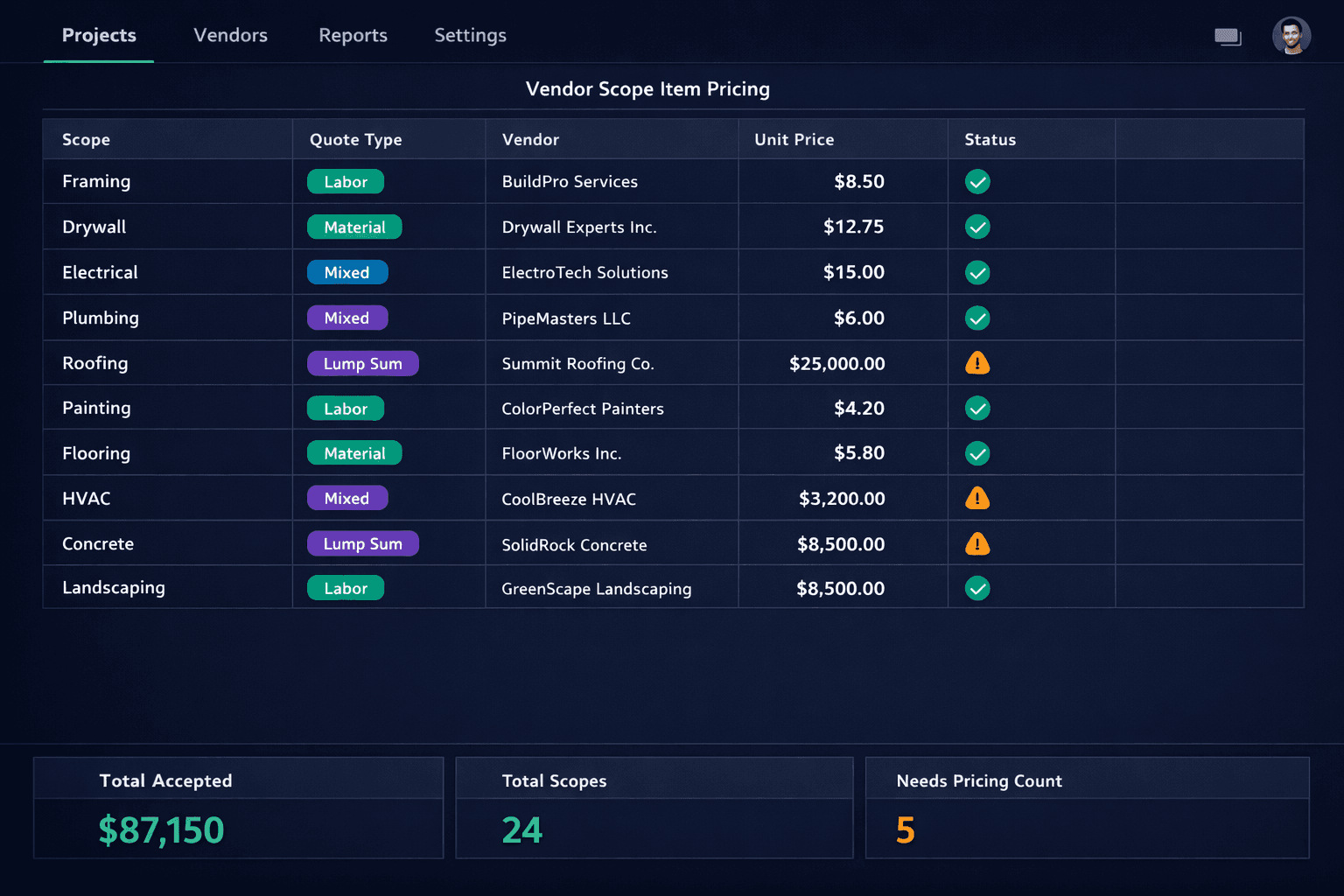
Not every trade quotes work the same way. Cornerstone PM's purchasing module lets a single scope item represent labor, material, a blended mixed rate, or a flat lump sum — so vendor bid templates match the way subcontractors actually price their work instead of forcing every trade into one rigid parts-only structure.
Most construction estimating tools were built around a catalog of priced parts: one SKU, one unit price, one quantity. That works fine for materials. It breaks down the moment a framing crew wants to quote an hourly labor rate, an electrician wants to bundle labor and material into one number, or a roofer wants to bid the whole job as a single flat price with no unit at all.
Why don't all vendor quotes fit one structure?
Every trade has its own pricing convention, shaped by how the work is actually performed and billed. A framing crew bills hours. A lumber supplier bills board feet. An electrician or plumber often blends labor and material into a single rate per fixture or per linear foot because separating the two doesn't reflect how they actually cost the job. A roofer or a concrete crew frequently skips per-unit pricing entirely and hands over one number for the whole scope. None of those are wrong — they're just different, and a platform that only supports one structure forces builders to either misrepresent the quote or manage it somewhere else.
Labor
Priced per hour, per square foot, or another unit — no material cost bundled in. Common for framing crews and finish trades billing their time separately from supplied material.
Material
Priced per unit for the product itself — drywall per sheet, lumber per board foot. Ties cleanly to takeoff-derived quantities pulled straight from the floorplan.
Mixed
A single blended rate that already includes both labor and material, the way electricians and plumbers commonly quote — still multiplies against a real quantity.
Lump Sum
One flat number for the entire scope, no unit and no multiplication. Common for roofing, concrete, and other trades that bid the whole job as a package.
How is this different from just adding a “notes” field?
A notes field lets someone describe a quote in text, but it doesn't change how the platform calculates a cost. A lump-sum scope item isn't a labor line with a comment explaining it's actually flat — it's structurally different: no unit, no quantity multiplication, just one accepted number that flows straight through to the budget and the purchase order. A mixed scope item still multiplies against a real quantity, the same way a labor or material scope does, but the resulting rate already accounts for both cost components in one number. The structure matches the math the vendor actually used to arrive at their price.
How does quote type affect vendor bid comparison?
When a bid request goes out, each scope item carries its quote type into the vendor bid template, so a framing crew is asked for an hourly rate and a roofer is asked for a lump sum — not the same generic line for both. When bids come back, comparison happens within the same scope and the same quote type. That matters because comparing an hourly framing rate against a lump-sum roofing bid was never a real comparison to begin with; keeping the structures distinct means the numbers that get compared were actually priced the same way.
This is the same discipline covered in Cornerstone PM's vendor bid request workflow: scope-filtered templates that ask each vendor for exactly what they need to quote, in the format they're used to quoting it.
What happens to a scope item with no accepted price yet?
It stays visibly unpriced. Cornerstone PM never fills a gap with a default, a company average, or an estimate dressed up as a real number. A scope without an accepted vendor bid shows a needs-pricing status all the way through the budget and purchase order flow — so a builder always knows the difference between a real cost and an open question. That's the same hard-cost rule that governs how awarded bids become job-cost budgets elsewhere in the platform.
How does the quote type flow into the purchase order?
Once a bid is accepted, the scope item's structure decides how its price reaches the purchase order. Labor and material scopes multiply their accepted rate against the relevant quantity — hours, square footage, or a takeoff-derived count. Mixed scopes do the same, since the blended rate still needs a quantity to apply against. Lump-sum scopes skip multiplication entirely and carry their flat accepted price straight to the PO. Purchasing never has to manually convert one vendor's pricing convention into another's just to keep the numbers consistent on paper.
Why does this matter at the scale of a full plan set?
A single mismatched scope item is a minor annoyance. A production builder running a dozen floorplans across several communities, with dozens of trades each quoting their own way, turns that mismatch into either a pile of misrepresented numbers or a shadow spreadsheet tracking the “real” pricing outside the system. Letting each scope item keep its actual quote structure — labor, material, mixed, or lump sum — means the vendor bid templates, the comparisons, and the budgets all stay accurate at scale, without anyone reverse-engineering a fake unit price to make a lump-sum roofing bid fit a parts-only mold.
For the full picture of how bids move from request to award to budget, see Cornerstone PM's purchasing module.
Stop forcing every vendor quote into the same mold.
Cornerstone PM's scope items match how trades actually price work — labor, material, mixed, or lump sum — and keep bid comparison and budgets accurate at every scale.
Request Early Access