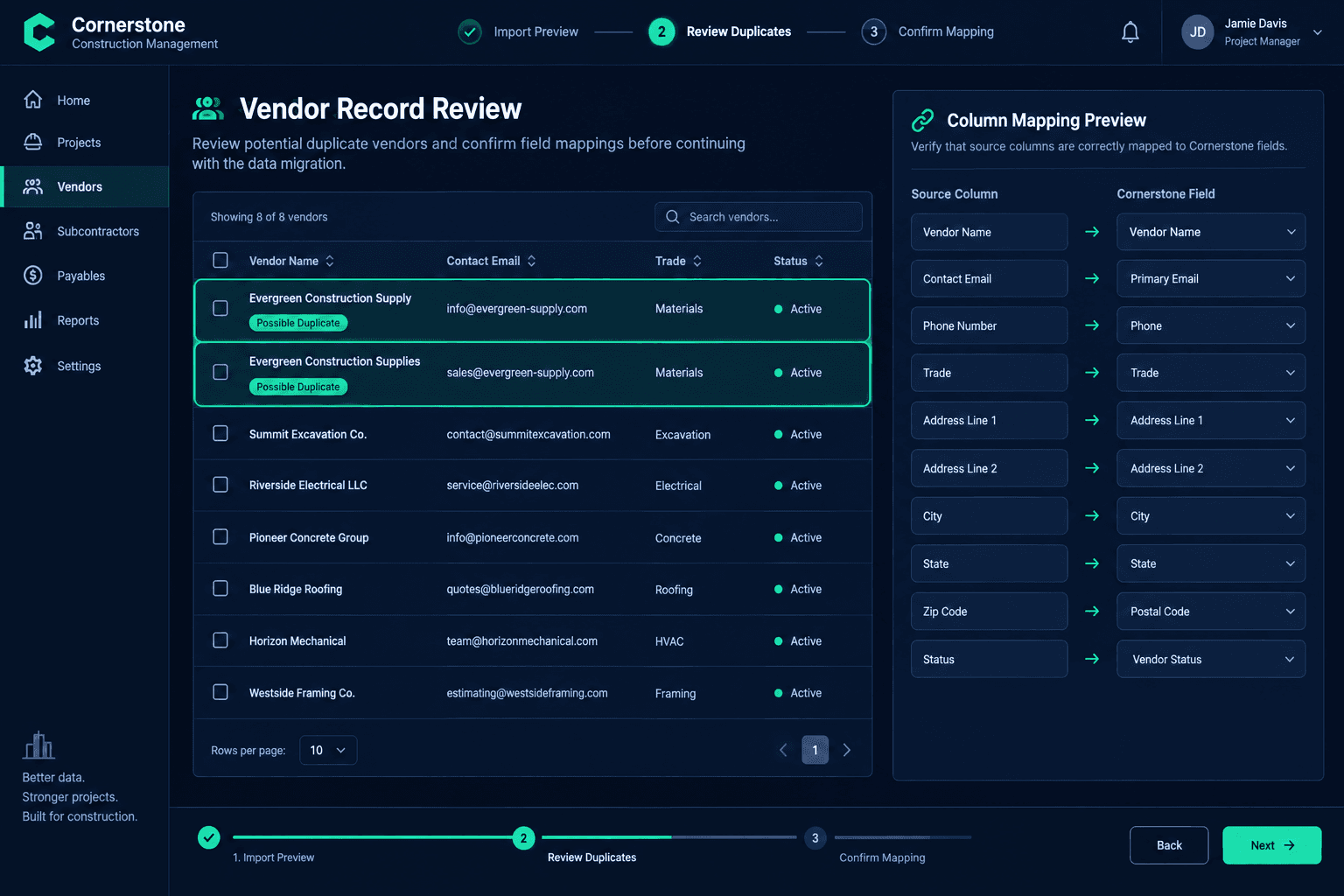
Before Importing Your CRM: Review Duplicate Vendor Records
Before confirming a CRM import, review your vendor list for near-duplicate names, shared contacts, and unclear scope assignments — a clean source file is what makes the project management platform you land on trustworthy from day one.
A migration tool can map columns, detect a source platform, and move thousands of rows in minutes. What it can't do is tell you whether "Evergreen Construction Supply" and "Evergreen Construction Supplies" are the same vendor or two completely different companies that happen to share a name. That judgment call belongs to the builder, and it's far cheaper to make before the import than to untangle after every home record references the wrong vendor.
This isn't a guide to switching platforms or a breakdown of migration costs. It's a narrow, practical checklist for one step: cleaning up vendor identity in your source data before you confirm the mapping and bring it into Cornerstone.
What does a vendor data cleanup review actually check?
The review covers six things, and none of them require special tools — a spreadsheet and a careful read are enough. The goal is to catch ambiguity in the source data before it becomes a wrong answer baked into your new system.
What the review checks
Original export preserved
A untouched copy of the source vendor list, saved before any cleanup begins
Near-match vendor names
Similar spellings, abbreviations, or trade names flagged for a closer look
Shared contacts
Vendor rows sharing an email address or phone number, checked individually
Scope and bid history
Which jobs, scopes, or accepted bids reference each vendor record
Ambiguous matches
Sent to a named person on the team for a confirmed answer, not assumed
Field mapping review
Source columns checked against Cornerstone fields before the import is confirmed
Why do two similar vendor names not prove a duplicate?
It's tempting to treat a near-match name as an obvious duplicate and merge it on sight. But construction vendor lists accumulate legitimate near-matches all the time: a regional supplier with a materials division listed separately from its install crew, a subcontractor who rebranded mid-year, or two unrelated companies that happen to share a common trade word in their name. Merging the wrong pair doesn't just lose a record — it can attach one vendor's purchasing and bid history to a company that never did that work.
The safer pattern is to treat a name match as a flag, not a verdict. Pull every other signal available — shared contact info, overlapping trade assignments, matching addresses — before deciding two rows describe the same vendor.
How should shared contacts factor into the decision?
A shared email address or phone number across two vendor rows is a stronger signal than a name alone, but it still isn't proof. Office staff at a general contractor can field calls for more than one trade. A supplier's main sales line might appear under both a regional and a local record. Shared contact info narrows the list of rows worth investigating — it doesn't close the case by itself.
Before resolving a flagged pair, check what each record is actually tied to in your old system: which jobs reference it, which bids were awarded to it, and which schedule tasks assume that vendor's scope. A record with real history attached deserves a careful look before it gets merged away or dropped.
Deduplication is a human decision, not an automatic one
Cornerstone's CRM Migration Wizard detects your source platform and uses AI-assisted column mapping to line up fields for you — but it does not automatically merge, fuzzy-match, or roll back vendor records on your behalf. Reviewing which rows are truly duplicates, and confirming that decision with the team, stays a manual step before you confirm the import.
Why ask the team before resolving an ambiguous match?
Some vendor pairs can't be resolved from the data alone. If a near-match name also shares no contact info and no scope history, the safest move is to ask whoever manages that trade relationship — a purchasing manager, a project manager, or whoever originally placed the bid. A quick confirmation from a named person beats a guess that gets baked into years of job history.
Keep a short list of every ambiguous pair, who it was sent to, and what they confirmed. That list becomes useful documentation if a vendor question comes up months later — you'll have a record of the decision instead of having to reconstruct it from memory.
Where does the AI-assisted field mapping fit into this process?
Once the vendor list itself is clean, the next step is confirming how each column in your export maps to a field in Cornerstone. The CRM Migration Wizard detects your source platform — Buildertrend, JobTread, or a plain CSV export — and proposes a mapping for every column: vendor name, contact email, trade, address, status. That mapping is a starting point, not a final answer. A column labeled "Phone Number" in your old export and "Phone" in Cornerstone is an easy match to verify; a column with an ambiguous or custom label is exactly where a quick check saves a mapping mistake later.
This is also the point to confirm status fields — active versus inactive vendors — map the way you expect, so a vendor you retired two years ago doesn't reappear as a live option on your next bid request.
How is this different from a general migration guide?
A general migration guide covers the whole process: choosing a new platform, estimating timeline, training staff, and running parallel systems during the switch. This checklist is narrower on purpose — it's the identity cleanup step for one data type, vendors, that happens before you ever open the mapping screen. Skipping it doesn't show up as an error during import; it shows up months later as a bid history attached to the wrong company or a vendor scorecard that quietly combined two unrelated trades.
Bring clean vendor data into a platform built to keep it that way.
Cornerstone's CRM Migration Wizard detects your source platform and maps every column with AI assistance — review the mapping, confirm it, and move forward with vendor records you can trust.
Request Early Access