What Home Builder Design Center Software Should Actually Do
A buyer-facing selections list is not a design center. The difference is whether selections drive the budget automatically, whether conflicting choices are impossible, and whether upgrade prices trace back to real vendor pricing — not an estimator's guess.
Most production builders inherit a selections tool that was built for custom builders or remodelers: a flat list of options, a shared allowance per category, and a spreadsheet somewhere that nobody fully trusts. The selections process works until a buyer picks two conflicting finishes, or the design center number disagrees with the Master Cost Budget, or a change order surfaces and nobody can explain where the upgrade price came from.
This post lays out what production home builder design center software should actually do — and why each piece matters for margins, buyer experience, and schedule.
What's the bar?
Spec-level control
Included-vs-upgrade decisions down to a single option, not just whole categories. Promote any standard finish to a paid upgrade with one spec-level change.
Exclusion groups
Conflicting selections made impossible. A buyer picks Carpet or LVP or Tile — one choice completes the category instead of leaving all others required.
Designer packages
Curated bundles that auto-lock coordinated options when a package is chosen. Buyers get a confident starting point; builders get consistent selections cycles.
Options linked to scope items
Every buyer selection lands automatically in the budget. No export, no re-keying — the design center and the Master Cost Budget stay in sync by design.
Vendor-priced upgrades
Upgrade prices trace back to accepted vendor pricing, not estimator guesses. The design center and the cost budget always agree because they share the same source.
Why does granular spec-level control matter?
Most design-center tools let you toggle entire option categories as included or excluded from the base price. That's too blunt. A production builder might want standard cabinet hardware included but a specific premium pull to be a paid upgrade — without bumping the entire cabinet category to optional.
Cornerstone's Design Center takes control down to the individual option. Open any option under Purchasing → Options, change its Spec Level from Standard to Upgrade I, Upgrade II, or Premium, and it drops out of the base price and becomes a paid +$X upgrade. The Standard/Upgrade toggle on the Spec Levels page handles category-wide exclusions when you want all options in a class to require an upgrade fee.
The marketing angle is straightforward: builders protect margin on materials where buyers consistently choose up, while keeping the base price competitive on finishes that most buyers accept at standard.
Why are exclusion groups necessary?
Without exclusion groups, a selection category like Flooring has a structural problem: if you mark it required, the buyer has to select all four options (Carpet, Tile, LVP, and Hardwood) before the category shows complete — which is obviously wrong. If you leave them all optional, the category never marks complete even after the buyer makes a real selection.
Exclusion groups solve it: define the four flooring options as a "pick one" group, and the moment the buyer selects Tile, the Flooring category is done. The other three options grey out. Selection-progress dashboards stop showing "incomplete" on categories where the buyer has genuinely finished.
Beyond flooring, the same logic applies anywhere a buyer makes a real choice between mutually exclusive options: roofing material (Asphalt or Metal), countertops (Granite or Quartz), exterior siding style. None of the leading competitor platforms — Buildertrend, JobTread, NEWSTAR — model option-class exclusivity natively.
How do Designer Packages shorten the selections cycle?
A buyer handed 300 individual options across 12 categories will freeze. The decision fatigue is real, and it extends the selections cycle by weeks while the build schedule waits.
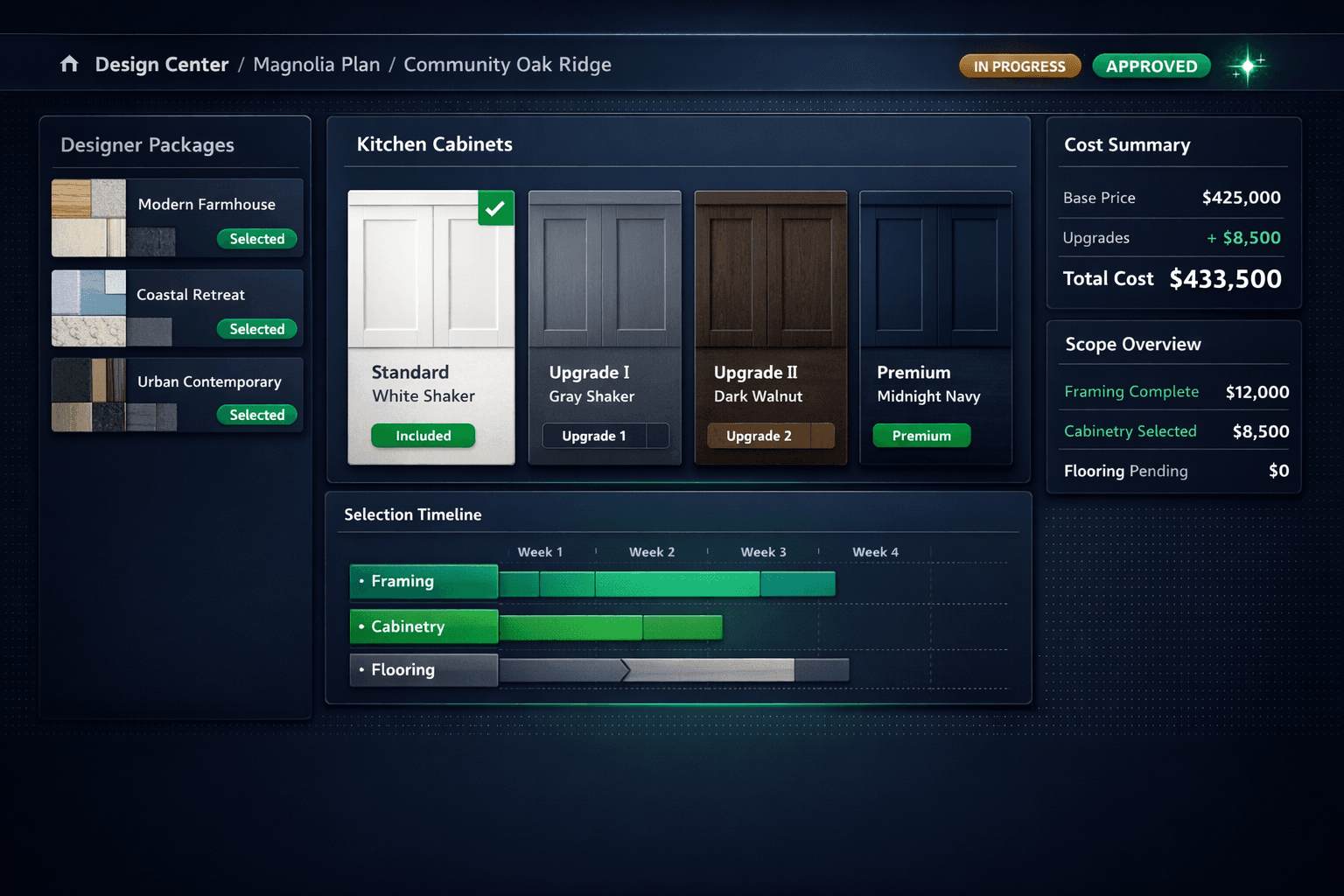
Designer Packages solve the starting-point problem. Cornerstone ships 64 curated packages across 7 categories — Modern Farmhouse, Coastal Retreat, Urban Contemporary, and more. A buyer picks a package and every category option auto-locks to that coordinated look. If they want to customize, removing the package unlocks à la carte selections.
From a builder's perspective, packages also protect consistency: you know exactly what the Modern Farmhouse finish schedule looks like across every home that chooses it, which makes purchasing and scheduling predictable. From a buyer's perspective, it's a confident starting point instead of a wall of isolated choices.
How should selections connect to the budget?
In most tools, the design center and the cost budget are separate. A buyer upgrades to Premium Cabinets in the design center. The project manager manually updates a spreadsheet line. The Master Cost Budget is right until someone forgets to update it.
In Cornerstone, Option Classes tie a selection category to a scope — and design options link directly to scope items. When a buyer selects Premium Cabinets, the cabinetry scope in the Master Cost Budget updates automatically. No export, no re-keying, no lag. The design center and the budget share the same data, not copies of it.
You can also bulk-create options from scope items or the parts catalog, and set global retail pricing mode so buyer-facing prices calculate consistently across every plan and community.
Why does the upgrade pricing source matter so much?
The differentiator that ties everything together is the hard cost rule: upgrade prices in Cornerstone trace back to accepted vendor pricing, not estimator guesses. A line with no accepted price shows as $0 / needs pricing instead of a synthetic number that nobody can defend.
This matters when a buyer asks why the Premium Cabinet upgrade is $8,500 more than the standard package. If the base cabinet cost is a filler number, there's no honest answer. If it's grounded in real vendor pricing, the answer is a specific bid from a specific vendor on a specific date.
It also matters for change orders. When a buyer upgrades mid-build and the original selection cost is traceable to a real bid, the change order delta is real too — not a negotiated number that erodes margin.
Foreman AI respects this rule too. When Foreman AI manages options and packages by chat, it adds parts and scope items following the same scope-first, vendor-priced flow — no invented numbers, even when the AI is doing the work.
How does Cornerstone PM compare?
What does this look like in practice?
A production builder running 80 homes per year across three communities sets up the Magnolia plan once: 64 Designer Packages auto-lock coordinated finishes, spec levels are configured per option so the base price is accurate, exclusion groups make conflicting flooring and roofing selections impossible, and every option class is wired to a scope item so buyer upgrades flow directly into purchasing.
When the Magnolia plan sells in Community Oak Ridge, the buyer opens the design center, picks the Modern Farmhouse package, swaps one cabinet choice, and the selections are done in a single appointment. The upgrade delta updates the Master Cost Budget in real time. The change order, if one comes later, is priced off the same accepted vendor bid the original selection used.
That's the bar. A buyer-facing selections list is a starting point. A real production home builder design center is what turns those selections into a trustworthy budget without anyone in the middle re-keying numbers.
A design center that actually moves the build forward
Spec levels, exclusion groups, Designer Packages, and vendor-priced upgrades — all wired into the budget automatically. See how Cornerstone PM's Design Center works for production builders.
Request Early Access