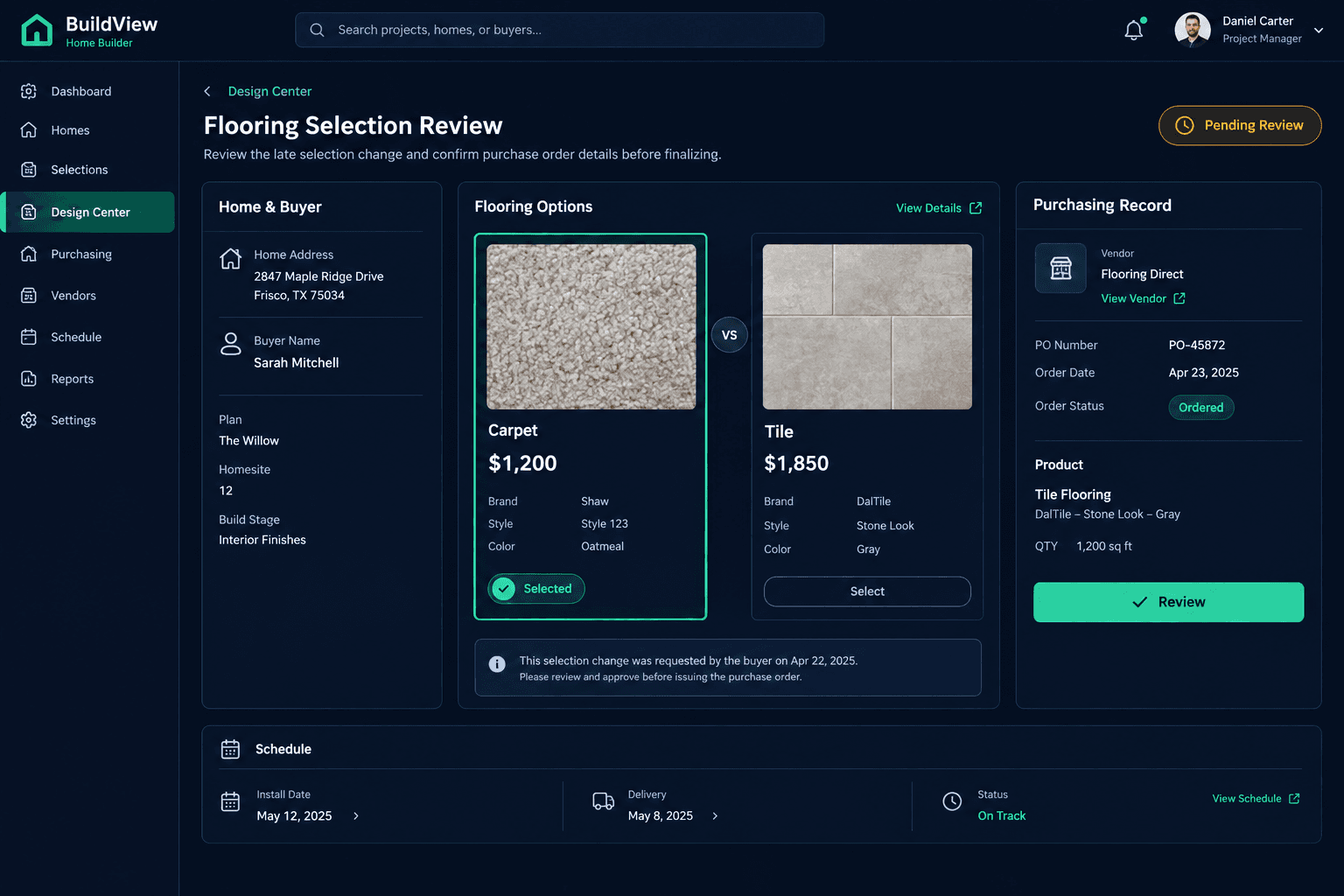
The Buyer Changed Flooring After Ordering: Check the Whole Handoff
When a buyer asks to change flooring after it's already been ordered, check the room quantities, call the vendor about cancellation and availability, get a revised quote, and confirm the new material's lead time with the field lead — before you promise the buyer anything.
A flooring change after ordering isn't a selection update; it's a request that touches three separate records at once — the design selection, the purchasing record, and the home's connected schedule. Editing the selection in Cornerstone doesn't cancel an order, issue a refund, or move an install date on its own. Each of those is a separate action someone has to take, and the review below is the sequence for taking them in the right order.
Why doesn't updating the selection handle the rest?
Cornerstone keeps the design selection, the purchasing record, and the schedule as connected references for the team — not as a single action that cascades automatically. If a buyer wants tile instead of the carpet that was already ordered, changing the selection in the design center only updates what's on record as chosen. It doesn't notify the vendor, it doesn't touch the purchase order, and it doesn't shift the install date on the schedule. Someone still has to do each of those things, and in the wrong order they can create a mess: a vendor notified too late to cancel, or a schedule left showing the old install date while the field crew shows up expecting the wrong material.
What the review checks
Original order status
Whether the first flooring choice is already ordered, not just selected
Room quantities
Whether the original room-level quantities still apply to the new material
Vendor cancellation and availability
What the vendor can cancel, return, or source for the new selection
Revised vendor quote
A written quote for the new material plus any fees, not an internal estimate
Installation timing
Whether the new material's lead time still fits the home's schedule
Why check room quantities before calling the vendor?
The original order was sized against the room-level quantities tied to the first selection — square footage, waste factor, and any minimum order amount the vendor requires. A different material can change all three. Tile often needs a different waste allowance than carpet, and some vendors set a minimum order quantity that doesn't match what was originally calculated. Pulling the room quantities before the vendor call means you're asking for an accurate number the first time, instead of getting a quote that has to be redone once someone notices the quantity was off.
What should the vendor call actually cover?
Three separate questions, and all three need an answer before you move forward: Can the original order still be canceled, and if so, is there a restocking fee? Is the new material available, and on what timeline? And what will a revised order actually cost? Don't estimate that last number internally — ask the vendor for it in writing. Vendor pricing and availability shift, and a stale internal guess is exactly the kind of gap that turns into a dispute later when the real invoice doesn't match what the buyer was told.
Editing a selection doesn't cancel an order
Cornerstone doesn't automatically notify a vendor, cancel a purchase order, or issue a refund when a design selection changes. Those are separate steps a person has to take — this review exists because skipping one of them is how a late flooring change turns into a bigger problem than it needed to be.
How does the field lead factor into the timeline?
The vendor's new lead time only matters in the context of the home's actual schedule, and the field lead is the person who knows what else is sequenced around install. A flooring delay of even a few days can push trim, final paint touch-ups, or a walkthrough that was already booked. Before confirming any date to the buyer, check with the field lead on whether the new material's availability still fits — or what has to move if it doesn't. Skipping this step is how a flooring change quietly becomes a schedule problem nobody flagged until it was too late to fix quietly.
Who approves the buyer-facing change?
Once the vendor quote and schedule impact are both known, any cost difference — higher or lower — should move through your standard change order or selection-change approval process, the same as any other post-selection change. Cornerstone doesn't apply a cost difference automatically when a selection is edited; the actual, accepted vendor pricing is what should be used, not a placeholder or the difference between two catalog prices. Confirming a new date or cost to the buyer before that approval is in place is how a builder ends up committed to a number that doesn't match what gets approved internally a day later.
How does Cornerstone support this review without doing it for you?
Cornerstone keeps the design selection, the purchasing record, and the connected schedule as shared reference points, so the person handling a late change is looking at current records instead of piecing the situation together from a buyer email and a vendor phone call. What Cornerstone doesn't do is cancel orders, call vendors, or move schedule dates on its own — those stay human actions, taken in the right order, with the vendor's actual answer driving the cost and the date the buyer hears back.
Keep the design, purchasing, and schedule records connected.
Cornerstone keeps a home's selections, purchasing records, and schedule in one place — so a late flooring change is a five-minute review instead of a scramble across three systems.
Request Early Access