Lot Management That Actually Prevents Double-Selling a Lot
Two sales agents, two buyers, one lot — and both contracts get signed the same week. It happens because the list everyone is working from says a lot is available right up until someone remembers to update it. Cornerstone PM's sales pipeline treats a lot as a real record with an enforced status, not a cell in a shared file, so the second sale can't happen in the first place.
Double-selling a lot is rarely a judgment error. It is a timing problem baked into whatever the builder is using to track lot status, and the fix is not “update the spreadsheet faster” — it is removing the gap between a lot changing status and everyone seeing that change.
Why a spreadsheet or whiteboard can't actually prevent this
A shared lot list works exactly as well as the discipline of whoever last touched it. A sales agent closes a deal on Lot 26 at 10 a.m. and marks it sold at 10:15, after the paperwork is filed. A second agent pulls up the same list at 10:05 and shows Lot 26 to a different buyer as available, because for those five minutes it was. Multiply that gap across a sales team, several communities, and a busy sales weekend, and the question is not whether a double-sell will happen — it is how many times a year.
The underlying issue is that the lot's status lives as a value someone has to remember to change, on a document that has no idea what a “sale” or a “contract date” is. Nothing connects the act of selling a home to the record that says the lot is taken.
How Cornerstone PM makes the lot itself enforce its own status
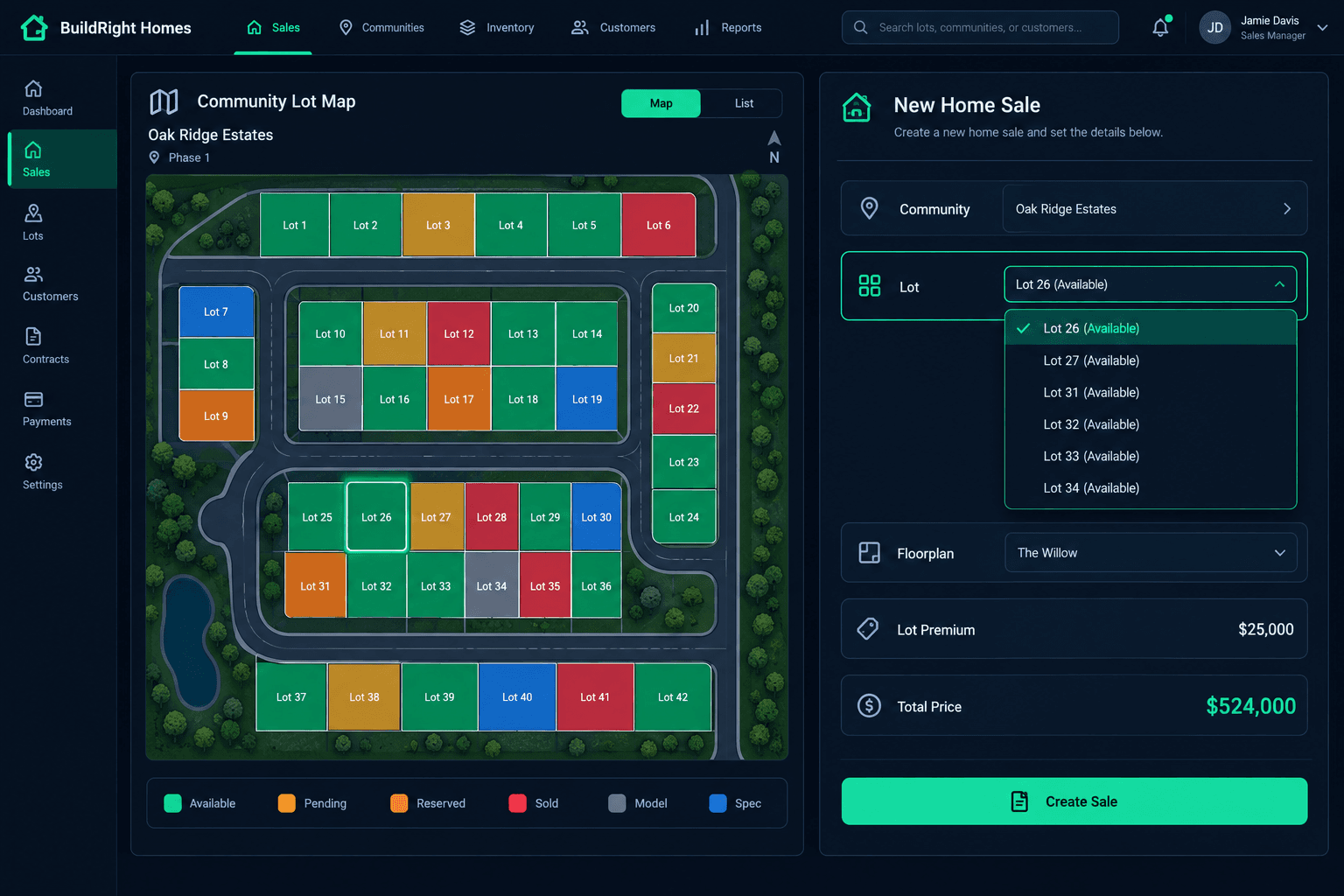
In Cornerstone PM, a lot is a first-class record — not a label on a map, not a row a human edits by hand. Every lot carries one of six statuses: Available (green), Pending (amber), Reserved (orange), Sold (red), Model (gray), and Spec (blue). When a sales agent starts a new home sale, the lot dropdown is filtered at the database level to status = AVAILABLE. A lot that just got linked to a home a minute ago by someone else is already gone from that list — not stale, not pending a refresh.
Underneath that, a unique constraint between the lot and the home record makes it structurally impossible for two active homes to claim the same lot at once. This is not a validation message that a careless click could skip past. It is the same category of protection as a bank account that cannot go negative — the system will not allow the second claim to exist, independent of whether anyone was paying attention.
Setting up lots takes minutes, with or without a map
Lot records do not require a community map to work. On the community's Lots tab, a builder can add lots one at a time, paste a list, or enter a range like 26-61and get every lot number created at once — including the gaps and alphanumerics real plats actually have, like “35A.” Address, acreage, and lot premium are editable right there. A builder who never touches the visual map still gets full double-sell protection, because the protection lives in the lot record and the sales dropdown, not in the map.
Builders who do use the community map get the same statuses rendered as colors on the plat, with a click-to-expand popup showing the lot number, address, acreage, and the linked home if one exists. The map is reading the same lot records the sales dropdown reads — there is no second source of truth to drift out of sync with the first.
Lot management capabilities
The lot premium shows up in the price automatically
Lots are not just inventory status — they carry their own pricing. A corner lot, a larger parcel, or a cul-de-sac premium is stored on the lot record as a dollar amount. When a sales agent selects that lot for a buyer, the premium and the lot's acreage auto-fill into the sale, and the premium becomes its own line in the price breakdown: Base plus Elevation plus Lot Premium plus Options minus Incentives equals Total. No one has to remember to look up what a specific lot adds to the price, and no premium gets quietly dropped because an agent built the quote from memory.
What happens when a deal falls through
A canceled sale clears the lot's link back to AVAILABLEautomatically, so the next buyer's agent sees it in the dropdown without anyone manually resetting a status field. Deleting a home does the same — the lot reopens, while the buyer's record and any legal documents (contract, pre-approval, proof of funds, earnest money) are archived rather than erased, so the sales history survives even though the lot itself is back on the market.
Automatic status changes are a convenience layer, not a locked workflow. A sales manager or admin can override any lot to any status by hand at any time — holding a lot off-market, marking a builder-held spec home, or correcting an edge case the automation did not anticipate. The system defaults to the obvious thing and gets out of the way when a human needs to decide differently.
Model and spec lots get their own rules
A lot marked Model is locked out of the sales dropdown entirely — there is no path for an agent to accidentally sell the model home out from under itself. A lot marked Spec behaves differently on purpose: selecting it for a buyer triggers a conversion flow instead of starting a new build. The buyer attaches to the existing spec home, the floorplan and options that are already built show read-only, and no new construction schedule gets created, because the home is already under construction or finished. Builders running speculative inventory alongside presale lots get the right behavior for each without having to remember which rule applies to which lot.
Stop finding out about a double-sell after the contracts are signed.
Dedicated lot records, enforced status rules, and a sales pipeline that only shows what's actually available — connected to pricing, budgets, and the rest of the build from day one.
Request Early Access