A QuickBooks Sync You Can Audit: Sync Events and Clean Transaction Memos
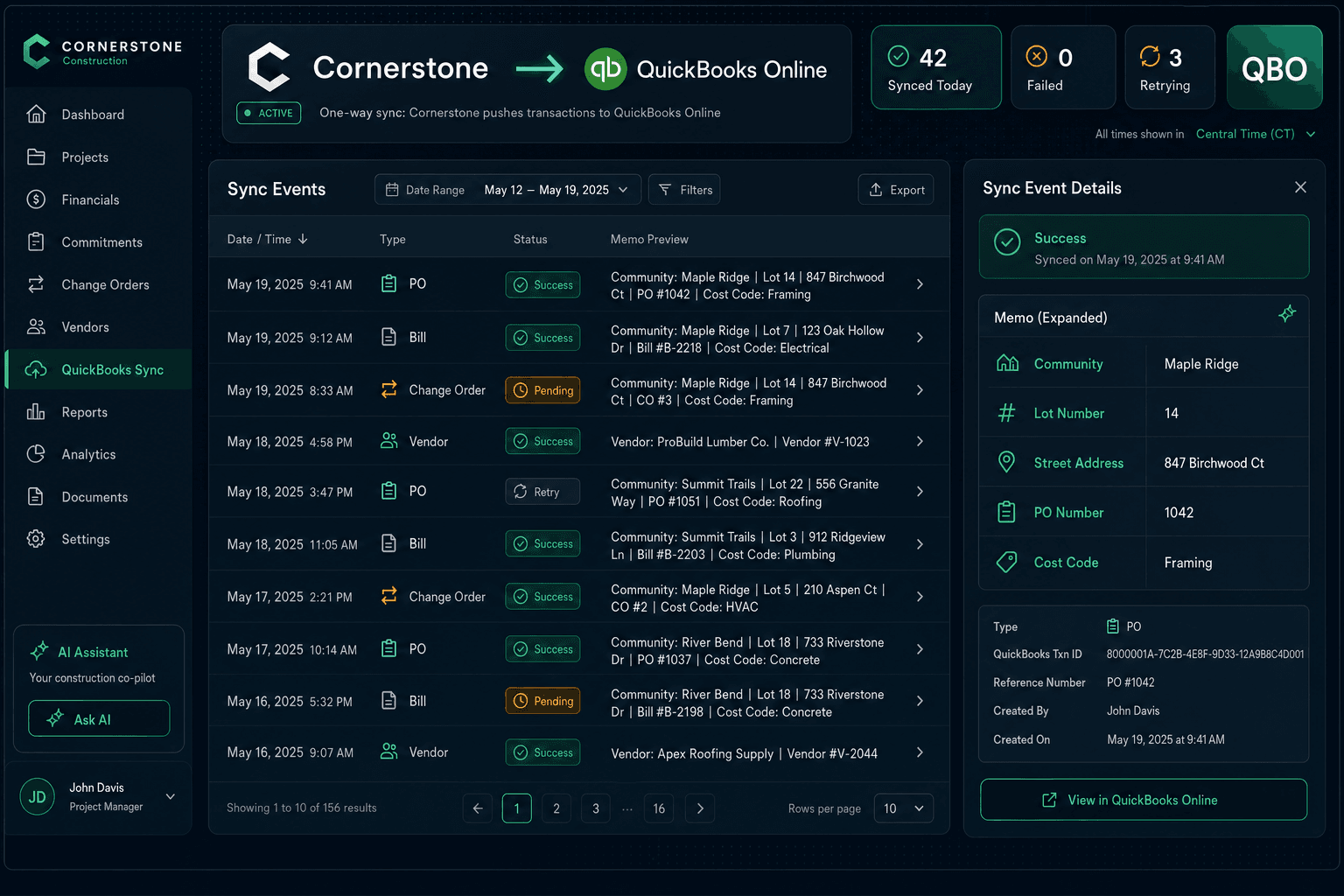
Every push from Cornerstone to QuickBooks Online is logged in Accounting → Sync Events — timestamp, record type, result status, and retry history — so builders and bookkeepers know exactly what synced, when it synced, and what to do if something didn't.
Most accounting integrations are a black box. Data goes in, bookkeepers pray it landed correctly, and nobody finds out there was a sync failure until month-end reconciliation surfaces a missing bill or a duplicated vendor. For a production builder running 30 active homes, a silent sync failure can mean hours of cleanup — and a QuickBooks register that disagrees with the job data everyone else is looking at.
Cornerstone takes the opposite approach. The QuickBooks integration is fully auditable: every push is logged, every retry is timestamped, and every synced transaction carries a structured memo so it's traceable inside QuickBooks without cross-referencing Cornerstone.
What does the Sync Events log show?
Accounting → Sync Events is the audit trail for every record Cornerstone has pushed to QuickBooks Online. Each row shows:
Sync Events — example log
If a push fails — network timeout, a QuickBooks API hiccup, an unrecognized vendor — Cornerstone retries automatically and logs each attempt. You can see exactly which records are still pending and when the next retry fires, without logging into QuickBooks to audit the register manually.
Why do clean transaction memos matter?
A QuickBooks register without useful memos is a list of dollar amounts with vendor names attached. For a builder running 5 communities and 200+ annual homes, that's not enough information for a bookkeeper to trace a transaction or for an owner to understand a P&L line without picking up the phone.
Every PO, Bill, and Change Order that syncs from Cornerstone carries a structured memo:
Example memo on a synced QuickBooks Bill
Community: Maple Ridge
Lot 14 | 847 Birchwood Ct
PO #1042 | Cost Code: Framing
Community name, lot number, street address, PO number, and cost code. A bookkeeper can pull any transaction from the QBO register, read the memo, and know exactly which home it belongs to and which trade it covers — without opening Cornerstone. That's what makes the books auditable instead of just reconcilable.
How does this fit the two-stage accrual flow?
The Sync Events log captures both stages of Cornerstone's two-stage AP flow. When a PO is sent, Cornerstone posts it to QuickBooks as a Purchase Order (committed cost) and logs the push. When the PO is marked received, Cornerstone auto-creates the matching Bill — linked to the PO so it closes automatically — and logs that Bill push separately. Two distinct events, two separate rows in Sync Events, both with their own timestamps and memos.
Two-stage sync — what gets logged
PO sent → Purchase Order logged
A committed cost appears in QuickBooks. Sync Events shows the record type, timestamp, and memo. Drafts never sync — only sent POs.
PO received → Bill logged
The matching Bill auto-creates in QuickBooks, the PO closes, and a second Sync Events row records the Bill push with its own timestamp and memo.
Why one-way sync protects the books
Two-way sync creates a specific failure mode: a bookkeeper edits a Bill amount in QuickBooks, the change writes back to Cornerstone, and suddenly the PO that dozens of scope items and change orders hang off has a corrupted cost. Finding and fixing that kind of corruption in an active build takes hours.
Cornerstone syncs one direction only. Approved records — POs, bills, change orders, vendors — flow from Cornerstone to QuickBooks. Nothing from QuickBooks overwrites Cornerstone. Cornerstone stays the single source of truth for all job data, and the Sync Events log shows every outbound push so builders can verify the books match without running a manual audit.
What flows in the sync — and what doesn't
Automatic sales tax and cost code clarity
The memos that carry into QuickBooks are only as useful as the underlying data they describe. Two supporting features make the data cleaner before it ever syncs.
Automatic sales tax on materials:Cornerstone applies sales tax to material lines and keeps labor exempt — on both POs and change orders — then carries the calculated tax into QuickBooks with the synced transaction. No manual material/labor splits, no re-keying tax amounts, and no end-of-month reconciliation to figure out what taxed and what didn't.
Cost codes on every transaction: Because every PO and Bill is linked to a cost code in Cornerstone's purchasing module, that code appears in the QuickBooks memo automatically. Bookkeepers get immediate trade-level visibility — framing, plumbing, electrical — without any manual tagging inside QuickBooks.
What builders get from an auditable sync
For a builder running multiple communities, the combination of Sync Events visibility and structured memos replaces two manual processes: the weekly "did everything sync?" check, and the month-end cost-code reconciliation exercise. Both become near-automatic when the sync log is always current and every transaction is self-describing.
Sync Events shows every push with timestamp and retry history — no silent failures.
Every QuickBooks transaction carries community, lot, PO#, and cost code — traceable without opening Cornerstone.
One-way sync means QuickBooks edits never corrupt Cornerstone job records.
Automatic material sales tax and labor exemption carry into QBO without manual splits.
The result is a QuickBooks register that reflects the actual build — not a delayed, partially-reconciled approximation of it. Builders who want to see the full picture, from PO commitment through bill payment, can read it in Cornerstone's purchasing hub or in QuickBooks, and both will agree.
See every sync. Trust every number.
Cornerstone PM logs every QuickBooks push in a real-time Sync Events audit trail and stamps each transaction with community, lot, PO number, and cost code. Request early access to see the full purchasing-to-accounting workflow.
Request Early Access