Your QuickBooks Register Says “Purchase Order 4471.” That Tells You Nothing.
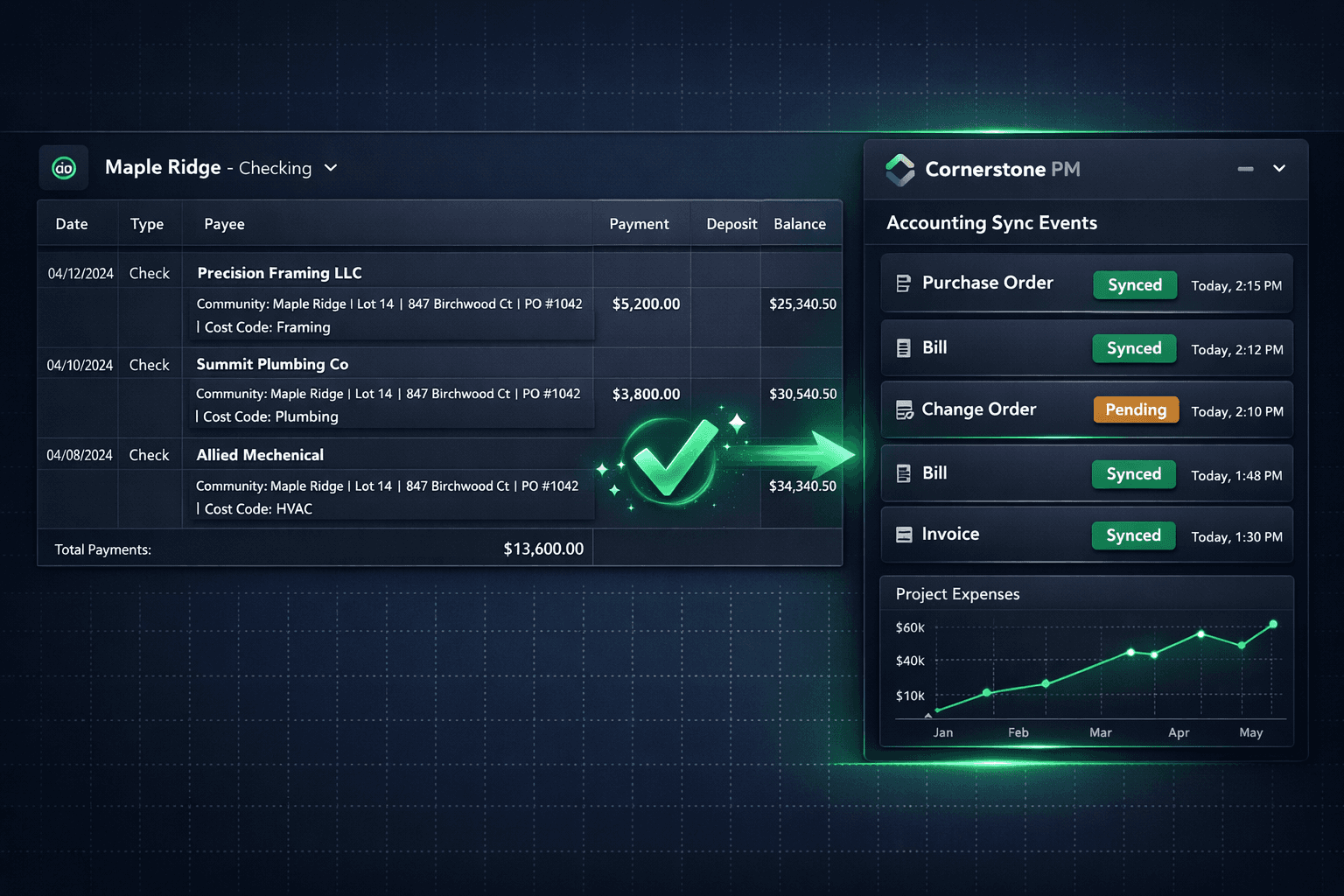
Every PO, Bill, and Change Order that syncs from Cornerstone to QuickBooks Online carries a structured memo — community, lot, address, PO number, cost code — so job costing is traceable inside QBO without opening Cornerstone.
It is the last week of the month. Someone at your company is scrolling the QuickBooks register, trying to remember which lot a $14,200 bill belonged to. The memo line says the vendor name. The amount is correct. But which home? Which community? Which cost code?
This is what job costing looks like when the accounting integration stops at the dollar amount. Most construction tools push a bare total across to QuickBooks and leave the context behind. The bookkeeper then becomes a reconstruction project, cross-referencing inboxes and PDFs to figure out what the number actually means.
Why does job costing break in QuickBooks?
QuickBooks is excellent accounting software. It is not a construction job ledger on its own — it depends on whatever context the integration sends it. When that context is “Purchase Order 4471,” the bookkeeper gets a number with no story. When it is “Community: Maple Ridge | Lot 14 | 847 Birchwood Ct | PO #1042 | Cost Code: Framing,” the number tells its own story without a phone call.
Memo comparison — same bill, two integrations
Purchase Order 4471
Community: Maple Ridge | Lot 14 | 847 Birchwood Ct | PO #1042 | Cost Code: Framing
Cornerstone writes the full context — community name, lot number, street address, PO number, and cost code — on every synced PO, Bill, and Change Order. A bookkeeper can pull any QuickBooks transaction and read exactly which home and which trade it covers, without opening Cornerstone's purchasing module.
How does the job structure reinforce the memo detail?
Clean memos only go so far if the QuickBooks job structure is a flat list of transactions. Cornerstone's integration wires the hierarchy correctly: each Community maps to a QuickBooks Customer, and each Home maps to a Project (or a sub-customer Job on QBO tiers without the Projects feature).
QuickBooks job-costing mapping
The memo detail and the job structure reinforce each other rather than fighting. The memo tells a bookkeeper which home a transaction belongs to; the QBO Project structure makes that home appear in the right P&L report automatically. Change orders roll up to the correct job. Per-community margin is visible without a pivot table.
How do you confirm every push actually landed?
Accounting → Sync Events in Cornerstone is the audit trail for every record pushed to QuickBooks Online. Each row shows the record type (PO, Bill, Change Order, Vendor), a timestamp, result status (synced, pending, or failed), and retry history if a push needed more than one attempt.
When a sync fails — a network timeout, a QBO API hiccup, an unrecognized cost code — Cornerstone retries automatically and logs each attempt. Builders can see exactly which records are still pending without logging into QuickBooks to compare registers manually.
Accounting → Sync Events — example log
Why one-way sync protects the books
Two-way sync creates a specific failure mode that production builders cannot afford: a bookkeeper edits a bill amount or description in QuickBooks, the change writes back to Cornerstone, and a cost that dozens of scope items and change orders hang off suddenly has a corrupted memo or a wrong number. Reconstructing that takes hours.
Cornerstone syncs one direction only. Approved records — POs, bills, change orders, vendors — flow from Cornerstone to QuickBooks. Nothing in QuickBooks overwrites Cornerstone. Cornerstone stays the single source of truth. If a bookkeeper needs to note something in QBO, it lives in QBO only and does not touch the build records the purchasing team is working from.
What else rides on the sync?
Two additional details keep the books accurate before a transaction ever leaves Cornerstone.
Automatic sales tax on materials: Most construction jurisdictions tax materials and exempt labor. Cornerstone applies that split automatically on both POs and change orders, then carries the calculated tax into QuickBooks with the synced transaction. No manual splits, no re-keying tax amounts at month-end.
One-click Chart of Accounts: Connecting Cornerstone to QuickBooks builds a construction-ready Chart of Accounts plus cost-code items automatically. It reuses existing accounts by name and never restructures books the builder already relies on — it only fills in what is missing, so the books do not change shape mid-month.
Every synced transaction carries community, lot, address, PO number, and cost code — traceable from the QBO register alone.
Community → QBO Customer, Home → Project: per-home and per-community P&L appear automatically in the right places.
Sync Events audit trail shows every push, every retry, every timestamp — no guessing whether a bill landed.
One-way sync only: Cornerstone pushes, QuickBooks never writes back. The source of truth stays in one place.
Month-end reconciliation becomes a verification rather than a reconstruction project. The QuickBooks register reflects the actual build — not a delayed, partially-described approximation of it. Builders who want the full picture can read it in Cornerstone's purchasing hub or in QuickBooks, and both will agree on what was committed, what was billed, and which home it belongs to.
Job costing that explains itself.
Cornerstone PM stamps every synced QuickBooks transaction with community, lot, address, PO number, and cost code — so your bookkeeper can close the month without a single phone call to find out which lot a bill belonged to.
Request Early Access