How Production Builders Should Model Structural Options
Most construction systems treat a finished basement, luxury bath, or flex room as a price-book line item: a name, a retail amount, and maybe a note. But the moment a buyer chooses one, it changes the actual home—its rooms, finishes, quantities, budget, and vendor work. The software should understand that too.
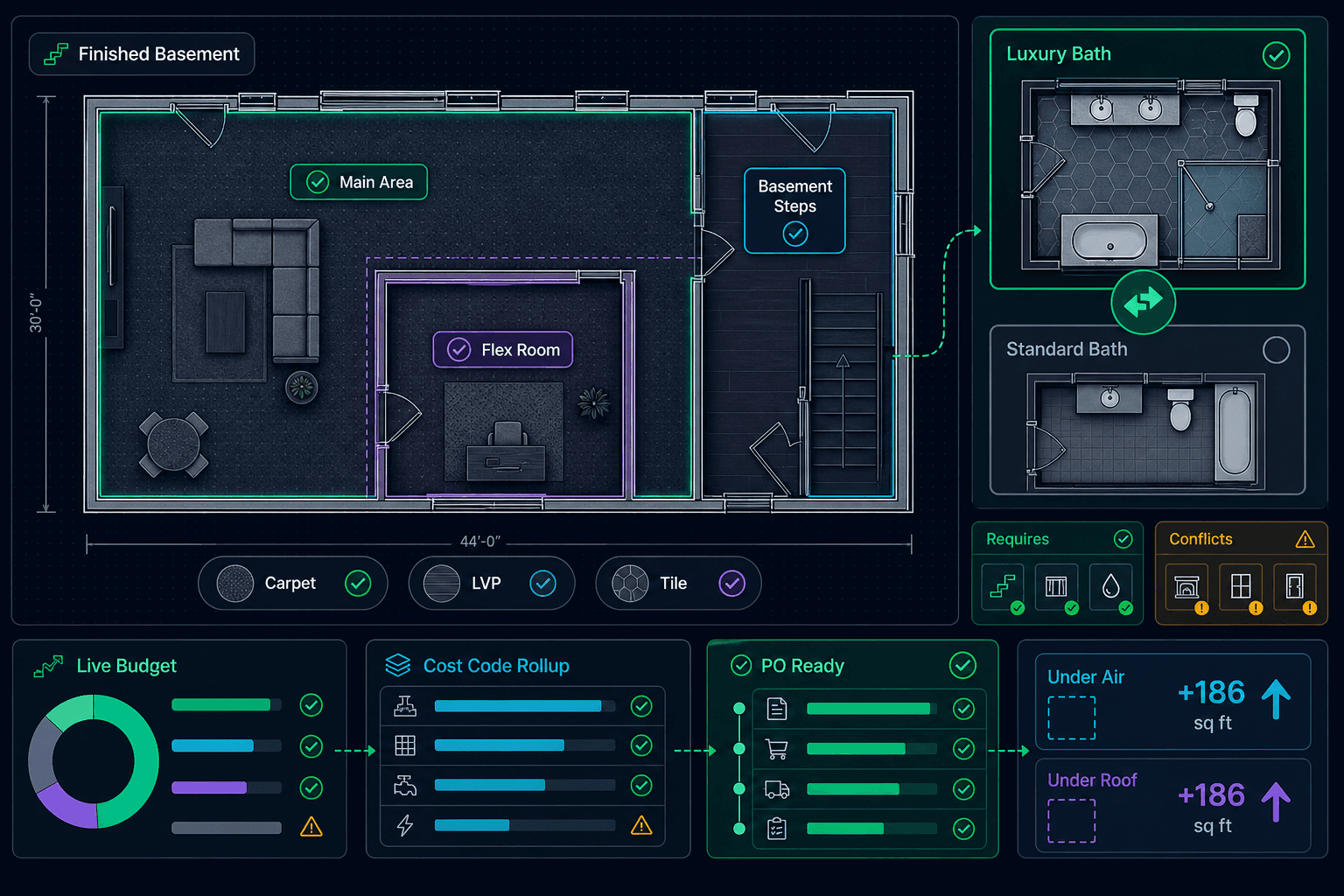
Cornerstone PM™ treats structural options as first-class parts of the home. An option can become a room, contain several rooms, replace a base-plan room, or carve a smaller room out of a larger space. The committed choice then flows through the Design Center, live budget, cost codes, purchase orders, and delivery tickets without a second estimating pass.
The four structural-option problems spreadsheets never really solve
A finished basement is sold as one dollar amount, but the buyer cannot choose flooring for the main area and steps separately.
A luxury bath is added while the standard bath remains in the budget, leaving the estimator to remove it by hand.
A flex room is framed inside a larger finished space, and both rooms get billed for the same carpet footprint.
The selection is recorded in sales, but purchasing still has to rebuild the cost impact and vendor orders later.
1. Let the option become the room
A structural option should not stop at “Finished Basement.” It can act as its own selectable location, or it can own multiple rooms and zones. A finished basement might contain a main area and basement steps, each with different flooring quantities and choices.
Buyers shop those option rooms in the same Design Center as the base-plan rooms. They can choose carpet in the main area, LVP on the steps, or tile in another space, using the builder’s spec-level tiers and retail pricing. The option is no longer a vague allowance with no selections behind it; it is a real, finishable part of the home.
2. Replace the base room without deleting it
Luxury Owner's Bath replaces Standard Owner's Bath
Commit the luxury bath and the standard bath drops out of that home's budget, selection list, and purchase orders. The option's own tile, flooring, cabinets, and quantities take its place. Un-pick it and the standard bath returns immediately.
That reversal matters. Cornerstone computes the home from the active choice; it does not destroy the floorplan template to force the math to work. One home can carry the luxury bath while the next home built from the same plan keeps the standard bath, with no duplicate templates or cleanup edits.
3. Net carve-outs so the same square foot is never sold twice
Consider a flex room framed inside a finished basement. The buyer still needs to choose flooring for both spaces, but the flex room's footprint no longer belongs to the open basement area. If software prices each room independently without understanding that relationship, the builder charges for the same floor twice.
Room-aware carve-out netting
Cornerstone nets the flex-room footprint from the basement at pricing time, class by class. Basement carpet and pad drop by exactly that footprint; tile, hardwood, and other alternates follow the same room relationship. Both rooms remain independently selectable without duplicate quantity.
4. Add guardrails with option compatibility rules
Room-aware modeling and carve-out pricing make structural options powerful. Compatibility rules make that catalog safe to hand to buyers and sales teams. Every option can declare a relationship to another option, and Cornerstone enforces it where selections are made.
Requires, Conflicts, and Includes
- Requires: a Flex Space can require the Finished Basement that creates the space where it is framed.
- Conflicts: a Luxury Owner's Bath designed for 10-foot ceilings can conflict with the standard ceiling-height option, steering the buyer to the correct variant.
- Includes: selecting one option can automatically bring its bundled option along.
Setup is a simple rule picker: search for the related option, choose Requires, Conflicts, or Includes, and add an optional note. Impossible combinations are stopped before they reach a contract, budget, or purchase order. The same options engine that keeps replacement and carve-out pricing honest also keeps the catalog internally consistent.
5. Carry the decision all the way to the vendor
The structural-option decision should not die at the sales desk. Once committed, it updates the live home budget, rolls costs up by cost code, and changes the quantities that feed purchasing. When the related construction task fires, Cornerstone can generate the purchase orders and delivery tickets and email them to the assigned vendors.
Each option can also carry its under-air and under-roof square-footage impact, keeping the sales choice and the construction record connected.
Step 1
Buyer commits option
Step 2
Budget recomputes live
Step 3
POs reflect real rooms
The better model: sell the home you will actually build
Structural options are not surcharges attached to a static plan. They alter the room graph of the home. When the system models that reality, buyers get accurate room-by-room choices, estimators stop maintaining manual deltas, purchasing receives the right quantities, and vendors see orders that match what will be installed.
Model structural options as part of the home.
See how Cornerstone connects room-aware options, buyer selections, live budgets, and automated purchasing for production builders.
Request Early Access