Trade Copy: The Selection Sheet That Hides Pricing From Subcontractors
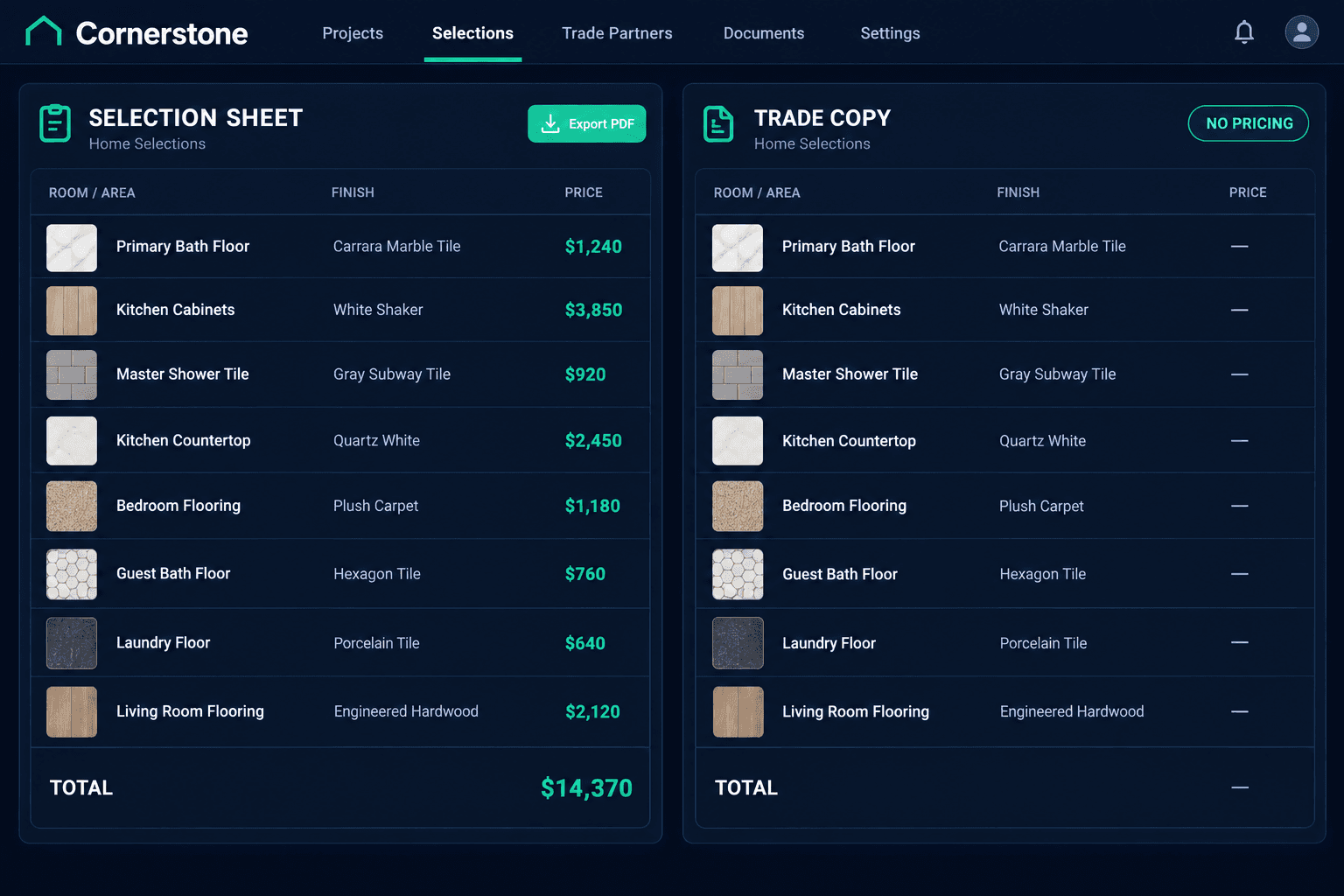
Cornerstone PM generates a Trade Copy of every home’s selection sheet with every dollar figure stripped out, so subcontractors can see exactly what finish goes in every room without ever seeing a buyer’s price, upgrade cost, or total.
A finished selection sheet does two jobs at once: it tells a buyer what they picked and what it costs, and it tells a trade exactly what to install where. Most builders only have one version of that document, which means a flooring crew taping a spec sheet to the wall of a model home is also looking at the buyer’s upgrade total and the builder’s margin on every line. The Design Center solves this by generating a second export from the same selection data — one with pricing, one without.
What is a Trade Copy selection sheet?
Alongside the standard buyer and office Selection Sheet PDF — which shows every room, every selection, upgrade costs, and totals — Cornerstone generates a separate Trade Copy version with zero pricing. No price columns, no line-item upgrade costs, no category subtotals, no summary total anywhere on the page. It’s stamped “TRADE COPY - NO PRICING” in the header, so it’s obvious at a glance which version a trade is holding.
Why does a pricing-free version matter?
Selection sheets get handed around a jobsite constantly — taped up in a room so a trade can confirm the cabinet door style, carried by a superintendent walking a home before drywall, left with a sub crew finishing a punch item weeks later. Every one of those moments is a chance for pricing to leak to someone who has no reason to see it. Trades need the spec: the room, the category, the exact option and attribute the buyer chose. They don’t need the buyer’s upgrade total or the builder’s margin on that line, and most builders would rather not hand it to them.
What stays on the page once pricing is removed?
The spec itself, fully intact. Trade Copy keeps every room, every category, and the exact selection the buyer made — including the catalog photo where one exists — so a trade can match the physical product to the sheet without guessing. The only thing missing is the column of dollar signs. A tile installer still sees “Primary Bath Floor: 12x24 Porcelain, Matte Grey”; they just never see what the buyer paid to upgrade into it.
Buyer / Office Selection Sheet
Every room, every selection, upgrade costs, and totals — the version sales and accounting use to confirm what a buyer owes.
Trade Copy
The same rooms, categories, and selections — stamped "TRADE COPY - NO PRICING" with every dollar figure removed. The version a sub tapes to the wall.
Does someone have to remember to regenerate it?
No. The Trade Copy auto-saves to the home’s Documents every time selections are locked or approved, and it replaces the previous Trade Copy on file so duplicates never pile up in the home’s document list. A builder relying on the automatic save never ends up with three outdated trade copies and no way to tell which one is current. There’s also a manual “Save Trade Copy to Home Docs” button for an on-demand save — useful right before handing a printed set to a trade walking the home that same day, without waiting on a lock event.
Can it be organized the same way as the buyer sheet?
Yes. Like the priced Selection Sheet, the Trade Copy can be grouped By Category or By Room. A flooring subcontractor working across several homes in a day might prefer a category-grouped sheet that isolates flooring selections across every room at once; a superintendent walking a single home top to bottom might prefer the room-grouped version. Both come from the same underlying selections in the purchasing and design workflow, so there’s no separate document to maintain by hand.
How does this fit into the rest of a home’s paperwork?
Trade Copy isn’t a standalone feature bolted onto the Design Center — it’s generated from the exact same locked selections that drive the buyer’s sheet, the home’s schedule, and the budget behind it. That means a builder never has to choose between keeping trades informed and keeping pricing confidential — both documents exist, both stay current automatically, and both come from one source of truth instead of two separate spreadsheets someone has to keep in sync.
The net effect is simple: trades get a clean, accurate spec sheet with photos showing exactly what finish goes where in every room, and builders never have to worry about a buyer’s upgrade total or their own margin ending up taped to a wall on a jobsite.
Give trades the spec, not the price
Cornerstone PM’s Design Center auto-generates a pricing-free Trade Copy alongside every buyer selection sheet, so subcontractors always see what to install without ever seeing what it cost.
Request Early Access →