Two Homes Need the Same Crew: Review Trade Capacity Before Promising Dates
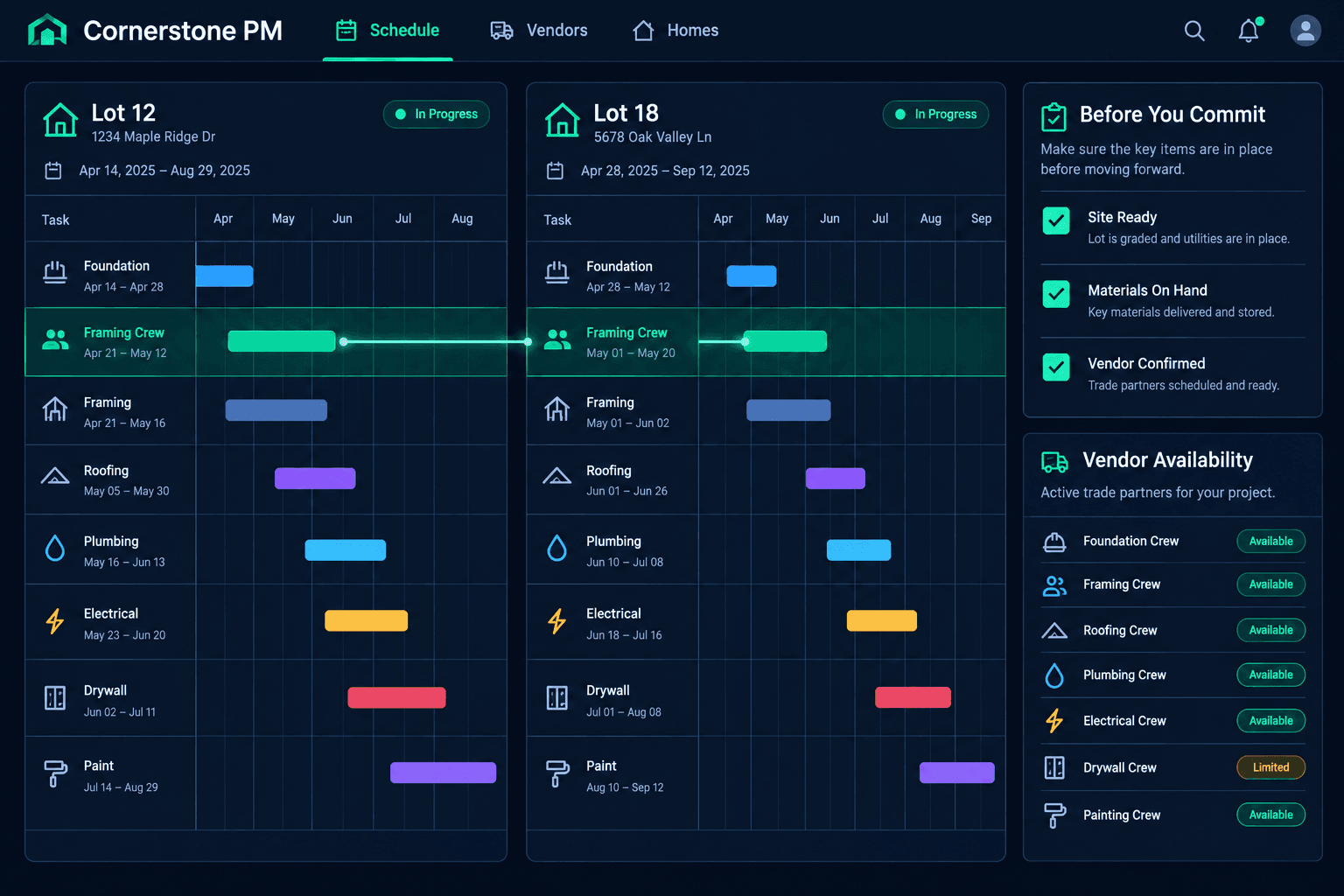
When two homes need the same crew in the same week, do not promise either date until the vendor confirms who they can actually staff. Use your home schedules to see the overlap, then check readiness before you commit.
It happens every busy season. Framing on one lot wraps early, another lot is ready for the same framer, and both buyers have been told a date. The schedule shows two tasks on the same days with the same vendor, but it cannot tell you how many crews that vendor can field. That answer comes from a phone call, and the order you do things in matters.
How do you spot two homes competing for one crew?
Start with each home's schedule in Cornerstone and the vendor assigned to that trade in each community. Look for the same vendor on tasks whose dates overlap or sit back to back. Cornerstone gives you the shared references; the comparison is yours. It does not run automatic crew-capacity optimization, resource leveling, or conflict detection, so make this check a habit in your weekly review rather than waiting for an alert.
Compare both schedules side by side
Note the task, the dates, and the assigned vendor on each home before calling anyone.
Treat crew count as the vendor's answer
Staffing is not recorded for you. Ask, and write down what they say.
What should you ask the vendor?
Give them both homes, both target windows, and the scope of work. Then ask a specific question: how many crews can you put on each home, and on which days? A vague "can you fit us in?" gets a vague yes. Record the answer, the date, and who gave it, so the superintendent and the office are working from the same commitment. If the vendor can only cover one home on time, you have a real decision to make rather than two broken promises.
Which home should get the crew first?
Compare predecessor completion on both. A home where the prior trade is actually finished beats one where it is only scheduled to finish. Then have the field lead confirm site readiness, since a crew that arrives to an unready lot is a lost day for everyone. Finally, check required materials with purchasing. If lumber, trusses, or fixtures are not on site or scheduled, the home is not truly ready, whatever the calendar says.
The software will not make this call for you
Cornerstone does not optimize crew allocation or show vendor staffing. The decision rests on vendor confirmation and your read of each site.
How do you commit dates without breaking the next trades?
Once the vendor has confirmed and you have picked the order, update both home schedules. Connected schedule changes carry the new dates to follow-on trades so you can see who is affected on each home. Then notify those trades and confirm they can make the revised dates. Tell the buyer or sales contact whose home moved while you still have a clear reason to give them.
A quick capacity checklist for the superintendent
- Identify both homes and the shared vendor.
- Ask the vendor how many crews they can staff and when.
- Compare predecessor completion on each home.
- Confirm site readiness and materials on hand.
- Update both schedules, then notify and confirm follow-on trades.
Confirm first, promise second
Two homes and one crew is a scheduling reality, not a failure. The damage comes from committing before you know. Keep the checklist above and use the construction hub to see how connected home schedules and community vendor assignments support the decision.
Keep every home schedule in one place
Cornerstone PM connects home schedules and community vendor assignments so your superintendents can see the overlap and make the call with the facts in front of them.
Request Early Access