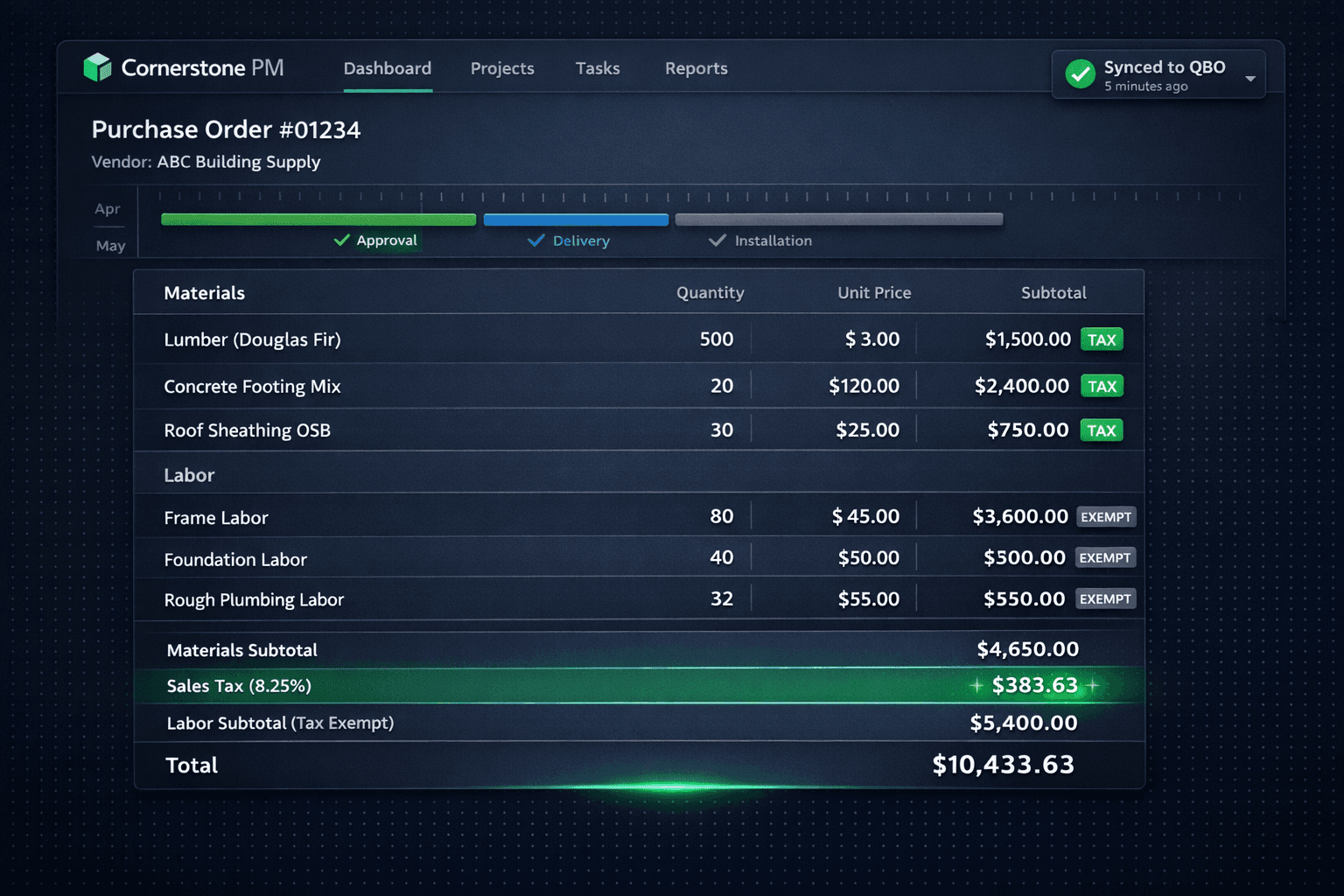
Automatic Sales Tax on Materials (Labor Stays Exempt)
Cornerstone PM automatically applies sales tax to material lines and keeps labor exempt on every purchase order and change order — then carries the exact tax amount into QuickBooks with the synced transaction.
Getting the material-labor tax split right by hand is one of those tasks that sounds simple until you're doing it on 30 active homes with mixed POs. Most construction jurisdictions tax the sale of materials and exempt the sale of labor — but plenty of builders still apply a flat tax rate to the entire PO, which means they're overstating taxable cost on labor-heavy subcontracts. Others skip tax on everything and clean it up at month-end. Neither approach keeps the books clean in real time.
Cornerstone handles the split automatically as part of the purchasing workflow. The tax rate is set once, and it applies to material lines only — every time, on every PO and change order, without manual intervention.
How does the material-labor tax split work?
The rule is straightforward: material lines on a PO are taxable, labor lines are exempt. Cornerstone applies this split to both purchase orders and change orders, so the tax calculation is consistent whether the cost originated as a base PO line or a change order addition.
Tax treatment by line type
The calculated tax flows directly into the PO total and — because Cornerstone syncs one-way to QuickBooks Online — it carries into the synced Purchase Order or Bill with the correct tax amount already applied. The bookkeeper doesn't need to recalculate or adjust anything on the QuickBooks side.
Why accurate tax split matters for job costing
Most builders know that materials are taxable and labor isn't. Where the calculation breaks down is on mixed POs — a single subcontract that includes both material supply and installation. If the tax is applied to the full PO total, the committed cost in the books overstates the actual tax liability. If it's skipped entirely, the accrual is understated.
Neither error is catastrophic on a single PO. Across 200 POs on 30 active homes, the cumulative error in committed cost is meaningful — and it compounds when you're drawing from a construction loan where your lender is reconciling committed cost against the draw schedule.
Cornerstone's automatic split keeps committed cost accurate at the line level. Material costs carry their tax; labor costs don't. The Master Cost Budget reflects the real liability for every trade, not a rounded estimate.
Tax on change orders — same rules apply
Change orders follow the same material-vs-labor logic as base POs. A change order adding upgraded countertops taxes the material portion; a change order adding trim carpenter time does not. This consistency matters because change orders often arrive mid-project when attention is elsewhere — having the tax apply automatically removes one more thing to check before approving.
When a change order syncs to QuickBooks as part of the one-way push, the tax amount is already embedded. The transaction arriving in QuickBooks is the complete, accurate number — not a pre-tax figure the bookkeeper needs to adjust.
How this fits the broader QuickBooks sync story
Automatic sales tax is one piece of a larger one-way sync between Cornerstone and QuickBooks Online. Approved POs post to QuickBooks as Purchase Orders (commitments). When a PO is marked received, the matching Bill auto-creates and closes the PO. Change orders sync as they're approved. Vendors sync automatically. Every transaction carries a structured memo — community name, lot number, address, PO number, and cost code — so every line in QuickBooks is traceable without opening Cornerstone.
Example PO memo in QuickBooks (with tax already applied)
Community: Maple Ridge | Lot 14 | 847 Birchwood Ct
PO #1042 | Cost Code: Framing
Materials: $4,650.00 + Sales Tax: $383.63 | Labor: $5,400.00 (exempt)
The memo carries the material and labor breakdown alongside the tax so any transaction in QuickBooks is self-documenting. You don't need Cornerstone open to understand what the charge covers or why the tax is what it is.
The connection to the hard-cost rule
Cornerstone's platform-wide hard-cost rule means that every dollar in the Master Cost Budget traces back to accepted vendor pricing — there are no stored defaults or estimator fudges. Automatic sales tax is a natural extension of that principle: the tax on material cost is computed from the actual accepted bid price, not a rounded estimate. A line with no accepted vendor pricing shows as $0 / needs pricing, and its tax is $0 too — not an invented number that gives a false sense of completeness.
Taken together, the hard-cost rule and automatic tax split mean the Master Cost Budget is trustworthy at every level: the material cost is real, the labor cost is real, and the tax is computed correctly from those real numbers. That's the foundation for accurate lender draw requests and honest buyer-facing change order pricing.
What about sales tax for options and upgrades?
The same material-taxable / labor-exempt logic applies to options and upgrades in the Design Center. When a buyer selects a material upgrade — flooring, countertops, exterior finish — the associated cost line on the PO carries tax. Labor for installation stays exempt. Builders don't need to configure this per option; the platform handles it consistently based on line type.
This is especially useful for builders running a buyer-facing Design Center where upgrades are priced from accepted vendor bids. The upgrade price the buyer sees reflects the real material cost plus tax — not a guess — and that number flows cleanly into the PO and from there into QuickBooks.
Accurate tax, every line, every PO.
Cornerstone PM automatically applies sales tax to material lines, keeps labor exempt, and carries the correct tax into QuickBooks — on every PO, every change order, without manual adjustment. See the full purchasing platform in action.
Request Early Access