Construction Allowances Done Right: Placeholder Budgets That Flow Into Your Real Cost Plan
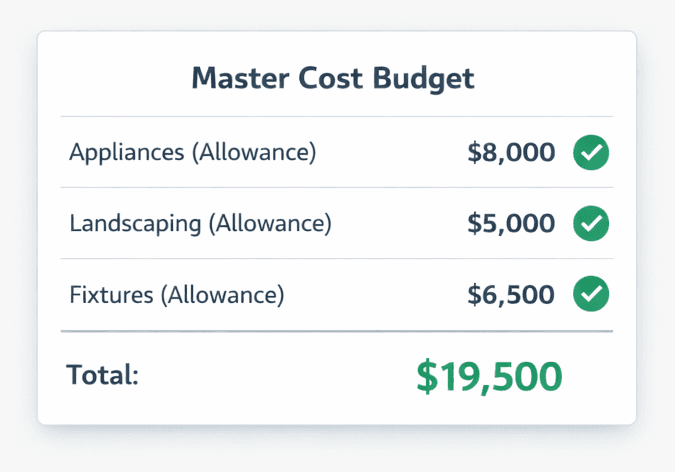
Cornerstone PM's allowance system lets builders set budget placeholder amounts for any non-bid line item — appliances, landscaping, specialty fixtures — apply them per floorplan or globally, and have them flow straight into the Master Cost Budget. When the real bid lands, the allowance is replaced automatically. No double-counting, no sticky notes, no fake vendor records.
Every production builder has items in the budget that don't have real vendor pricing yet. Appliances get spec'd before they get bid. Landscaping varies by lot and sits in rough estimates for months. Specialty lighting, window treatments, mailbox packages — there are always a handful of line items that need a dollar in the budget before a subcontractor has touched them. The question is: what does your software do with those numbers? Cornerstone PM's full purchasing system treats allowances as first-class budget items — not workarounds.
Why does construction allowance tracking break in most software?
The root problem is that most construction software was built around bids and purchase orders — confirmed numbers from real vendors. Allowances don't fit that model neatly, so they get handled with workarounds that create their own mess.
The sticky-note workaround
Builders write allowance amounts on a whiteboard or in a shared note, then someone has to manually subtract them from the formal budget. When the real bid lands, the note gets forgotten and the allowance stays in the spreadsheet.
Fake bids to hold the slot
Some platforms have no allowance concept at all, so builders create a placeholder 'bid' from a fake vendor just to get a number into the system. Managing fake vendor records and cleaning them up when real pricing arrives is busywork at scale.
Double-counted totals
When the real bid arrives and gets added alongside the placeholder, both numbers end up in the budget total — inflating costs until someone catches and removes the duplicate. On a 50-home run, this happens constantly.
No visibility into allowance variance
The gap between what you budgeted as an allowance and what the vendor actually bid is real margin data. Without a proper allowance system, that variance lives in a spreadsheet nobody checks — or nowhere at all.
Multiply any of those by 50 or 100 homes a year, across 12 floorplans in three communities, and the allowance problem becomes a budget integrity problem. The Master Cost Budget stops being a source of truth and becomes a document you're constantly reconciling against notes and spreadsheets.
How does Cornerstone PM's allowance system work?
Allowances in Cornerstone PM are native budget items — they live in the same data structure as bid-backed scope items, not in a separate notes field or a workaround vendor. Setting one up takes three steps:
- Name the allowance and set the amount. Give it a clear label (e.g., “Appliance Package Allowance,” “Landscaping Allowance — Standard Lot”) and the dollar amount that reflects your best current estimate or your standard budget target.
- Choose per-floorplan or global. Per-floorplan lets you set different amounts for different plans — the 1,800 sqft Magnolia gets a $1,500 appliance allowance while the 2,600 sqft Summit gets $2,200. Global applies the same number across every plan in the community when the item doesn't vary by size.
- It flows into the Master Cost Budget immediately. No export, no manual entry into a separate budget sheet. The allowance shows up as a named line item in the budget view, clearly distinguished from bid-backed items so you can see what's confirmed pricing and what's still estimated.
When the real bid arrives — whether through the vendor bid portal or a Bid Import AI upload — the allowance is replaced, not duplicated. The budget updates in place. You can see the variance between what you budgeted as a placeholder and what the vendor actually bid — which is real margin intelligence, not just an accounting detail.
What does "flows into the Master Cost Budget" actually mean?
The Master Cost Budget in Cornerstone PM is a per-floorplan, community-aware budget that aggregates all scope items — auto-quantity scopes tied to square footage, vendor bid lines, design option pricing, and now allowances — into a single cost picture.
When an allowance is in the budget, it's real money in that plan's cost model. Your total cost-to-build number is accurate because it includes the estimated cost of every item, not just the items that already have confirmed bids. That matters for:
- Pricing decisions— you're setting home sale prices against a complete budget, not a partial one
- Draw schedules — construction draws align to actual projected costs, including the placeholders
- Variance tracking — when real bids land, the difference between the allowance and the actual number surfaces automatically in the budget view
- Buyer transparency— allowances for buyer-selected items (appliances, certain finishes) can flow through to the design center pricing so buyers understand what's included vs. upgraded
Allowances vs. bid-backed scope items: side by side
Construction allowance features: Cornerstone PM vs. typical construction software
How allowances fit with auto-quantity scope items
Cornerstone PM's purchasing system has two complementary tools for handling costs that don't come from a vendor bid:
Auto-quantity scope items handle costs that scale predictably with square footage — frame labor per sqft, paint per sqft, slab work per sqft. You define the rate once, and the system applies it automatically to every floorplan, every structural option, every community. These are calculated automatically from plan dimensions.
Allowanceshandle costs that don't scale from a formula — appliance packages, site-specific landscaping, specialty fixtures, lot premiums. You set a dollar amount (per floorplan or globally), and the system holds that slot in the budget until the real bid replaces it.
Together, these two tools mean your Master Cost Budget is complete before a single bid comes back from a vendor. You're pricing homes against a real projected cost model — not a partial one with gaps where the bids haven't arrived yet.
A practical example: the appliance package on three floorplans
You're building three floorplans in a new community — the Magnolia (1,800 sqft), the Summit (2,200 sqft), and the Ridgeline (2,600 sqft). Appliances aren't bid yet but you need to price the homes today.
In Cornerstone PM:
- Magnolia: Appliance Package Allowance → $1,500
- Summit: Appliance Package Allowance → $1,900
- Ridgeline: Appliance Package Allowance → $2,400
All three flow into the Master Cost Budget for each plan immediately. You price your homes with complete cost models. Three weeks later, your appliance vendor submits actual pricing through the bid portal. Bid Import AI processes it, matches the scope, and replaces all three allowances with the real numbers. The Master Cost Budget updates. You can see exactly how much you were over or under your allowance estimates — per plan, per community.
That variance data matters. Consistently running 20% under your appliance allowance means you're leaving margin on the table. Running 15% over means you need to revisit your allowance amounts before pricing the next community. Cornerstone surfaces that signal automatically instead of burying it in a reconciliation spreadsheet.
Where allowances fit in the full purchasing workflow
Allowances are one piece of Cornerstone PM's end-to-end purchasing system for production home builders. The full flow looks like this:
- Blueprint AI extracts 130+ material scopes from a floor plan PDF in under 60 seconds
- Auto-quantity scope items price formula-driven costs from square footage automatically
- Allowances hold budget slots for non-bid items while vendor pricing is collected
- Vendor bid requests go out via the no-login portal with scope-filtered Excel templates
- Bid Import AI processes returned bids, replaces allowances, and updates the Master Cost Budget
- Design center option pricing flows into the budget for buyer upgrades and selections
The result is a single, connected cost model — no parallel spreadsheets, no manual reconciliation, no budget gaps. Every line item, whether it started as a takeoff scope, a square-footage formula, or a placeholder allowance, ends up in the same Master Cost Budget with confirmed or estimated status clearly marked.
Stop losing margin to allowance guesswork
Cornerstone PM's Allowances system keeps every un-bid line item in your real Master Cost Budget — per floorplan or globally — and replaces them automatically when real pricing arrives. No spreadsheets, no double-counting, no surprises.
Request Early Access