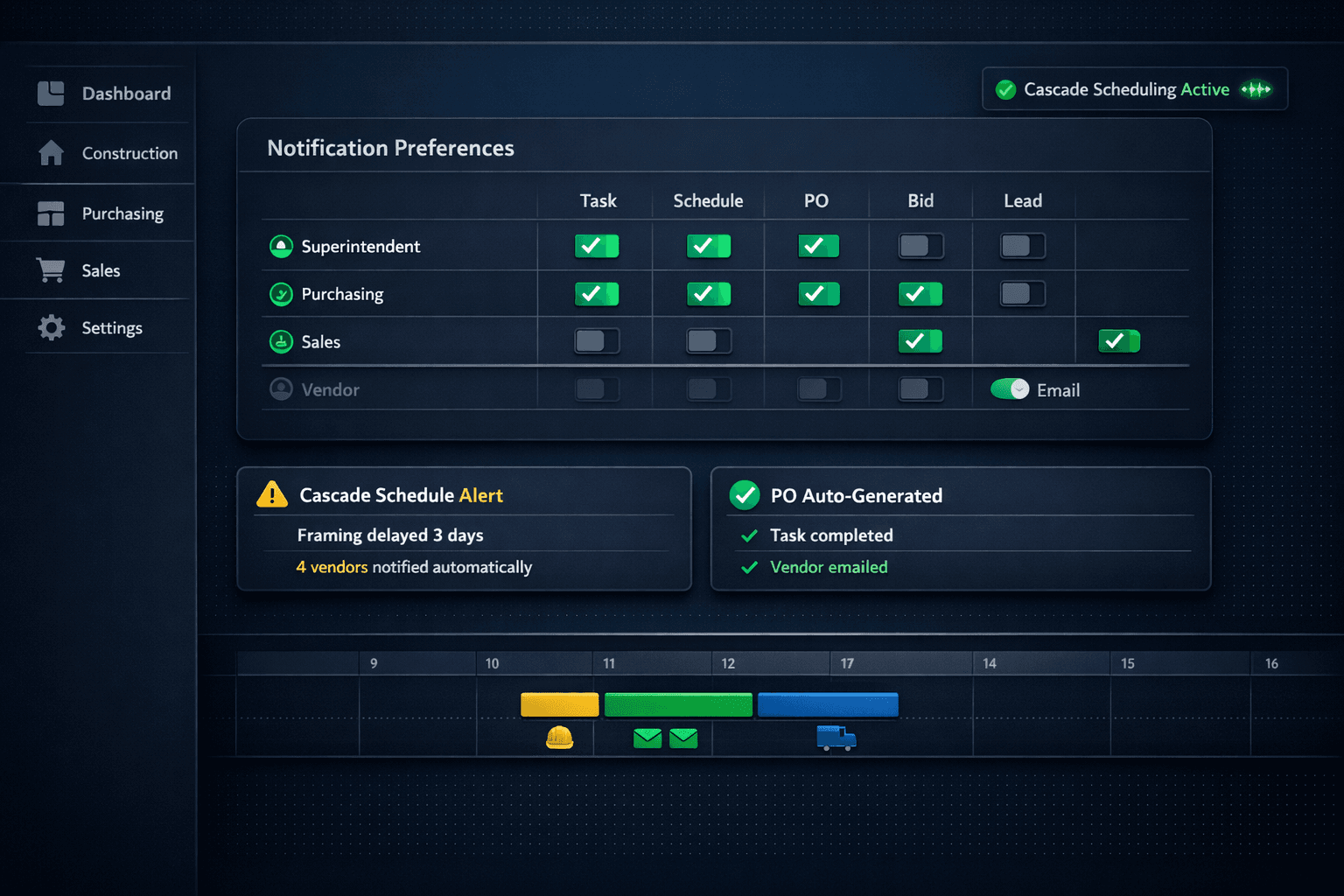
Notification Overload: Role-Based Alerts for Construction Teams
When everyone on a construction team gets every alert, nobody reads any of them. The fix is per-user notification preferences and role subscriptions, so each person receives only the events that matter to their job. Cornerstone PM's construction module ties alerts directly to the actions that generate them — cascade scheduling moves, completed tasks, and auto-generated purchase orders — so the notifications have real weight because they're actually rare.
Alert fatigue is not a personality flaw. It is a configuration failure. A superintendent who has routed every software email into a folder he never opens made a rational decision: the signal-to-noise ratio was too low to read at the source. Fixing the behavior means fixing the configuration, not lecturing the superintendent.
Why does everyone end up with everyone else's alerts?
Most construction software defaults to “notify everyone” because that is the safest setting to ship. Nothing falls through the cracks if everyone gets everything — at least not on day one. What actually happens over the following months is that teams quietly stop reading. A purchasing manager does not need to know that a sales lead walked a model home. A superintendent does not need a notification every time a vendor submits a bid. A salesperson does not need cascade scheduling alerts for trades he has never met.
Each of those irrelevant alerts arrives with the same subject line weight as an alert that actually matters. Once the team learns they can't trust the inbox, they stop checking it. Then the one alert that needed immediate attention sits there for three hours.
Role-based notification subscriptions
Superintendent
Purchasing
Sales
Per-user subscriptions — each role sees only the alerts relevant to their work.
What actually generates the alerts in Cornerstone?
The alerts that matter in a home building operation fall into two categories: things that changed the schedule, and things that require someone to act. Cornerstone generates both.
When one trade slips, cascade scheduling adjusts every downstream task automatically and sends notifications only to the vendors whose dates actually moved. A three-day framing delay does not trigger an alert to the sales team. It triggers an alert to the plumber whose rough-in date just shifted, and to the superintendent overseeing the home. Those alerts carry real information — a specific new date and the name of the slipped predecessor — so the vendor can respond to something concrete rather than a generic “schedule update.”
On the purchasing side, when a task completes, the purchase order generates automatically and emails the vendor directly — no one has to open the purchasing screen. The notification that fires is the email to the vendor, not a blast to the whole office. The purchasing manager who configured the PO gets a confirmation in their feed; the superintendent gets the task-completion event; nobody else is involved.
The vendor's inbox deserves the same discipline
Alert fatigue is not only an internal team problem. Subcontractors who work with multiple builders get buried in notifications from all of them. If every completed task on every home in a 50-home community triggers a fresh email, a framer who works for six builders in the same market is receiving hundreds of messages a week that have nothing to do with their next scheduled start.
Cascade scheduling in Cornerstone sends vendor notifications selectively — only when that vendor's task dates change, and only with the specific information they need: the new date, the home address, and the predecessor that moved. A vendor who trusts that every email from a builder is meaningful is a vendor who actually reads them. That translates directly into fewer no-shows and fewer “I never got that schedule change” conversations.
Fewer notifications, higher action rates
A superintendent who receives twenty alerts a day responds to a fraction of them. A superintendent who receives three — each one about something that actually changed — responds to all three. Notification design is schedule management.
Setting up role subscriptions that hold
The failure mode with notification settings is treating them as a one-time setup. Teams configure everything on day one, then add a new hire six months later and leave their defaults on. Within a week that person has muted the software.
Cornerstone's per-user notification preferences are tied to the user's role within the platform, so a new superintendent who is added to the account inherits the superintendent subscription profile as a starting point. That profile gets task and schedule events — the cascade alerts that tell them when a trade moved — and is off by default for bid activity and lead pipeline events that purchasing and sales own.
The inverse is equally important. A purchasing coordinator who is also covering sales for a community does not need two separate logins. They can subscribe to both purchasing events and lead events under their own account. Subscriptions are additive: a user can subscribe to any event they want, regardless of their primary role. The role profile sets a sensible default; individual preferences adjust from there.
Connecting notifications to the rest of the platform
Alerts that stand alone are announcements. Alerts that link to action are tools. In Cornerstone, a cascade schedule notification links directly to the affected task so the superintendent can confirm the vendor was notified, pull up the Gantt, and see the full downstream impact before calling anyone.
For builders who want to go further, Cornerstone's 37 typed webhook events expose the same notification triggers to external systems. A schedule-changed event can fire an SMS via Twilio, update a dashboard, or post to a Slack channel — without anyone writing custom integrations around a scraper. The notification layer that lives inside the product is the same event system that feeds the API surface.
The purchasing loop is similarly connected. Cornerstone's purchasing module generates POs from completed tasks, emails the vendor, and updates the Master Cost Budget — all from the same event that fired the task-completion notification. The superintendent's alert and the vendor's email share the same trigger. Nothing falls through the gap between the two systems because they are not two systems.
The goal is alerts that still get opened in month six
A well-designed notification system is invisible when it is working. The superintendent checks their email and sees three messages, all of which matter. The purchasing coordinator sees bid activity exactly when a vendor submits. Sales sees the lead event the moment a buyer scans a QR code at the model home.
None of them had to configure a filter. None of them muted a category in frustration. And none of them missed something because they stopped trusting the inbox. That is the practical outcome of treating notification design as a real engineering problem rather than a checkbox in the settings menu.
Alerts your team actually reads.
Role-based notification preferences, cascade scheduling alerts that fire to the right vendor, and PO events wired to completed tasks. Cornerstone PM keeps construction teams informed without the noise that makes them stop listening.
Request Early Access