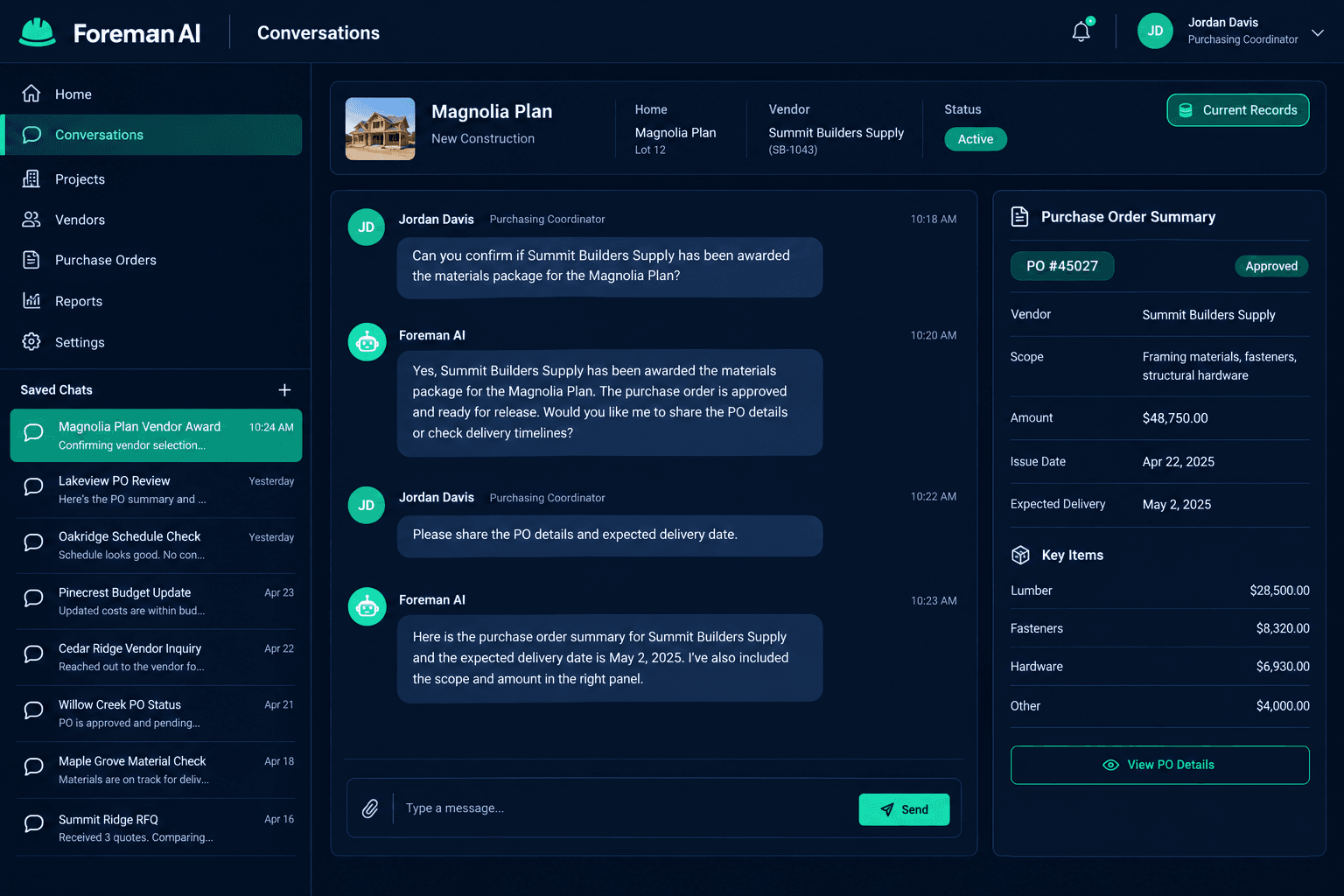
Returning to a Foreman Conversation: Check What Changed Before Acting
Resume a saved Foreman AI conversation by restating the home or task, asking Foreman to pull current records, and reviewing any proposed next step — because a saved answer from a few days ago is a record of what was true then, not a guarantee of what's true now.
Foreman AI saves your conversation history, so a purchasing coordinator who was mid-discussion about a vendor award on Tuesday can reopen that exact thread on Friday instead of reconstructing the context from scratch. That's a real time-saver. It's also exactly where a quiet mistake can creep in: the thread still shows Tuesday's answer, but by Friday the vendor assignment, the schedule date, or the design selection it was based on may have moved.
What is saved conversation history, and what isn't it?
Saved conversation history means Foreman keeps your prior questions and its prior answers searchable and reopenable — you don't lose the thread when you close the tab or come back a week later. It is not the same thing as Foreman's personal memory of your role and preferences, and it is not the automatic context compaction that keeps Foreman working through a long, single-session marathon task. Saved history is about finding yesterday's conversation again. It says nothing on its own about whether yesterday's conclusion still holds.
What the review checks
Restated context
The specific home, vendor, or task named again, not assumed from the saved thread
Current records pulled
Schedule, selections, vendor assignment, or purchasing status checked fresh, not replayed from memory
Old answer vs. current status
The saved conversation's conclusion compared line-by-line against what the records show today
Proposed action reviewed
Any PO, message, or confirmation Foreman suggests checked before it goes out
Why restate the home or task instead of just continuing?
A saved thread can read like the conversation never stopped, but days passed, and other things happened on that home in the meantime — a purchasing record updated, a buyer changed a selection, a vendor responded to a bid. Naming the home and task again before continuing isn't redundant — it's the cue that tells Foreman to treat this as a live follow-up on current data, not a continuation of a frozen snapshot.
How do you confirm the old answer still holds?
Ask Foreman directly for the current status — the home's schedule, its design selections, or the vendor assignment in question — rather than asking whether its earlier answer is still accurate. Those are different questions. The first pulls fresh records and lets you compare them yourself. The second invites Foreman to reason about its own prior answer, which is a weaker check than looking at what actually changed.
Once you have both the saved answer and the current pull side by side, the comparison is usually quick: either nothing material moved and you can proceed, or something did and you now know exactly what needs to be resolved before you act on it.
There is no automatic stale-answer warning
Foreman doesn't flag a saved answer as outdated on its own, and conversation history isn't a shared team chat session or an immutable audit trail — it's your saved thread, reopenable by you. Checking whether an old answer still matches current records is a step you take, not one Foreman takes for you.
Why review the next action before approving it?
If Foreman proposes a next step out of a resumed conversation — drafting a PO, messaging a vendor, confirming a schedule date — treat that recommendation the same way you'd treat one generated fresh: read it against the current records before it goes out. A recommendation built on a few-day-old premise can look perfectly reasonable and still be wrong if the underlying vendor award or selection shifted in the meantime.
How is this different from Foreman's memory or long-session handling?
Foreman's personal memory carries your role and preferences across every conversation, and its memory compaction keeps a single long session from losing context mid-task. Saved conversation history is a third, separate thing: it's about finding a past conversation again, days or weeks later, without losing the thread. All three matter for a construction AI that works the way builders actually work — in short bursts, interrupted by field calls, picked back up days later — but they solve different problems, and only this one needs a current-records check before you act on it.
Pick up where you left off — without picking up stale data.
Foreman saves your conversations and keeps your home, purchasing, and design records in one place, so resuming a thread is a quick current-status check instead of a guess.
Request Early Access