Why Buyers Call You for Updates You Already Have
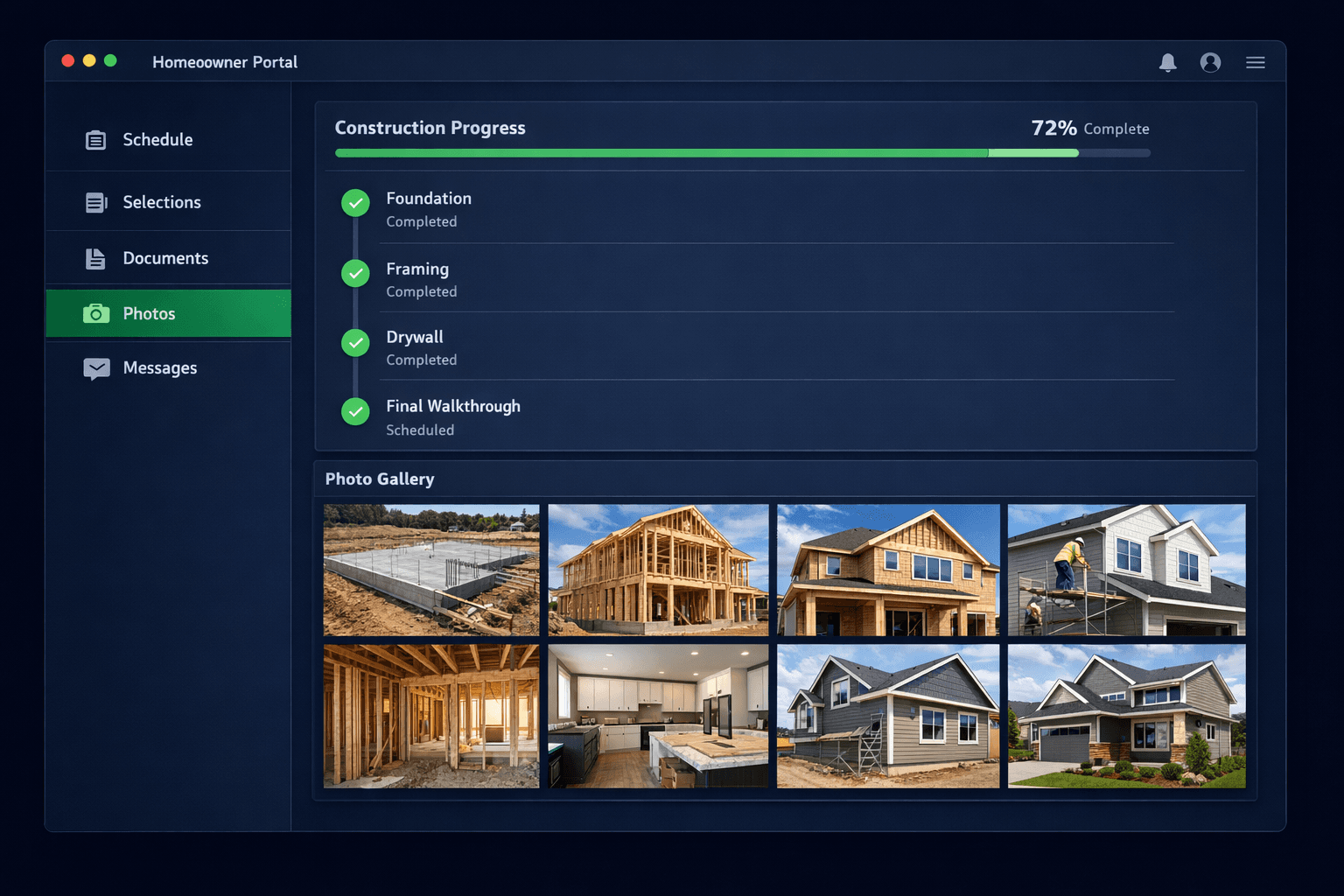
A homeowner portal gives buyers direct, read-only access to their home's schedule, selections, documents, and jobsite photos — pulled straight from the builder's own project management system — so the buyer stops calling for status updates the team already recorded three days ago.
Every production builder has the same phone pattern. A buyer calls, not because anything is wrong, but because they have no way to know what's happening with their home other than asking a person. The information exists — a milestone was marked complete, a selection was locked in, photos were uploaded from the jobsite — it just never made it past the builder's internal systems.
What is actually driving the "just checking in" calls?
It's rarely one big communication failure. It's five small ones, repeated across every home in every community, every week.
What buyers are actually asking
“Where are we in the schedule?”
The buyer has no visibility into which phase is active or what's next
“Did my selection get approved?”
Design center decisions live in the builder's system, not anywhere the buyer can see
“Can you send more photos?”
Field photos get taken but stay attached to internal punch list or QA records
“Who do I even ask?”
No single point of contact, so the buyer calls the sales rep, who forwards to the super, who forwards to the PM
“What happened to the change order I signed?”
Paperwork is filed somewhere, but the buyer has no record of status or balance due
None of these questions require research. Every answer already sits in a record somewhere in the builder's software. The gap isn't information — it's access.
How does a homeowner portal close that gap?
Cornerstone gives each buyer a secure, read-only link tied to their home record. No separate login to remember, no app to install. The link opens a scoped view built from the same data the field and sales teams already maintain: schedule milestones as the superintendent marks them complete, selections as the design center locks them in, and photos as they're uploaded from the jobsite.
What the buyer sees — nothing the team has to re-enter
Every field populates automatically from existing records — zero duplicate entry
What should stay out of the buyer's view?
A homeowner portal is scoped, not open. Vendor pricing, bid comparisons, internal margin, and trade-to-trade communication stay internal — the buyer never needs to see what a subcontractor quoted or how a change order was priced against cost. The portal shows outcomes, not the builder's cost structure.
That scoping matters as much for trust as it does for confidentiality. Buyers who see a clean, focused view of their own home read it as transparency. Buyers who stumble into internal pricing or vendor disputes read it as a mistake — exactly the kind of thing that generates a worried call instead of preventing one.
Does this actually reduce the call volume?
Most buyer calls are status checks the team could answer with a link. When a buyer can open the portal and see "Framing — Completed" and a fresh photo from Tuesday's walk, the call that would have asked exactly that never gets made. The calls that remain are the ones that need a person: a change request, a concern about a photo, a question specific to their home that no dashboard answers on its own.
That's the same design principle behind model home QR lead capture and vendor jobsite check-in: outside parties — buyers and vendors alike — should be able to get what they need without creating extra work for the builder's team. The homeowner portal applies that same principle to the entire build cycle, from contract to closing.
Because the portal reads directly from the sales pipeline and design center, there is no separate update step. The rep who moves a buyer from "Under Contract" to "In Construction" and the designer who locks in a countertop selection are already doing the only work required — the portal just makes that work visible to the person who's been waiting to see it.
What a homeowner portal gives you
Fewer status calls
Buyers self-serve the questions that don't need a person
Zero duplicate entry
Portal reads live from schedule, design center, and photos
Scoped visibility
Buyers see their home's progress, not vendor pricing or internal notes
One point of contact
Assigned rep and super clearly listed, no phone-tag chain
Trust through transparency
A real-time view reads as confidence, not a status email written from memory
Give every buyer a window into their own build.
A homeowner portal built on Cornerstone's project management platform — live schedule, selections, documents, and photos, with zero extra data entry for your team.
Request Early Access