Vendor Jobsite QR Check-In: Proof of Who Was on the Lot, and When
A QR code posted on the lot turns every vendor visit into a GPS-stamped, weather-logged, timestamped record — no app download, no Cornerstone login, and no way to scan from a couch three miles away. Cornerstone's jobsite check-in ends the “the framer says he was there Tuesday” argument with a timestamped record that proves it.
Every builder has had the version of this conversation where two people are certain of opposite things. The superintendent is sure the lot was empty on Tuesday morning. The framer is equally sure he had a crew out there. There is no paper trail. There is nothing to arbitrate the dispute except memory, and memory doesn't help when a schedule slips or a delay claim arrives.
How does jobsite QR check-in work?
Cornerstone generates a unique, token-protected QR code for each home or lot. A builder prints it on weatherproof signage — typically with the community name, lot number, and address — and posts it at the site.
When a vendor arrives, they point their phone camera at the sign. No app download. No Cornerstone account. The scan opens a lightweight web page that logs the check-in and, critically, captures GPS coordinates at the moment of the scan. Because the GPS has to match the lot's address, a vendor cannot check in from their truck parked downtown and claim they were on site.
Alongside the GPS and timestamp, Cornerstone automatically logs the weather conditions at that moment — temperature, sky, precipitation. A rain delay stops being a verbal claim and becomes a documented condition. Vendors can also attach a progress photo before they leave, which ties directly to the home record in Cornerstone.
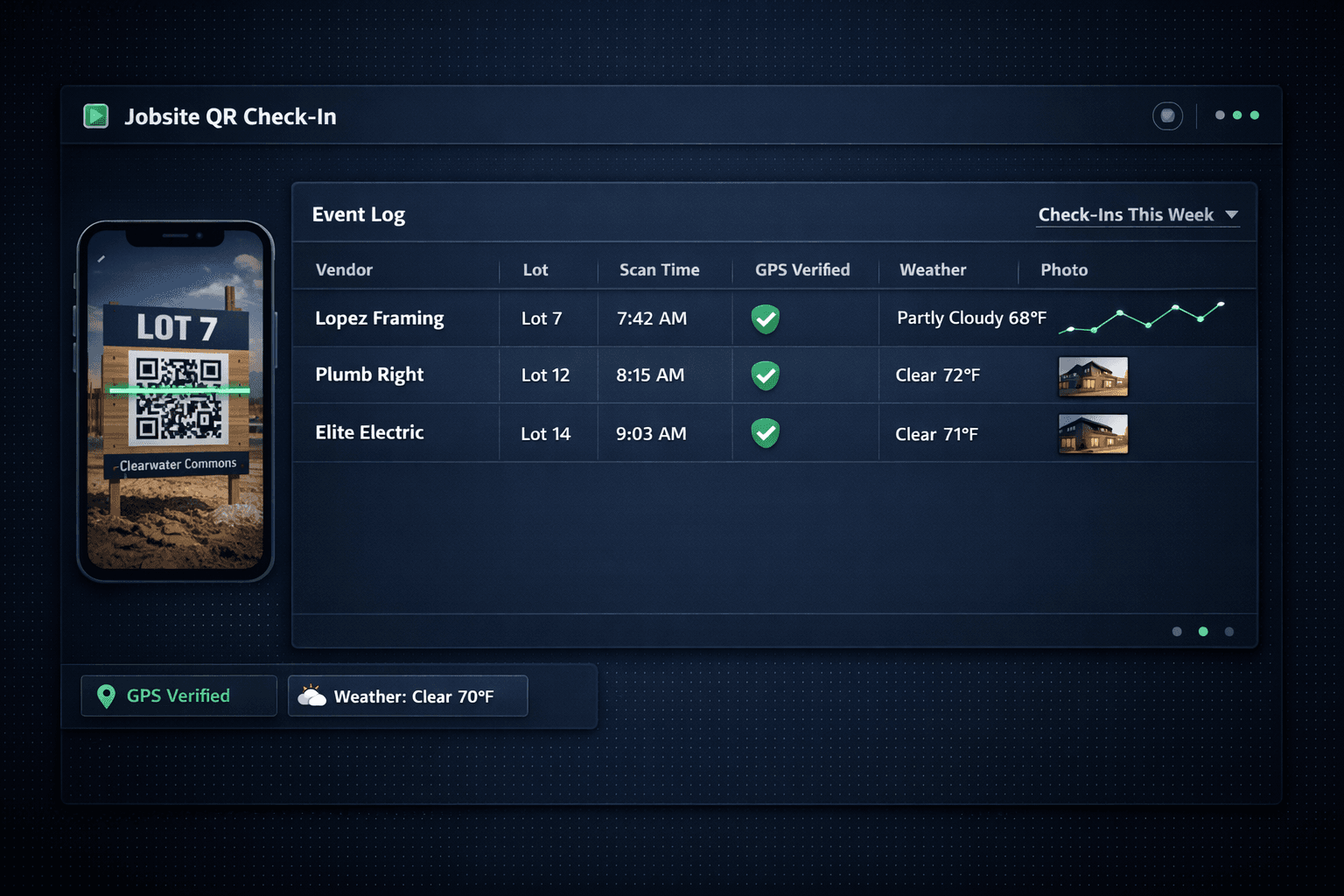
Clearwater Commons — Jobsite Check-In Log
Lopez Framing
Lot 7 · 7:42 AM · Partly Cloudy 68°F
Plumb Right
Lot 12 · 8:15 AM · Clear 72°F
Elite Electric
Lot 14 · 9:03 AM · Clear 71°F
Each check-in logs GPS coordinates, weather conditions, and timestamp — permanent records against the home in Cornerstone.
Why not just require vendors to log into the software?
Vendors who have to create an account to confirm they showed up for a two-hour task will find a reason not to. This is the same logic behind Cornerstone's no-login vendor bid portal: the fewer steps between a trade and a completed action, the higher the compliance rate. A QR sign on a stake and a phone camera the vendor already has is zero friction.
The token embedded in the QR code is the authentication. It is tied to that specific lot, so it cannot be reused on a different job or shared across communities. The vendor does not need a Cornerstone seat, and the builder does not need to manage vendor credentials.
How to set up vendor jobsite QR check-in
Generate the lot QR code in Cornerstone
Navigate to the home or lot and open the QR settings. Cornerstone generates a unique, token-protected code for that address — no vendor account required.
Print and post the sign on the lot
Print on weatherproof signage and post at the lot entrance. Include the community name, lot number, and address so there is no ambiguity about which job it covers.
Vendor scans with their phone camera
Any phone camera works — no app download, no Cornerstone login. The scan opens a web page that handles the rest.
GPS, weather, and timestamp log automatically
Cornerstone records coordinates, weather conditions, and the exact time of the scan. The GPS must match the lot address — a remote scan fails the check.
Vendor attaches a progress photo (optional)
From the same web page, the vendor can snap and attach a photo. It logs alongside the GPS and weather data against the home record.
Review the log in Cornerstone — or pipe it via webhook
Superintendents see every check-in from the home's record. Each event also fires a webhook, so builders can route check-ins into SMS alerts, dashboards, or their own tooling.
What does the weather log actually get you?
Weather logging sounds like a nice-to-have until the moment you need it. A slab subcontractor claims the pour was delayed because of rain on Thursday. Without documentation, that is a he-said conversation. With Cornerstone's check-in log, you have the actual conditions at the time of the scan — temperature, precipitation status, sky conditions — attached to the lot and the date. If it says “Clear 72°F” at the scan, the rain-delay claim does not hold up.
This matters most at month-end when trades are explaining why a draw is late or a task is behind. A construction schedule that lives in a platform with cascade scheduling and check-in documentation is a fundamentally different dispute-resolution tool than a whiteboard and a stack of text messages.
How does check-in connect to the rest of the build?
A check-in event in Cornerstone is not a standalone record. It sits against the home alongside the task schedule, the PO history, and the vendor assignment. When a trade checks in, a superintendent watching that lot sees the event in context — before framing is complete, after rough plumbing is done, on the same timeline that drives cascade scheduling downstream.
Each check-in also fires a webhook event. Builders who want real-time SMS alerts when a trade arrives on a lot can wire that up without writing glue code. Cornerstone ships 37 typed webhook events with HMAC signatures and delivery logs — check-in events are one category in a full automation layer that covers home lifecycle, task completion, bid activity, and schedule changes.
What vendor jobsite QR check-in covers
No vendor app required
Any phone camera scans the QR — no download, no Cornerstone login
GPS-verified location
The scan must happen at the lot address — remote fakes fail
Automatic weather logging
Conditions at scan time are recorded — rain delays documented, not remembered
Progress photo attachment
Vendor attaches a photo of work completed at the moment of check-in
Timestamped audit trail
Every visit is a permanent record against the home in Cornerstone
Webhook events
Pipe check-ins into SMS, dashboards, or your own tooling via webhook
The broader pattern: outside parties never need an account
Jobsite QR check-in follows the same design principle as every other external-facing feature in Cornerstone: the people on the outside of your operation should never need an account to do their job. Vendors submit bids through a token-protected portal with no login. Buyers move through the design center without a paid seat. Trades check in with a phone camera and a QR sign.
This is not just convenience — it is compliance. When a check-in requires a downloaded app, a portion of vendors will not install it, and you end up with incomplete records for the trades who pushed back. A QR sign and a phone camera have a compliance rate close to 100% because the friction is essentially zero.
For builders running multiple communities on a production home builder platform, that means a complete attendance record across every lot, every trade, every day — without a single phone call to verify who was actually there.
Every vendor visit — GPS-stamped and documented.
Cornerstone's jobsite QR check-in turns lot visits into permanent, GPS-verified records with weather and photos attached — no app, no login, no arguing about who was where.
Request Early Access