Punch Lists Without the Clipboard: AI Punch List Management
A superintendent walks a home with a phone camera, snaps twenty photos, and the punch list dies in the camera roll until someone retypes it two days later. Foreman AI reads your jobsite photos, drafts the punch items, assigns them to the right trade, and writes them as real task records in the platform — no clipboard, no re-keying.
Punch lists are one of the last paper-and-phone workflows left in residential construction. The walk itself takes an hour; the admin that follows — sorting through camera photos, writing descriptions, texting trade contacts, chasing status — takes another two. For a builder closing ten or twenty homes a month, that overhead adds up fast and the list is always slightly stale by the time it reaches the trade.
Why punch lists belong inside your build platform
Most punch list tools treat the list as a standalone module — a separate app, a PDF, or a shared spreadsheet that lives outside the rest of the build. When an item is resolved, you mark it in the list. The task board, the vendor record, and the schedule don't know about it.
Cornerstone keeps punch lists connected to the home. Each item is a task on the home's record, visible in the same place as the framing schedule, the PO history, and the design center selections. When a superintendent filters the task board to “open punch items — Lot 14,” every trade sees exactly what's assigned to them. When an item closes, the audit trail stays in the platform.
That connection is what makes Foreman AI useful for punch lists rather than just a chat transcript you copy out. Foreman is an agent with 396+ skills that reads and writes your actual data. When it creates a punch item, it creates a real task on the home — not a note in a conversation window.
How Foreman reads jobsite photos
Foreman has AI vision built in. You can drop a photo — or a batch of photos — directly into a Foreman conversation. Foreman analyzes what it sees: visible defects, incomplete work, surface damage, hardware issues, missing cover plates. It describes the item, notes the location, and suggests the trade responsible based on the type of work.
This is useful for the parts of a punch walk where the superintendent knows exactly what they're looking at but doesn't want to stop and type. Snap the photo, drop it in, move to the next room. Foreman does the transcription.
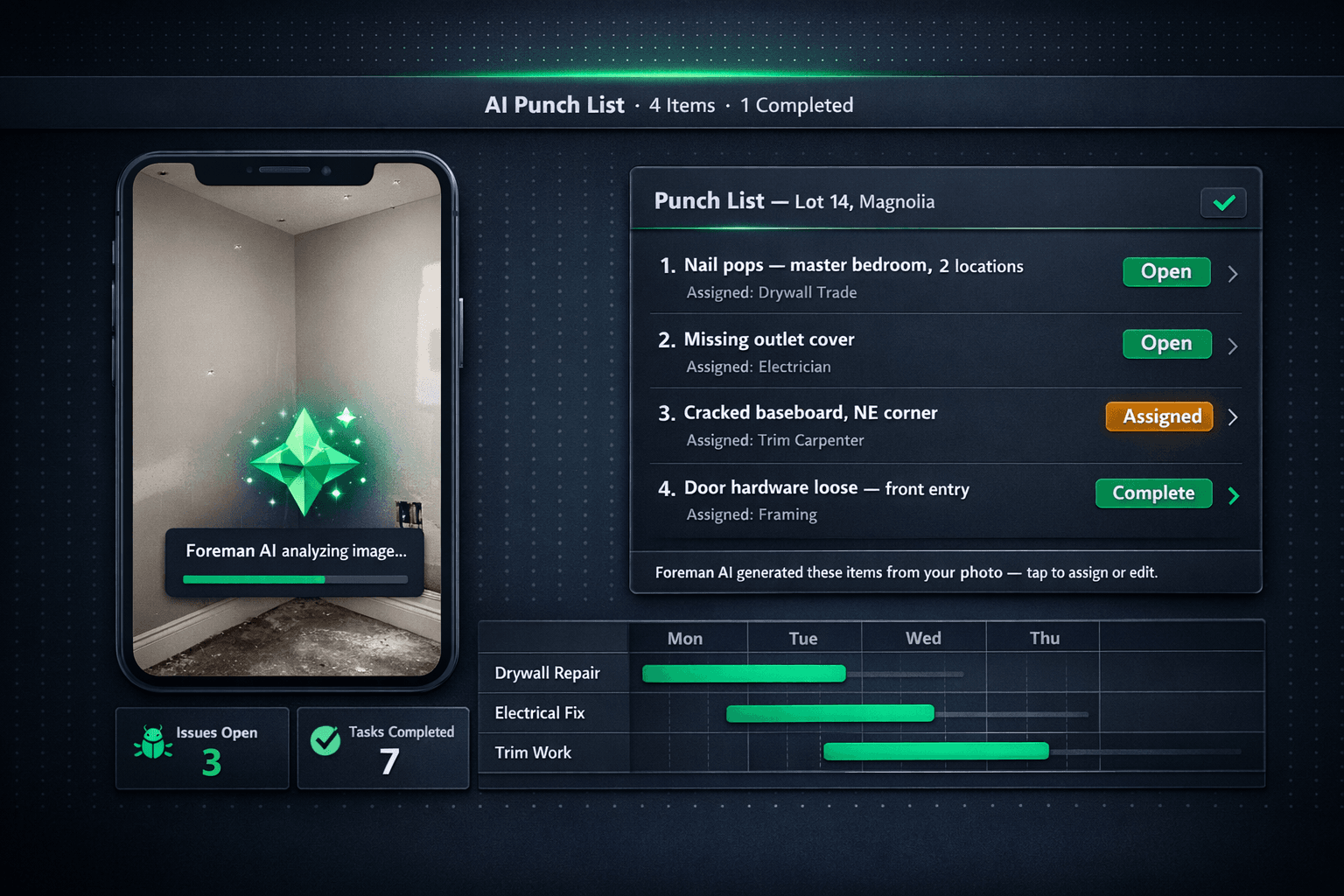
Lot 14, Magnolia — Punch Items from Photo Walk
Nail pops — master bedroom, 2 locations
Assigned: Drywall
Missing outlet cover — hallway
Assigned: Electrician
Cracked baseboard, NE corner — kitchen
Assigned: Trim Carpenter
Door hardware loose — front entry
Assigned: Framing
Foreman AI drafted these items from four jobsite photos — each is now a real task on the home, assigned to the right trade.
How to run an AI punch walk in Cornerstone PM
Open the home and start a punch conversation with Foreman
Navigate to the home that needs a punch walk. Open Foreman AI and tell it you are walking Lot 14 for punch items. Foreman loads the home's context — plan, assigned trades, open tasks — so every item it creates lands on the right record.
Drop your jobsite photos into the conversation
Take photos on your phone as you walk and paste or upload them directly into the Foreman conversation. Drop a batch at once — one per room or one per issue — or add them as you go.
Foreman reads the photos and drafts punch items
Foreman's AI vision analyzes each photo and identifies defects, incomplete work, or items needing attention. It drafts descriptions and suggests the trade responsible for each one.
Review, adjust, and confirm
Check the list in the conversation. Reassign any items, add notes, or merge duplicates. When you confirm, Foreman writes the punch items as real task records on the home — not a chat transcript you copy out later.
Track resolution through the platform
Each punch item lives in Cornerstone as a task, visible in the schedule and task board. Assigned trades see their items; superintendents filter by status. Resolved items close with a full audit trail.
An agent, not a chatbot — the difference matters for punch lists
Most AI tools you can throw at a construction problem are chatbots: they answer questions and return text. The output lives in the chat window. If you want it somewhere useful, you copy it out by hand — which is essentially the same clipboard problem as before, wrapped in a nicer interface.
Foreman is an agent. It reads and writes your actual platform data. When it creates a punch item, it's a real task record in Cornerstone — assigned to a trade, tracked against the home, visible to the superintendent in the task board. The difference is that the punch walk ends with the list already in the system, not in a camera roll or a Word doc.
That same read-and-write capability applies across 396+ skills across 20 construction categories. Foreman can look up a vendor's assigned scope, check whether a home has open POs, or pull the schedule for a trade across the whole community — all in the same conversation where you're managing punch items.
How punch items connect to the rest of the build
Punch items in Cornerstone aren't isolated from the rest of the build. They tie into the same task and vendor flow the scheduling module uses. When a punch item is assigned to a trade and a PO exists for that trade on the home, the item resolves inside the same vendor context — no separate system for tracking who showed up and when.
The scheduling module surfaces open punch items against the home timeline, so a superintendent can see at a glance whether the punch walk is blocking a close. Foreman AI can query open punch items for a home or a community and summarize what's outstanding, trade by trade, in seconds.
What Foreman AI covers in punch list workflows
AI vision analysis
Reads jobsite photos to identify defects and incomplete work
Automatic trade assignment
Suggests the right trade for each item based on the type of work
Real task records
Creates actual task records on the home, not chat output you copy out
Status tracking
Punch items surface in the task board — filter by trade, status, or home
AI summary on demand
Ask Foreman for a punch summary by trade or community anytime
Audit trail
Resolved items close with a timestamped record in the platform
The bottom line for home builders
The clipboard and the camera roll aren't the bottleneck in a punch walk — the re-keying and the follow-up are. A superintendent who can walk a home, drop photos into Foreman, and leave the punch list fully created and assigned by the time they reach the truck is doing the same walk in less total time, with less chance something falls through.
Punch lists generated by Foreman are part of the same home builder project management platform that handles scheduling, purchasing, vendor bids, and QuickBooks sync. There's no separate punch list module to log into, no third-party app to reconcile. The punch walk ends where the rest of the build lives.
Turn your phone camera into a punch list generator.
Foreman AI reads jobsite photos and writes real punch items to the platform — no clipboard, no re-keying, no separate app. See the full Foreman AI platform in action.
Request Early Access