Stacking Sales Incentives Without Blowing Your Margin
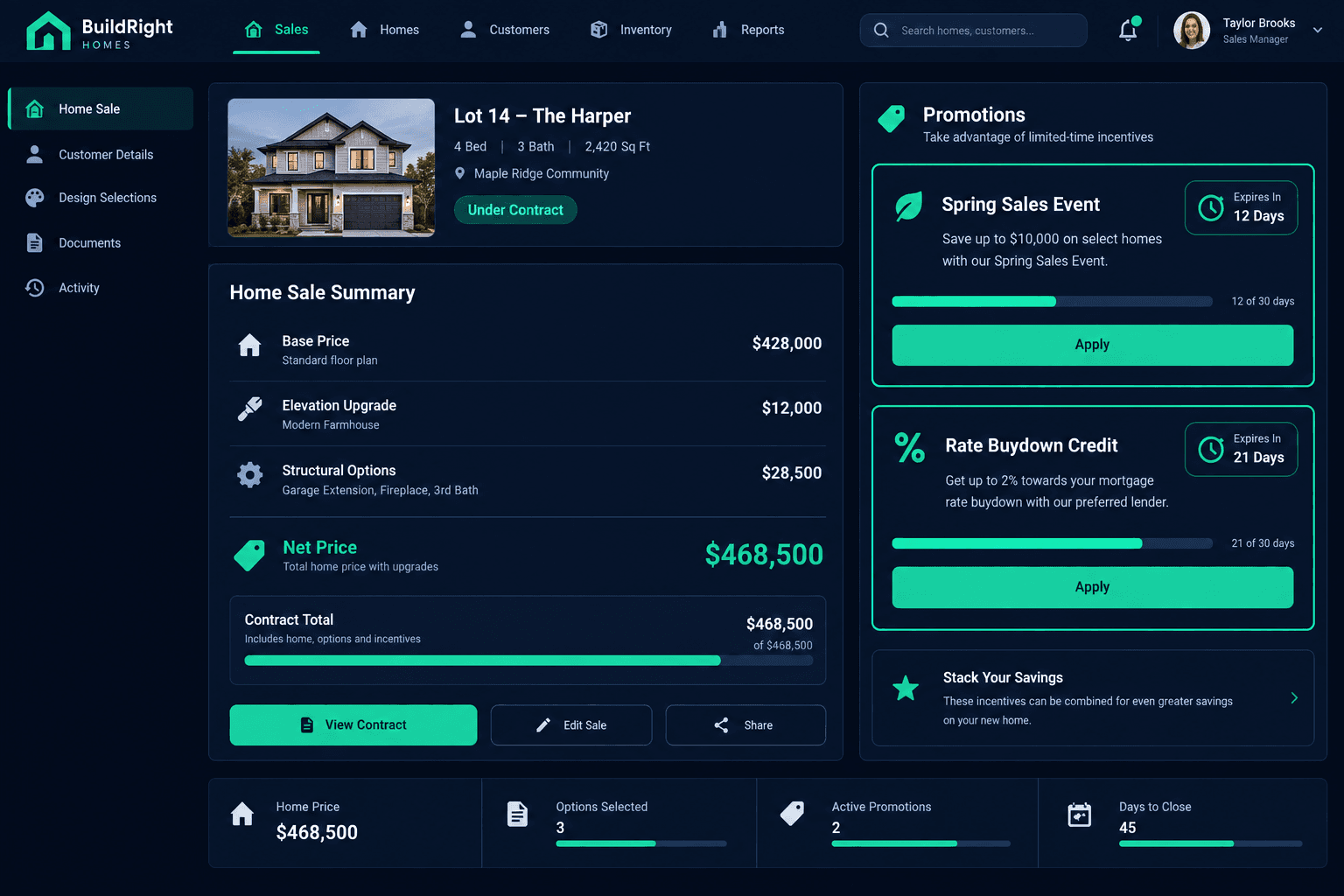
Cornerstone PM's sales pipeline includes a net price calculator that stacks active promotions with expiration countdowns directly inside the 60-second sale workflow — so the number a buyer is quoted is the exact number that becomes the contract.
Most home builders run more than one incentive at a time: a seasonal sales event, a rate buydown from a preferred lender, maybe a free upgrade to move a slow-selling elevation. Each one has its own start date, its own expiration, and its own math. Tracked in a spreadsheet or a sales counselor's memory, that combination is where quoted prices and contracted prices quietly drift apart.
The fix isn't a better spreadsheet template. It's putting incentive math inside the same system that generates the sale — so promotions expire on schedule, stack correctly, and never require someone to remember what was active three weeks ago.
Why do promotion spreadsheets fall apart?
It's not a discipline problem — it's a data model problem. A spreadsheet has no idea what community a promotion applies to, whether it's still active, or whether it can be combined with another incentive already on the deal. Every one of those checks has to happen in a person's head, every single time a quote goes out.
Promotions live in a sales counselor's head
A $5,000 closing-cost credit, a rate buydown, and a free elevation upgrade are all active at once — but which ones stack, which ones expire this week, and which lot they apply to usually lives in someone's memory or a sticky note on a monitor.
Cornerstone PM's promotions live on the community record with explicit start and expiration dates. Every sales counselor building a quote sees the same active list — no tribal knowledge required.
Net price math happens in a side spreadsheet
Base price, plus elevation, plus structural options, minus two stacked incentives — done by hand or in a spreadsheet that isn't connected to the actual contract, which means the number a buyer sees and the number that gets contracted can drift apart.
The net price calculator rolls base price, elevation, structural options, and stacked promotions into one live total inside the same 60-second sale workflow — the number the buyer sees is the number that becomes the contract.
Expired promotions still get quoted
A Memorial Day incentive that expired three weeks ago is still sitting in an old price sheet PDF that a sales counselor forwards to a buyer, and now the sales manager has to decide whether to honor a stale number or have an awkward conversation.
Every active promotion in Cornerstone PM shows a countdown to its expiration date. Once it lapses, it drops out of the net price calculator automatically — no expired incentive can be quoted by accident.
What does the net price calculator actually roll up?
The net price calculator is a line-by-line build of the real contract total — not a rough estimate. Here's a typical example for a single home with two stacked incentives active:
Net price calculator — example sale
That total isn't a side calculation — it's built inside the same sale-creation flow used to lock the buyer, lot, floorplan, and structural options. When the sale is created, the net price on the screen is the net price on the contract.
How do promotion expiration countdowns work?
Every promotion in Cornerstone PM is created with a start date and an expiration date, scoped to a specific community. Sales counselors see a visible countdown on each active incentive — not a static list someone has to remember to prune.
- Countdown visibility: Counselors see exactly how many days are left on a promotion while building a quote, not after the fact.
- Automatic removal:Once a promotion's expiration date passes, it drops out of the net price calculator — it can't be applied to a new sale by accident.
- Community-scoped:A promotion built for one community doesn't leak into another, so a builder running different incentives across communities doesn't have to keep separate spreadsheets.
How does this fit the rest of the sale workflow?
Incentive stacking is one step inside the broader sales pipeline: buyer and lot, floorplan and elevation, structural options, then incentives and net price, then a one-button review-and-submit. The same sale that applies stacked promotions also auto-generates the 9-step sales checklist, the construction budget, and the buyer's Design Center allowance — no separate promotion tracker to reconcile against the contract later.
Sales counselors can also generate branded PDF price sheets — per community or across all communities — that reflect current pricing and active incentives, so a buyer never gets handed a printout with numbers that stopped being true two weeks ago.
Incentive management vs. a promotion spreadsheet
Promotions that drive real sales activity deserve better than a side spreadsheet. When incentive math lives inside the same sales pipeline that creates the contract, there's no gap between what a buyer is quoted and what gets built.
Stop reconciling promotions against the contract by hand.
Cornerstone PM's net price calculator stacks active incentives, tracks expiration dates automatically, and rolls straight into the same 60-second sale workflow that generates the contract.
Request Early Access