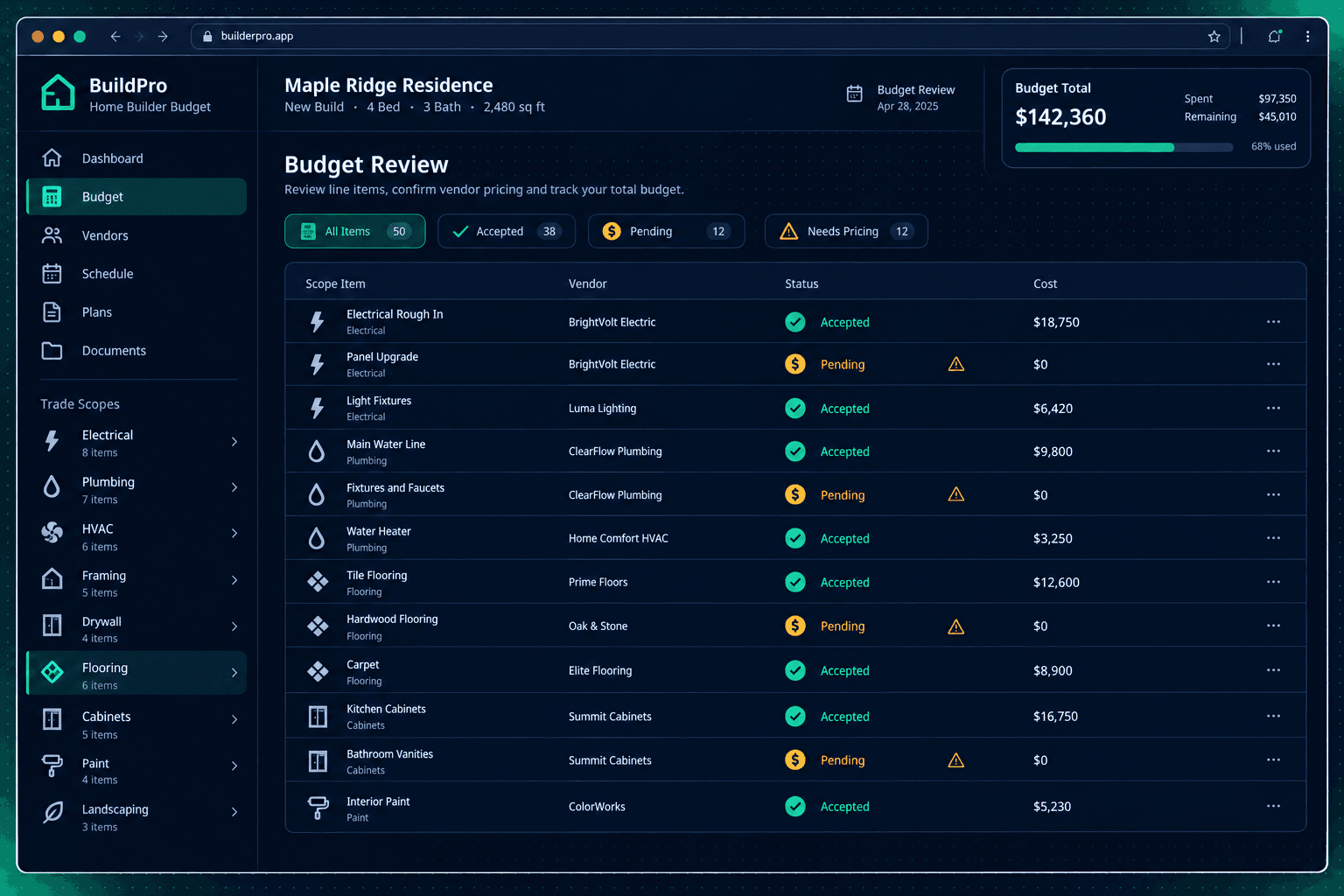
A Zero-Dollar Budget Line Is Not Free Work: Review Missing Vendor Prices
A $0 line on a home budget almost never means the work is free — it usually means there's no accepted vendor price attached to that scope yet, and a reviewer needs to find out which before the budget gets approved.
A budget total can look lower than it should for two very different reasons: real savings on a line, or a line that's quietly sitting at zero because nobody has priced it. Both show up the same way on a summary screen. Only a line-by-line review tells you which one you're looking at.
Why does a budget line show $0 in the first place?
Cornerstone stores no default or made-up cost for Parts or Scope Items — every dollar on a budget has to trace back to accepted vendor pricing. That's a deliberate choice: a builder would rather see an honest $0 than a stale placeholder number nobody remembers to update. The tradeoff is that a $0 line needs a human to notice it and act, because the system won't quietly fill the gap with a guess.
A true Allowance is the one line type built to legitimately carry a direct dollar as a budget placeholder for work that hasn't been bid yet. Everything else — Parts and Scope Items — is priced strictly from an accepted vendor bid, so a $0 there means exactly one thing: no vendor price has been accepted for that line.
True Allowance
A deliberate budget placeholder for a scope that hasn't been bid yet — the dollar amount is a planning number, set on purpose, not a missing price.
Missing Vendor Price
A Part or Scope Item with no accepted vendor bid attached. Shows as $0 / needs pricing — not a confirmed free inclusion, just an unresolved gap.
How do you tell a true allowance from a missing price?
Open the line and check its type before you check its dollar amount. If it's flagged as an Allowance, the $0-or-nonzero value is a placeholder a builder set on purpose, and it's doing exactly what it's supposed to do until real bids come in. If it's a Part or Scope Item, a $0 means purchasing hasn't accepted a vendor price for that scope — check whether a quote is sitting unaccepted, or whether nobody has requested one at all.
This same scope-first filing makes the check faster: every Part and Scope Item lives under the trade it belongs to, so a reviewer can walk one scope at a time instead of hunting across an unsorted list for every zero.
Who should resolve a zero-cost line before budget approval?
Every unresolved $0 line needs a named owner, not a general reminder to "double-check the budget later." Whoever holds the vendor relationship for that scope — often purchasing, sometimes a project manager — should either request a quote if none exists, or accept pricing that's already been submitted but never confirmed. A bid that's already been imported still needs that acceptance step before its price reaches the budget.
Approving a home's budget while real zero-dollar lines sit unresolved doesn't make the cost go away — it just means the number the team is working from doesn't reflect what the home will actually cost. Flag and resolve those lines before approval, not after the home is already under construction.
Cornerstone shows the gap — it never papers over it
Every Area Cost is filed under the scope it belongs to, and every Part or Scope Item is priced only from accepted vendor pricing. A line with no accepted bid shows plainly as $0 / needs pricing — Cornerstone won't invent a number, and it won't hide the line either. Resolving it is still a human decision.
Why does this check matter more than it looks?
A single missed zero-dollar line can make an entire home's budget look healthier than it is, and that gap doesn't surface until a vendor eventually gets paid for work the budget never accounted for. Treating every $0 line as "needs pricing until proven otherwise" — rather than assuming it's fine — is the cheapest place to catch that gap, because it costs a few minutes of review instead of a budget correction mid-construction.
None of this replaces a purchaser's judgment about which vendor to use or when a quote is reasonable — it just makes sure every dollar in the budget is either a real accepted price or a deliberate allowance, never a silent gap. For the full flow from scope-first budgeting to accepted vendor pricing, see Cornerstone PM's purchasing module.
Catch every zero-dollar line before the budget is approved.
Cornerstone PM never stores a default cost — every Part and Scope Item is priced from accepted vendor bids, so a missing price shows up as $0 / needs pricing instead of hiding in plain sight.
Request Early Access