Every Line Item Is Real: Construction Budgets Without Estimator Fudging
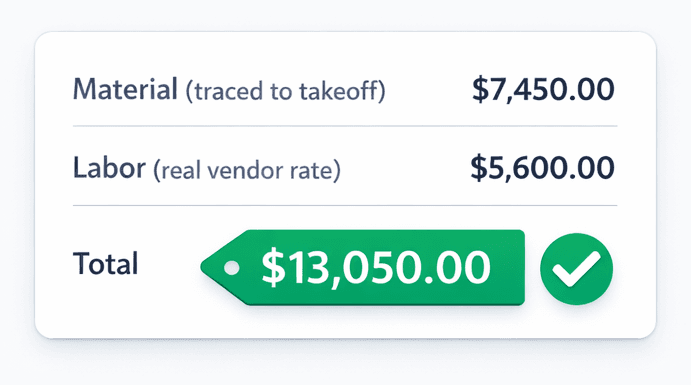
Cornerstone PM removed filler pricing app-wide. Every material line traces to an actual takeoff part. Every labor line traces to a real vendor bid. When a number is in your Master Cost Budget, you can explain exactly where it came from.
Most construction estimating software has a dirty secret: a significant share of the numbers in a typical budget were typed in by an estimator who was making an educated guess. Filler pricing — round numbers, synthetic material/labor splits, placeholder totals copied from last year's job — is so common that most builders have stopped noticing it. Until a change order surfaces, a margin report doesn't close, or a buyer asks a question that can't be answered honestly.
What is filler pricing, exactly?
Filler pricing is any budget number that doesn't trace back to an actual source. It takes several forms in production home building:
- Placeholder totals— a scope line where the estimator typed “$12,000 framing” because that's roughly what it was last time
- Synthetic labor splits — a tool requiring material/labor percentages that nobody measured, just invented
- Copied estimates— last year's budget copy-pasted into this year's project with no reconciliation against current vendor pricing
- Default pricing from the software — some platforms pre-populate cost lines with national averages that have never matched your market or your vendors
Individually, any one filler line looks harmless. Across a 50-home year, the accumulated variance between filler numbers and reality is a meaningful margin problem — one that shows up at reconciliation when it's too late to fix.
Why does filler pricing cause real problems?
The change order you can't justify
When material cost is synthetic — a round number the estimator typed in — you can't prove to the buyer that a price increase reflects real conditions. The conversation becomes adversarial because neither side has a source to point to.
Labor splits that drift silently
Many tools require a material/labor split on every line item. Estimators invent one — 60/40, 70/30, whatever feels right — and never revisit it. Over dozens of homes, those invented splits accumulate into systematic margin error that nobody can trace back to a cause.
The re-bid that overwrites everything
When a vendor submits a new bid and the estimator imports it manually, filler lines get duplicated instead of replaced. The budget suddenly shows two plumbing scopes, one real and one stale, and nobody is sure which to trust.
Buyer-facing numbers that can't be explained
A buyer asks why the cabinet upgrade is $4,800 more than the standard package. If the original cabinet number is filler, there is no honest answer. Builders in this position either absorb the question or absorb the upgrade cost.
How does Cornerstone PM eliminate filler pricing?
The fix isn't disciplined estimating. It's a system that makes filler pricing structurally impossible because every number has a required source. Here's how the three layers work together:
Layer 1: Blueprint AI supplies the material quantities
Blueprint AI reads your floor plan PDF and extracts 130+ material scopes — framing lumber, concrete, windows, fixtures, finishes — in under 60 seconds, mapped to auto-quantity scope items tied to square footage. The material quantity on every scope line isn't a guess. It is a calculated number drawn from the actual floor plan geometry and a real parts catalog. When you price the Magnolia plan, the lumber scope reflects what the Magnolia plan actually frames — not what a similar plan framed two years ago.
Layer 2: Vendor bids supply the rates
Material quantities without real vendor rates are still filler. Cornerstone's vendor bid request system auto-generates scope-filtered Excel templates and sends them to your vendors. When a vendor submits a bid through the no-login portal, their pricing lands directly against the scope items in your budget. Labor rates and material unit costs come from an actual vendor submitting for actual work — not a synthetic split the estimator typed.
And because awarded bids lock on acceptance, that vendor's rate is the number in your budget until a formal change goes through the system. No invoice creep. No silent revisions. The rate is traceable to a specific vendor and a specific bid date.
Layer 3: Bid Import AI replaces, not duplicates
One of the ways filler creeps back in is through re-import. A vendor updates their pricing. The estimator imports the new bid. The old line stays in the budget alongside the new one, and suddenly there are two framing scopes. Cornerstone's Bid Import AI handles re-imports with replacement logic — it matches scope, replaces pricing, and doesn't leave stale lines behind. The budget stays clean through every bid round.
What does traceability actually mean for your margins?
When every number traces to a source, three things become possible that aren't possible with filler budgets:
- Honest change order conversations. When a scope cost changes, you can show the buyer exactly what the original bid was, who submitted it, and what the new number is. The conversation is about real conditions, not a defended guess.
- Accurate plan-repeat pricing. When you build the Magnolia plan in a new community, the budget for that plan is built from confirmed vendor bids — not estimates carried forward from another community where labor and material costs might differ significantly.
- Margin reports that close cleanly. Because every line traces to either a takeoff part or a vendor bid, reconciliation at close of construction isn't an archaeology project. The delta between budget and actual is a real number, and the source of any variance is findable.
Construction estimate accuracy: Cornerstone PM vs. typical software
How does this connect to the Design Center?
Filler pricing doesn't only affect the cost budget — it contaminates the buyer-facing design center too. If the base cabinet cost is a filler number, the upgrade pricing for Premium Cabinets is calculated off a fiction. Buyers end up paying for the gap between the real cost and the filler, or builders absorb it quietly.
Cornerstone removed filler pricing app-wide, which means design center upgrade pricing traces to real vendor bids and real takeoff parts just like the cost budget does. A buyer who upgrades to a Premium cabinet package is paying a number grounded in actual material and labor pricing — not an estimator's round-number guess padded for safety.
That integrity carries through to the spec-level control Cornerstone ships: builders can promote any standard finish to a paid upgrade by changing its spec level from Standard to Upgrade I, II, or Premium. The upgrade price is calculated from the same real cost foundation as everything else.
Where does this fit in the full purchasing workflow?
Real vendor pricing is the confirmation step in Cornerstone PM's end-to-end purchasing system. The full chain looks like this:
- Blueprint AI extracts real material quantities from the floor plan PDF
- Auto-quantity scope items calculate sqft-driven costs (frame labor, paint, cleaning) automatically across every floorplan and structural option
- Allowances hold placeholder budget for un-bid items so the Master Cost Budget stays complete without filler
- Vendor bid requests go out with scope-filtered Excel templates — each trade sees only their scope
- Vendors submit real pricing through the no-login portal; awarded bids lock and replace allowance placeholders in the budget
- Bid Import AI handles re-bids with replacement logic — no duplicate lines, no stale filler
The result is a budget where you can click any line item and answer “where did this number come from?” — every time, with a real answer.
Every dollar. Every source. No filler.
Cornerstone PM traces every budget line to a real vendor bid or a real takeoff part. Get the construction estimate accuracy your margins depend on.
Request Early Access